70 (GB) Adjustments
Adjusting the Registration
Adjustments
a
b
a
b
2 Green SIZE and LIN (linearity) adjustment
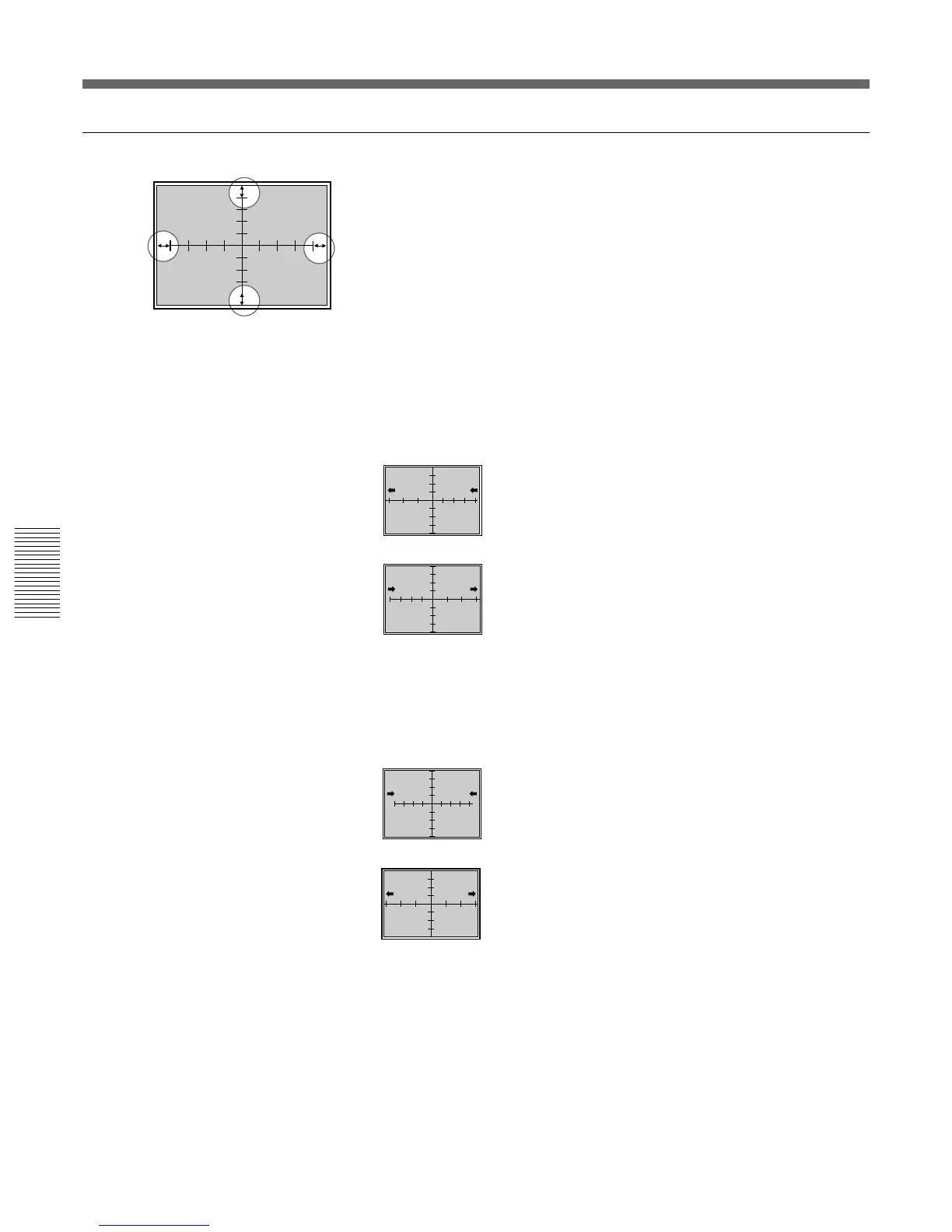
Adjust the picture size with respect to the screen, and the picture’s up,
down, left and right balance.
1 Press the LIN key.
The CROSS HAIR pattern appears.
You can also change to the 9 × 9 HATCH pattern by pressing the
PATTERN key.
2 Press the ADJ G key.
Pay attention only to the encircled portions illustrated on the left.
3 Adjust with the B and b keys until parts (a) (distances from the right
and left ends of the screen to the first vertical lines) are of equal length.
B :The left and right vertical lines are shifted to the
left while the vertical center line remains
unmoved.
b :The left and right vertical lines are shifted to the
right while the vertical center line remains
unmoved.
4 Press the SIZE key.
5 Adjust with the B and b keys until parts (a) on the left and right are
15 to 20 mm long.
B :The horizontal scale is reduced.
b :The horizontal scale is expanded.
6 If they are not aligned, press the LIN key and repeat steps 3 to 5.
7 If the CROSS HAIR pattern is off-centered on the screen, adjust the
centering again and repeat steps 1 to 6 for the horizontal scale
adjustment.
For details of the centering adjustment, see “Green CENT (centering)
adjustment” on page 69 (GB).



 To Next Page