26 User manual 208898
3. Taking an Exposure CRANEX Novus e
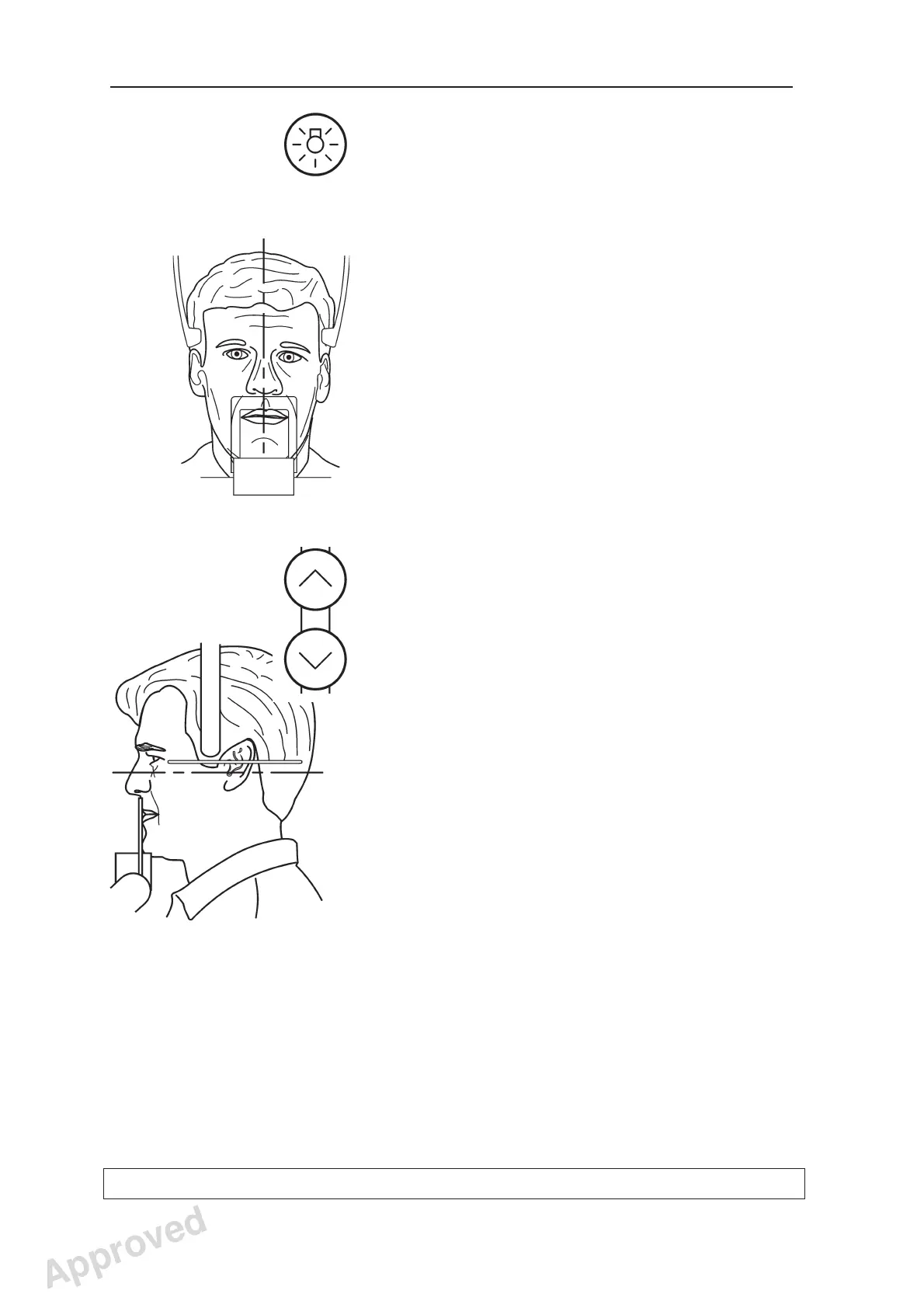
The Patient Positioning lights can also be
switched on and off with the Lights key.
9. Look at the refl ection of the patient in the mirror
and position the midsagittal plane of the
patient so that it coincides with the midsagittal
plane light.
Make sure that the patient is looking straight
ahead and that the patient’s head is not tilted or
turned to one side.
10. Press either Up/Down key to adjust the tilt of
the patient’s head until the patient’s Frankfort
plane coincides with, or is parallel to, the
horizontal light.
If necessary use the light positioning knob to
adjust the height of the light.
CAUTION:
When pressing the Up/Down keys to adjust the
tilt of the patient’s head make small adjustments
only so as not to cause the patient any distress
or discomfort.
Approved: Ukkonen Juha-Pekka 2015-03-13 13:08
Reviewed: Savinen Antti Juhani 2015-03-12 11:32
Approved
See PDM system to determine the status of this document. Printed out: 2016-01-27 12:19:26
D508980, 4
Copyright © 2015 by PaloDEx Group Oy. All rights reserved.



 To Next Page