Manage Alarm Limits
96
6.6 Manage Alarm Limits
Alarm limits for each vital sign parameter are predefined and turned on automatically when sensors are
connected to the patient and to the Monitor. Sometimes it is desirable to adjust the alarm limits to meet a
patient’s monitoring requirements.
The Auto Set function only sets alarm limits for vital sign measurements that are currently in alarm. The
new alarm limits are based on the current vital signs measurements.
To change alarm limits using Auto Set
1. Touch Menu on the Vital Signs screen.
2. Touch
Alarms Settings.
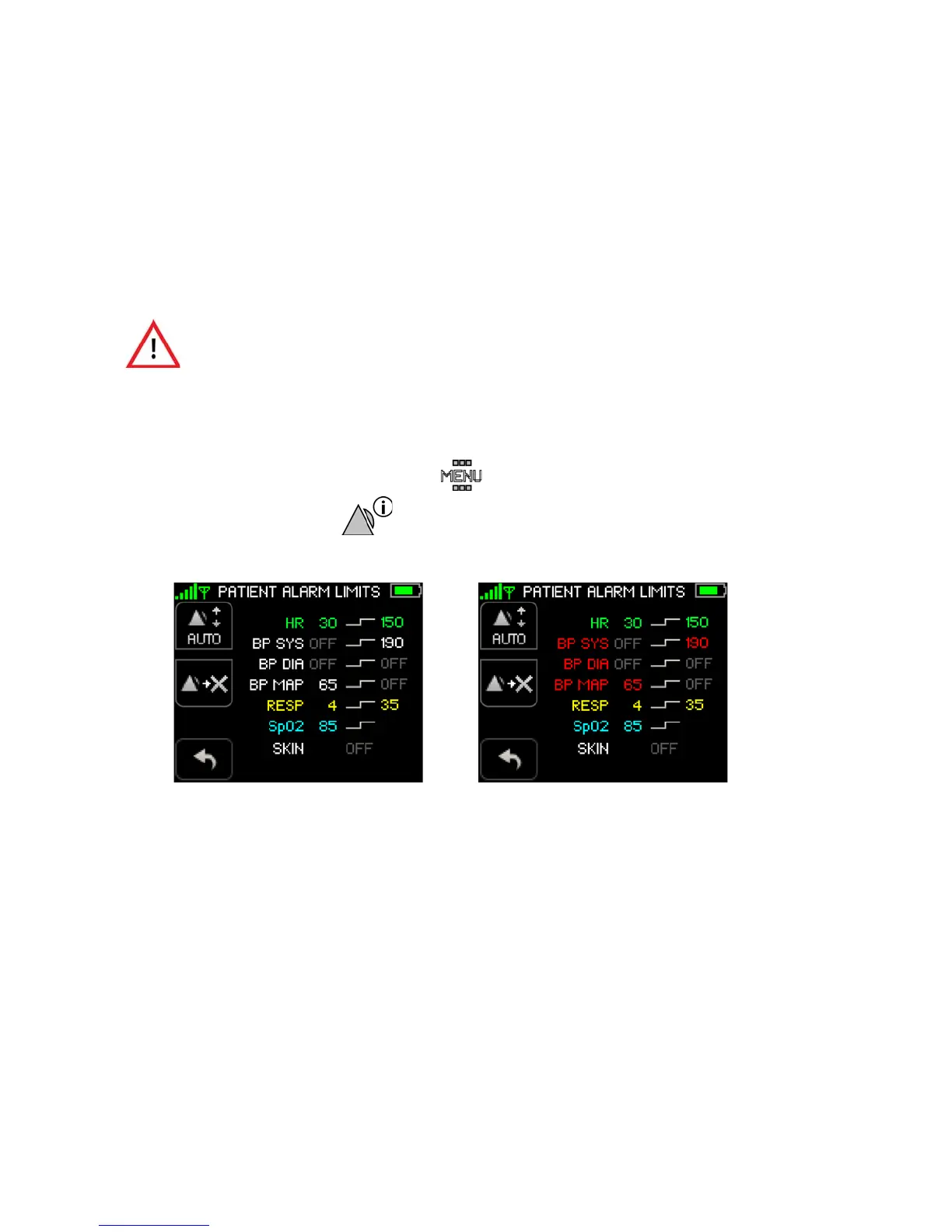
The Patient Alarms Settings screen appears.
Note: Systolic, diastolic and MAP alarm limits for cNIBP appear in red when measuring NIBP
continuously. Normal NIBP alarm limits appear in white.
Note: Alarm limit settings appear only for the currently monitored vital signs.
Once Auto Set is selected (on the ViSi Mobile Monitor), review the newly
calculated alarm limits carefully before deciding to confirm or cancel the new
alarm limits. Once new alarm limits are confirmed on the ViSi Mobile
Monitor, they cannot be changed back to the original pre-set limits from the
ViSi Mobile Monitor. Use the ViSi Mobile Remote Viewing Device to change
the alarm limits back to the original pre-set limits.
NIBP Alarm Limits cNIBP Alarm Limits
(Alarm limits in white) (Alarm limits in red)


 To Next Page