Installation and Reference Manual
Configuring PBX functionality
118
Installation and Reference Manual v3.2/0410/6
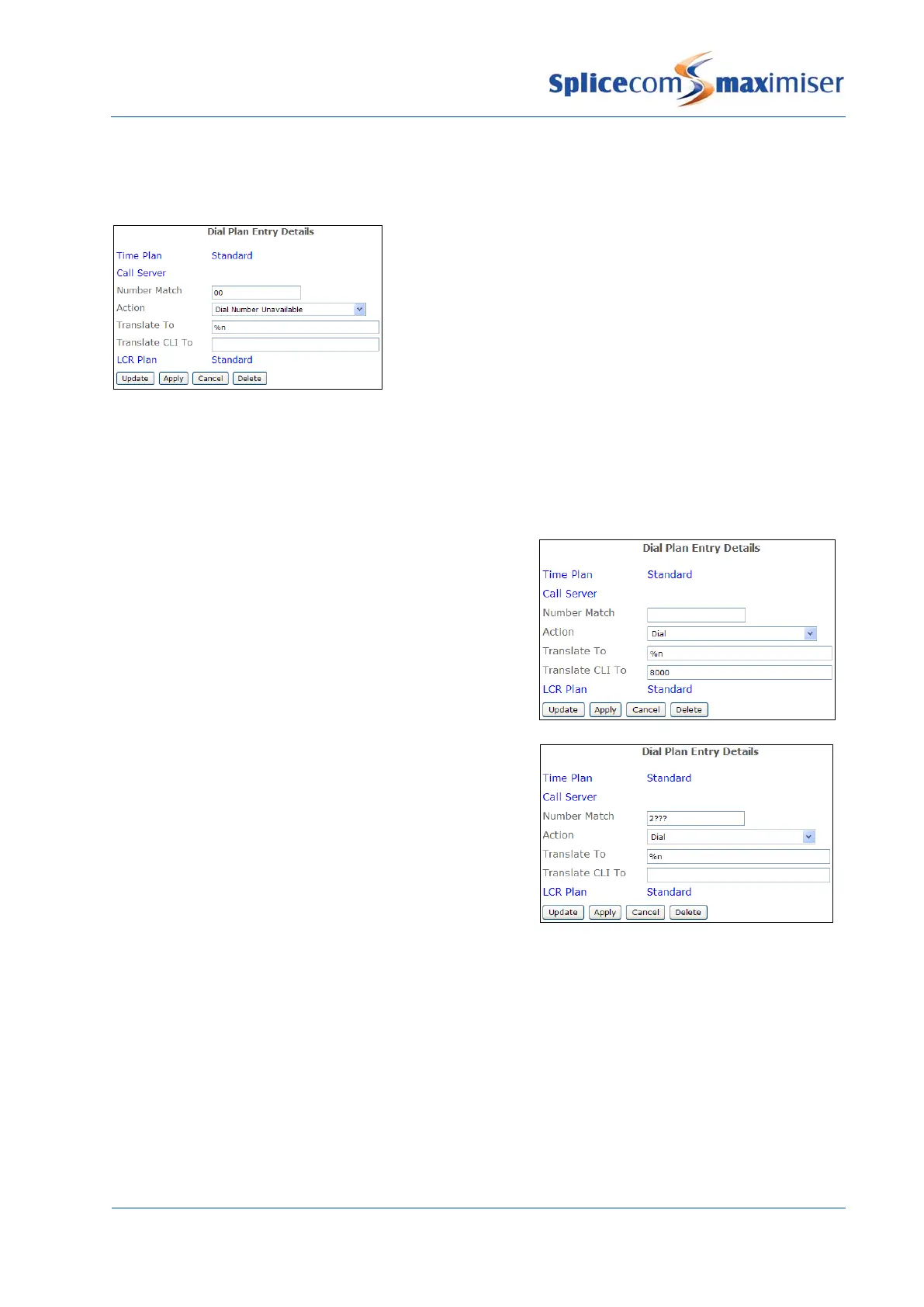
As well as allowing external calls to be made Dial Plan entries can be used to disallow external calls.
In this example calls to international numbers are barred.
The Translate CLI To field in a Dial Plan entry can be used to specify the outgoing CLI for a specific call.
This is useful if you wish, for example, the main company number to be presented with external calls
rather than the User’s individual DDI number.
A User or Department’s Extension Number should be
entered in the Translate CLI To field similar to this example.
This number will be used as the CLI for all internal calls. For
external calls the User or Department’s DDI number as
specified in the relevant DDI Call Plan will be presented as
the CLI. (Please refer to Working with DDI Plans section
from page 169 for further information.)
If the Users’ own extension numbers are to be used as CLI
for internal calls this example Dial Plan entry for each
extension number range can be created.
An entry in the Translate CLI To field will take precedence over a User’s DDI Call Plan entry (please refer to
page 165 for further information) and the Trunk’s Presentation Number (please refer to page 159 for
further information).
Example Dial Plan Entries
The following diagrams give examples Dial Plan entries that can be created to make use of features
available on the system. Further examples are available within the relevant sections of this manual.



 To Next Page