Installation and Reference Manual
Working with Voicemail
Installation and Reference Manual v3.2/0410/6 237
Using Call Recording with Vision
For information on how to set up Call Recording with Vision please refer to the Vision Installation and
Configuration Manual.
Maintaining and Troubleshooting Voicemail
Each User’s and Department’s voicemail box can be viewed and maintained by accessing the Mailbox
directory on the Call Server as follows:
Via your browser:
1 Enter ftp://voice:<maintainerpassword>@<ip address>, eg ftp://voice:password@192.168.0.1
2 Each voicemail box is displayed
For information on how to set the Maintainer password used to access the Mailbox directory via FTP
please refer to the System Passwords section from page 251.
Via the Telnet:
1 Telnet on to the system using Root access as described in the Root Access to a Call Server section
on page 252
2 Enter cd /voicemail/Mailbox, then press Enter
3 Enter ls to view each mailbox
Identifying a User’s and Department’s Voicemail box
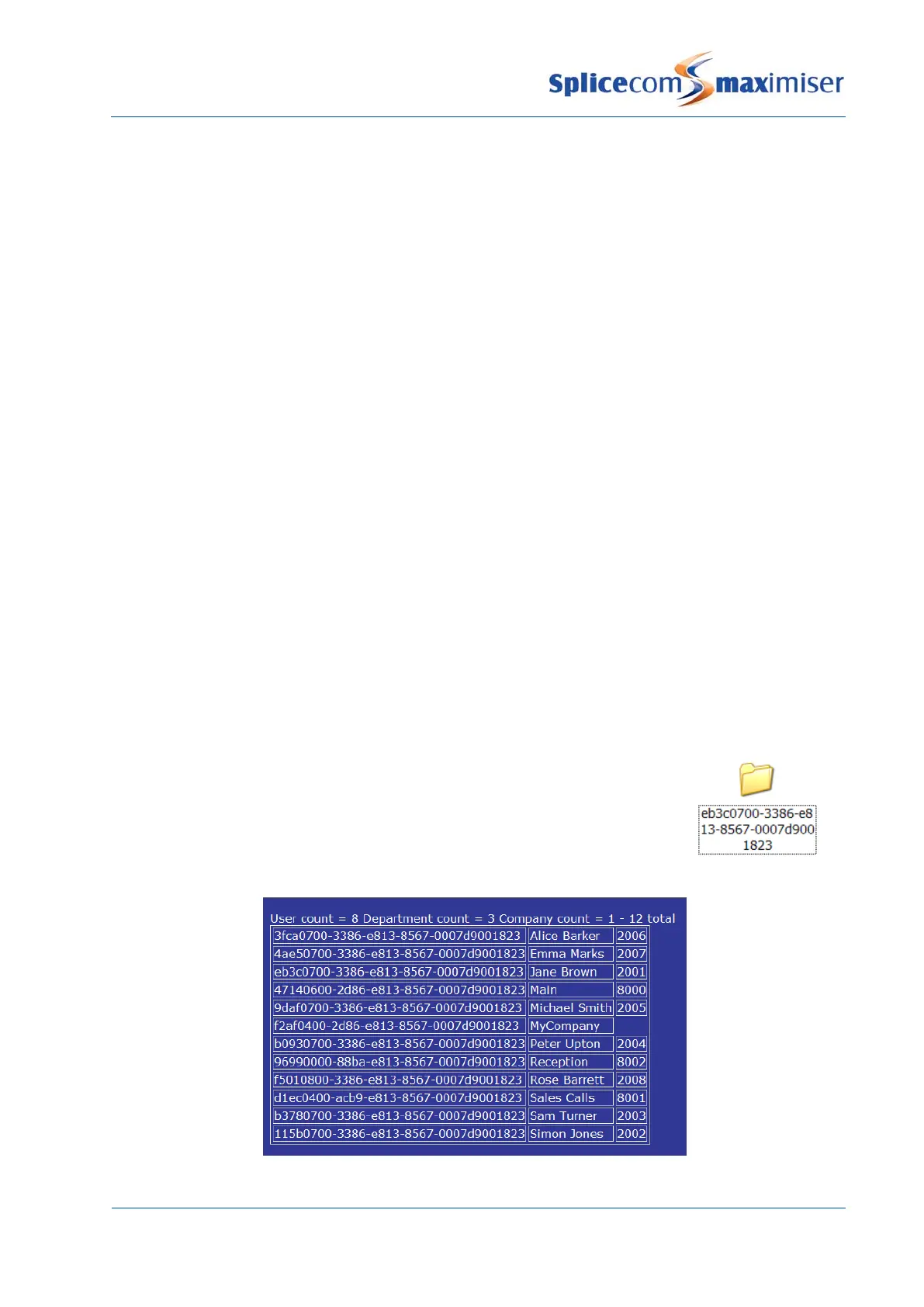
Each User is identified on the database by a GUID (Global Unique Identifier).
This GUID is used to identify the User’s voicemail folder in the Mailbox
directory.
A list of each User’s, Department’s and Company’s GUIDs are displayed within
Manager by selecting Utilities and then Voicemail GUIDs.



 To Next Page