Installation and Reference Manual
Configuring PBX functionality
Installation and Reference Manual v3.2/0410/6 167
is required to use this facility (please refer to page 45 for further details) together with the required
number of Trunk licences, one per channel (please refer to page 35 for further details).
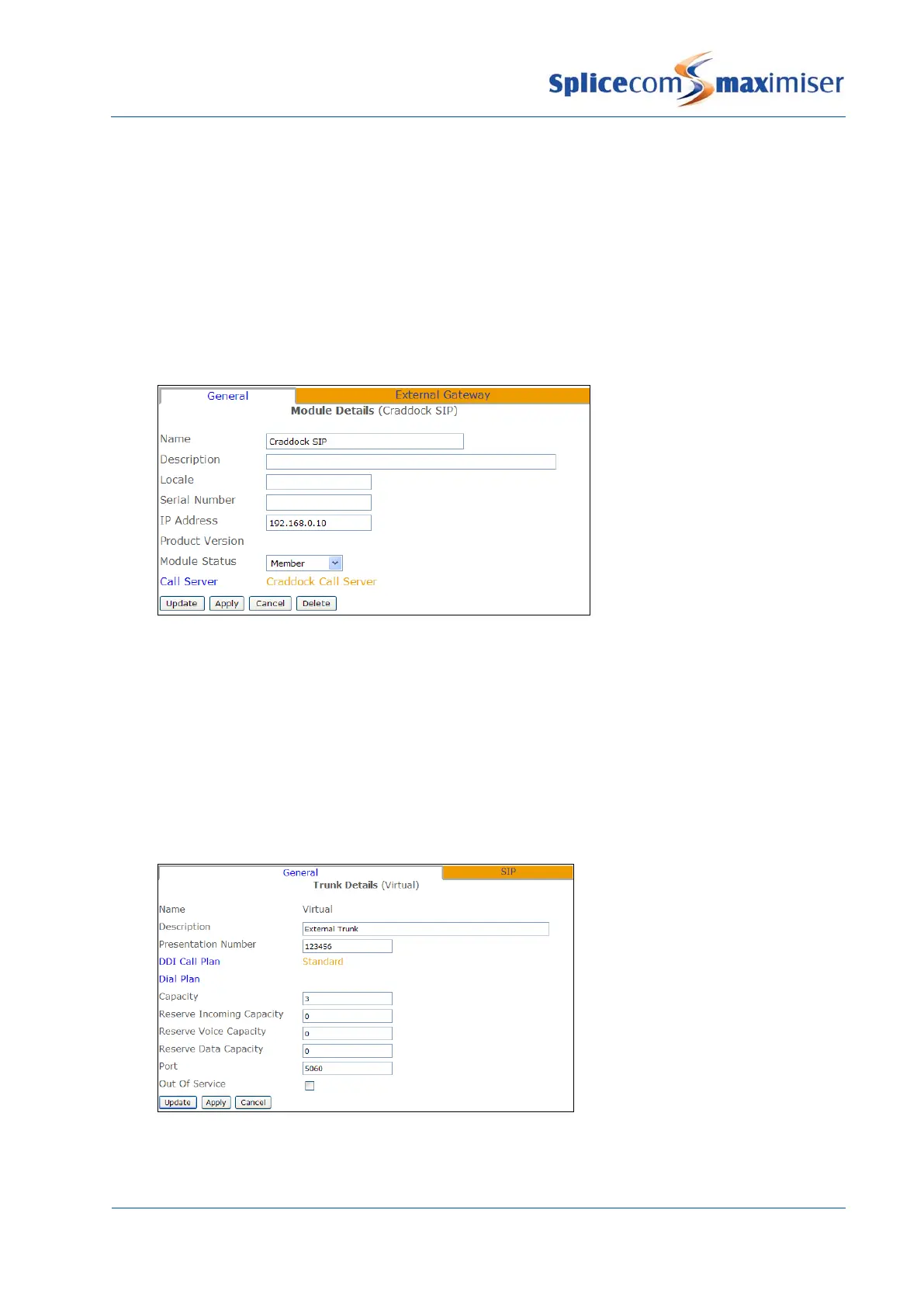
1 In Manager select Modules
2 From the Module list select the Add SIP Gateway button
3 In the Name field enter a name to identify this external gateway
4 Enter the IP address of the remote end, or the name, e.g. sip.example.com, if required instead
5 Select Apply
6 Select the Call Server field
7 From the Select Call Server list select the Call Server to which this SIP Gateway is to be registered.
8 Select Update or Apply when ready.
9 From the navigation pane select Trunks
10 Select the Module created above
11 From the Trunks List select Virtual
12 In the Presentation Number field enter the number to be sent on this Trunk. (This may be the
account number supplied by the SIP provider.)
13 Select Apply
14 Select the DDI Call Plan field
15 From the Select DDI Plan list select the DDI Plan required
16 In the Capacity field enter the number of connections to be allowed on this link.
17 Select Apply
18 Select the SIP page
19 From the Compression Type list box select G729A8K



 To Next Page