DocID026814 Rev 1 17/52
UM1811 PHY menu
52
5 PHY menu
To be able to execute PHY layer commands, the G3-PLC platform working mode needs to
be configured to the PHY mode.
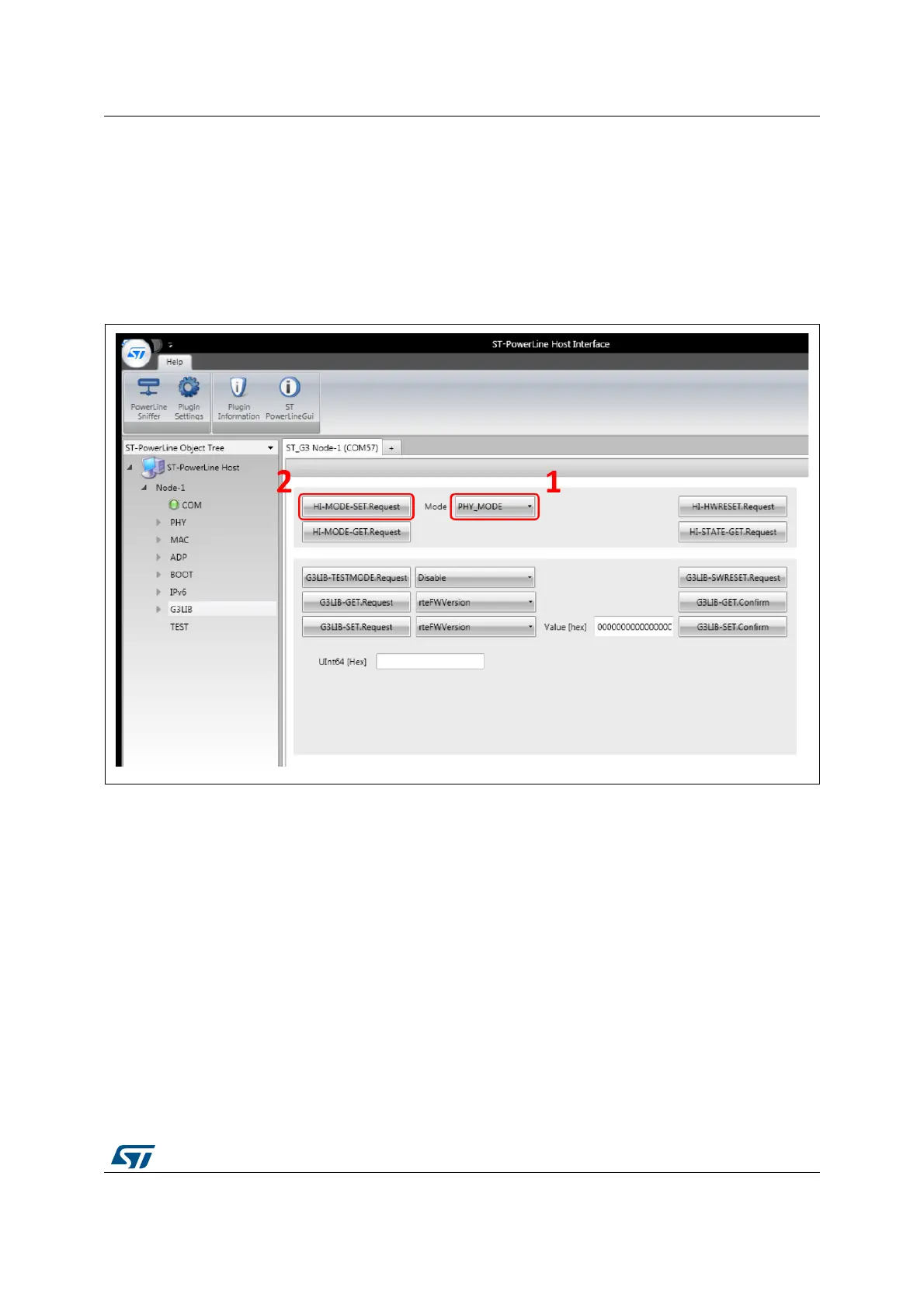
To do this, simply go to the G3LIB panel as shown in Figure 9. Choose the PHY_MODE
from the available modes (1) and press the HI-MODE-SET.Request button (2).
Figure 9. Configure the host interface in PHY mode
Once the PHY mode is selected, the following menu panels may be accessed:
PHY root menu: it allows to send data in the physical layer mode
PDACK: physical data service for acknowledgment message sending
PLME control: physical layer management entity control panel, used for the line status
request and RX/TX configuration
PLME: physical layer management entity panel, used to set the transmission
parameter details (modulation, ToneMap, ToneMask, etc.).


 To Next Page