PHY menu UM1811
20/52 DocID026814 Rev 1
5.3 PLME menu
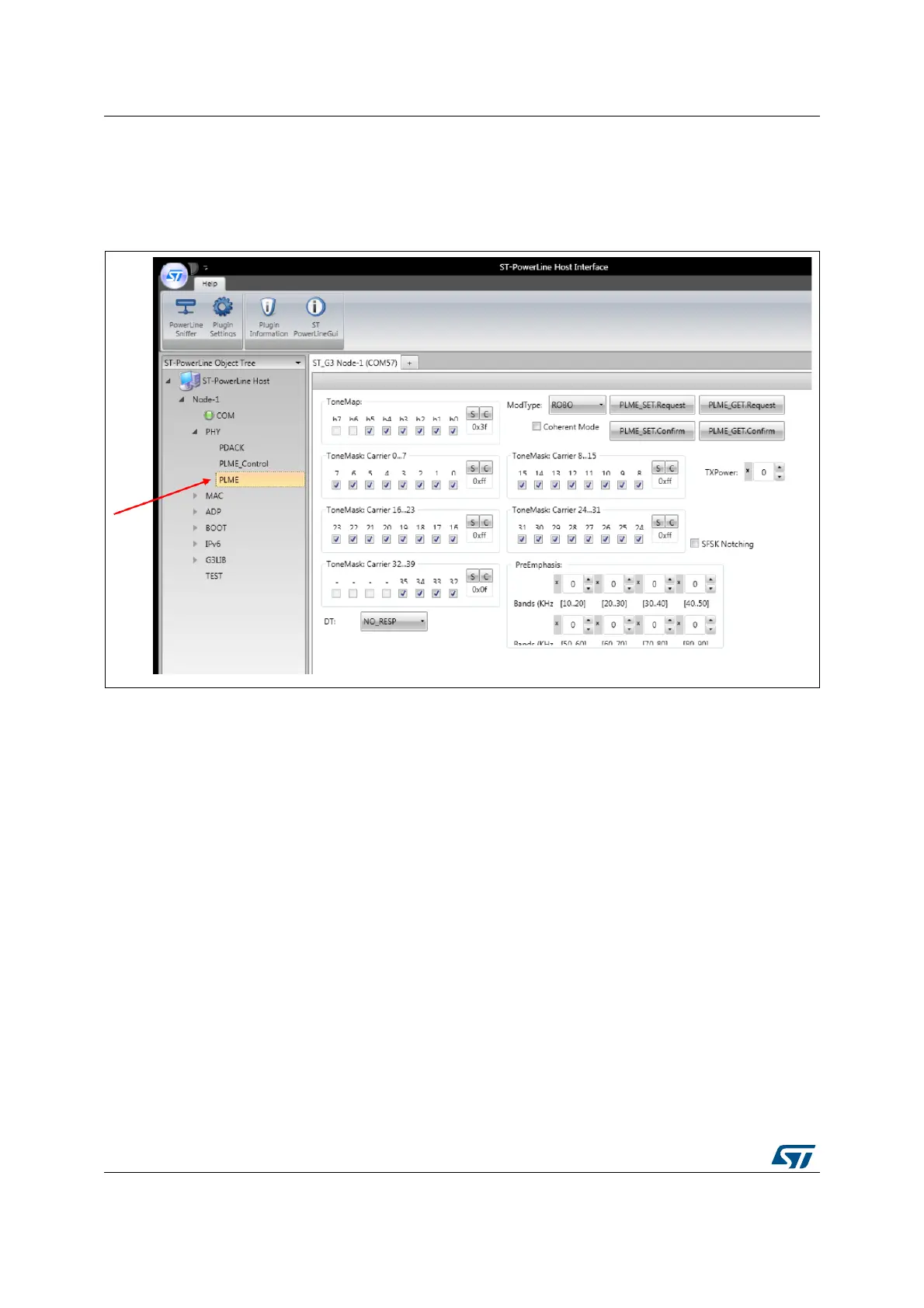
The physical sublayer management entity menu allows setting the transmission parameters,
as shown in Figure 12.
Figure 12. PLME menu description
From this panel, the following commands are available:
PLME_SET.Request: to set PHY layer transmission parameters
PLME_GET.Request: to get parameters related to the latest received packet
PLME_SET.Confirm: forces generation of a confirm message (if automatic event is
disabled)
PLME_GET.Confirm : forces generation of a confirm message (if automatic event is
disabled).
The following transmission options are available in the panel:
ToneMap: bitmap containing the list of the active sub bands (bit set to 1) or inactive (bit
set to zero). Active means that data are transmitted in that sub-band, inactive means
that dummy data are transmitted. The 6 less significant bits are only considered.
ToneMask: bitmap containing the list of the active carriers (bit set to 1) or inactive (bit
set to zero). Active means that the carrier has energy (transport data or dummy bit),
inactive means that the carrier has no energy.
DT: delimiter type
– NO_RESP: start of the frame with no response expected
– RESP_EXP: start of the frame with response expected
– ACK: positive acknowledgment
– NACK: negative acknowledgment


 To Next Page