MAC menu UM1811
24/52 DocID026814 Rev 1
msduHandle: the handle associated with the MSDU to be transmitted
QoS: quality of service for the MSDU (normal priority, high priority, contention free)
Once the MCPS-DATA.Request command is executed, messages will be logged into the
trace window.
6.2 MLME control menu
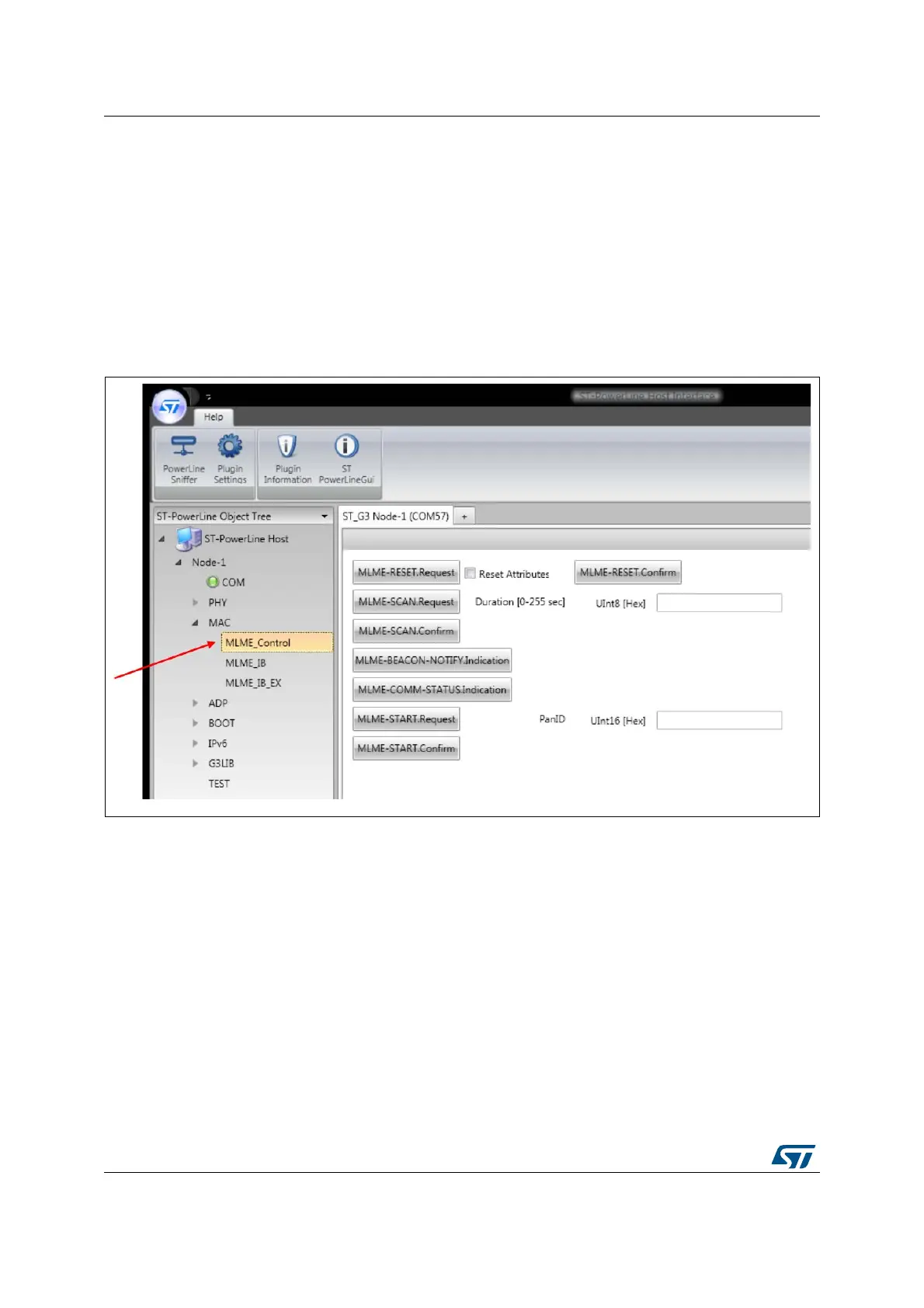
The MAC sublayer management entity control menu offers the management layer
commands of the G3-PLC MAC layer, as shown in Figure 15.
Figure 15. MLME control menu
On the MLME_control panel, the following commands are available:
MLME-RESET.Request: resets the MAC layer
MLME-RESET.Confirm: forces generation of a confirm message (if automatic event is
disabled)
MLME-SCAN.Request: performs an active scan on the channel for the duration
entered by the user in the free text area
MLME-SCAN.Confirm: forces generation of a confirm message (if automatic event is
disabled)
MLME-BEACON-Notify.Indication: forces generation of an indication message
(if automatic event is disabled)
MLME-COMM-STATUS.Indication: forces generation of an indication message
(if automatic event is disabled).


 To Next Page