DocID026814 Rev 1 31/52
UM1811 ADP menu
52
7.1 ADP root menu
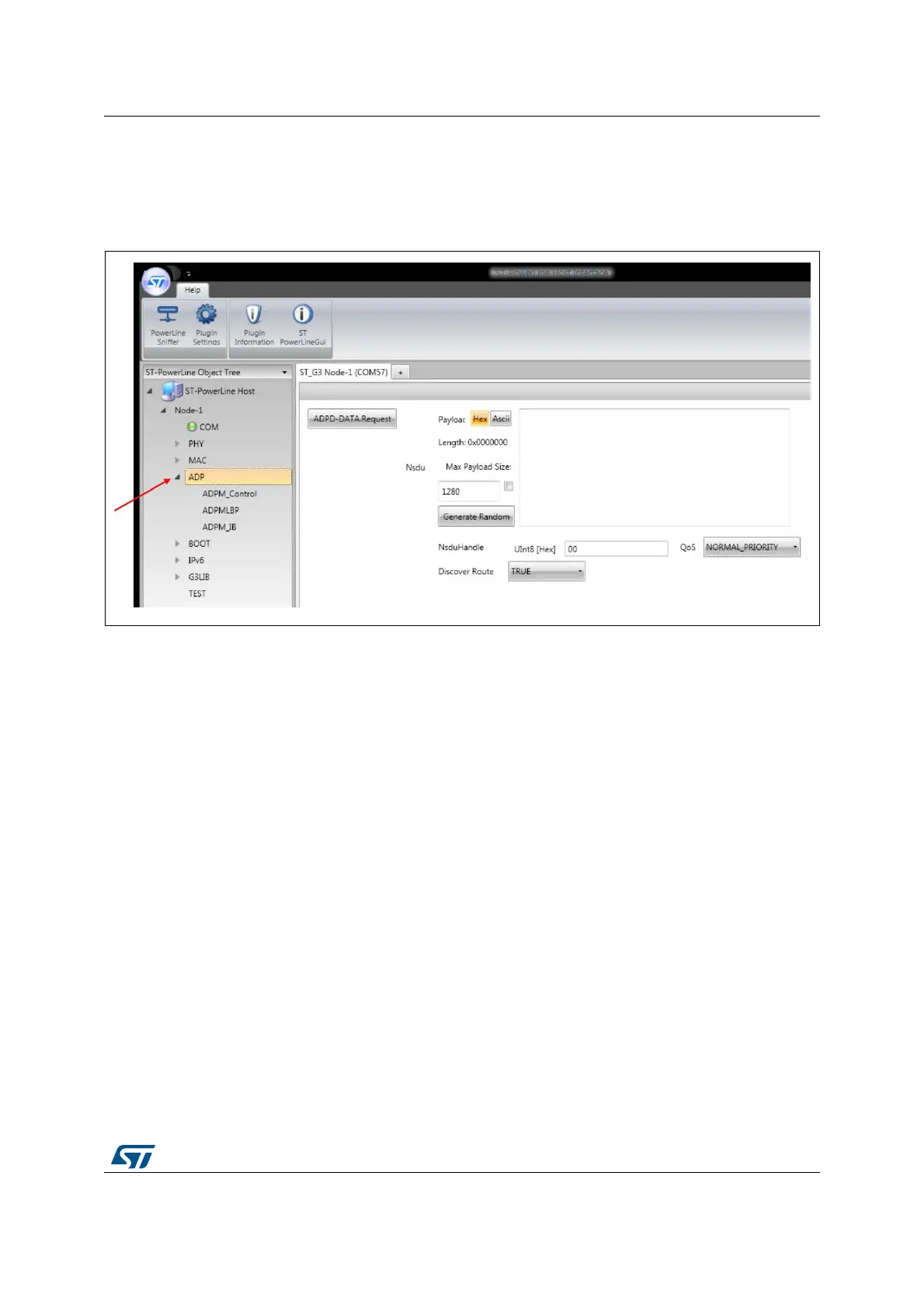
The root menu offers the possibility to enter a payload and send it at the ADP layer, as
shown in Figure 19.
Figure 19. ADP root panel
The ADP root panel is composed of one single command:
ADPD-DATA.Request: request
s IPv6 DATA transmission
Confirm and indication messages are automatically generated as explained in Section 3.4
on page 12.
The following options are available in the panel:
Payload type: select
s the hexadecimal or ASCII input mode for the NSDU
Payload content: free text window to enter the NSDU to be sent (note that the data has
to be a valid IPv6 packet)
Max Payload Size: check box to configure the maximum size for the random option
Generate Random: option to generate a random NSDU
NsduHandle: the handle associated with the NSDU to be transmitted
QoS : quality of the service for the NSDU (normal priority, high priority, contention free)
Discover Route option: if TRUE, a route discovery procedure will be performed prior
sending the ADP frame, as long as a route to the destination is not available in the
routing table. If FALSE, no route discovery is performed.


 To Next Page