
EasyManua.ls Logo

Stack ST8100 - User Manual

Stack ST8100
66 pages
Print Icon
To Next Page IconTo Next Page
Loading...
Part No./IssueNo. 542030-004
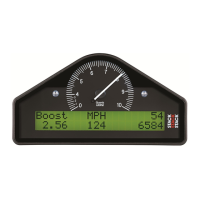
ST8100 Display SystemST8100 Display System
Users GuideUsers Guide

Questions and Answers

  • K
    Kimberly GibbsSep 2, 2025
    How to fix peak values not updating on Stack ST8100 Monitor?
    • M
      Mark MooreSep 2, 2025
      If the peak values on your Stack Monitor are not being updated, it could be due to a couple of reasons. First, the gate value might be set too high. Try changing the Gate RPM in the display configuration menu. If this doesn't solve the problem, the internal memory battery may be dead, and the unit should be returned to Stack for a new battery service.
  • J
    Jennifer SanchezSep 1, 2025
    Why does my Stack ST8100 Monitor show a constant pressure reading of 0 PSI?
    • L
      Lauren MorrisSep 1, 2025
      If your Stack Monitor displays a fixed pressure reading of 0 PSI or 0.0 Bar, or you suspect a low/slow reading, the pressure sensor may have failed and needs to be replaced. Also, check the pressure connections, as faulty sensor connections could be the cause.
  • P
    Philip OrrAug 31, 2025
    Why is my Stack Monitor showing a constant pressure reading of -99 PSI?
    • P
      Patrick RiveraAug 31, 2025
      If your Stack Monitor shows a fixed pressure reading of -99 PSI or -9.9 Bar, the pressure sensor has likely failed and needs replacement. Another possible cause is faulty sensor connections, so check the continuity of sensor leads for short circuits.
  • D
    dunnhenryAug 30, 2025
    Why isn't the 'Low Oil Pressure' message appearing on my Stack ST8100?
    • E
      Eric MillerAug 30, 2025
      If the !! LOW OIL P !! message does not appear on your Stack Monitor during power up, and the warning light does not turn on, there are a few potential causes. The pressure sensor might have failed, requiring replacement. Alternatively, the sensor connections could be faulty, so check for continuity on the sensor lead. Finally, ensure that the oil pressure alarm is enabled in the settings.
  • M
    Matthew MillerAug 29, 2025
    What causes a Stack Monitor to display a constant pressure reading of 999 PSI?
    • G
      Gina ParkerAug 29, 2025
      If your Stack Monitor shows a fixed pressure reading of 999 PSI or 99.9 Bar, the pressure sensor has likely failed and needs to be replaced. Alternatively, check the continuity of sensor leads, as faulty sensor connections may also cause this issue.
  • C
    Craig ChavezAug 28, 2025
    Why does my Stack Monitor show 0 degrees when the engine is hot?
    • W
      Wendy SmithAug 28, 2025
      If your Stack Monitor displays a fixed temperature reading of 0° C or 0° F when the engine temperature is above 12° C or 55° F, it suggests that a temperature sensor has failed. Replace the sensor. Also, check the continuity of sensor leads for open circuits, as faulty sensor connections could be the cause.
  • M
    Mary ChristensenAug 27, 2025
    Why is my Stack Monitor display flashing and the dial pointer resetting?
    • J
      Joseph FigueroaAug 27, 2025
      If your Stack Monitor display flashes and the dial pointer resets or vibrates, this could be because the battery is almost dead. In this case, recharge or replace the battery. Additionally, check the power connections to B- and B+ to ensure the power lead has continuity.
  • E
    Elizabeth BanksAug 27, 2025
    How to troubleshoot a Stack Monitor showing a constant 999 temperature reading?
    • A
      albertcaldwellAug 27, 2025
      If your Stack Monitor displays a fixed temperature reading of 999° C or 999° F, it is likely that the temperature sensor has failed and needs replacement. Another potential cause is faulty sensor connections, so check the continuity of the sensor leads.
  • N
    Nicole VazquezAug 26, 2025
    What to do if my Stack ST8100 displays a 'Low Battery' warning or the screen is dim?
    • J
      John SmithAug 26, 2025
      If your Stack Monitor display is dead, showing no backlight or any activity on the display, but the green dial lights are dimly lit, or if you see a !! LOW BATT !! warning, it indicates that the battery is almost dead. Recharge or replace the battery. Also, check the power connections to B- and B+ to ensure the power lead has continuity.
  • S
    Sandra SanchezAug 25, 2025
    Why does my Stack ST8100 display incorrect pressure and temperature readings?
    • C
      Christopher ClarkAug 25, 2025
      If your Stack Monitor displays pressure values that are too low and temperature values that are too high, the cause might be low battery voltage. Try recharging the battery to resolve this issue.

Summary

Preface

Introduction and Support Information

Covers manual purpose, edition details, related products, and contact information.

Chapter 1. Introducing the Display System

How to Use this Manual

Explains how to navigate and use the manual for setup, operation, and installation.

Chapter 2. Getting Started

System Components and Connection

Lists standard/optional components and guides connecting them.

Display Module and Wiring Harness

Describes the Display Module, its panel, and details the wiring harness.

Chapter 3. Operating the Display System

System Power, Display Layers, and Values

Explains system power-up, cycling display layers, and viewing data.

Peak Values, Alarms, and Lap Times

Covers displaying, resetting peak values, alarms, and lap time functions.

Gear Shift Light

Explains when the gear shift light activates based on engine RPM.

Chapter 4. Configuring the Display System

Configuration Mode and Settings

Explains how to enter configuration mode and adjust system settings.

Alarm Control and Exiting Configuration

Details how to enable/disable alarms and exit configuration mode.

Chapter 5. Installing the Display System

Installation Overview and Preparation

Covers installer competence, tools, system types, and preparation.

Display Module and Switch Fitting

Details fitting the Display Module and installing switches, considering placement.

Wiring, Ignition, and Sensor Installation

Covers wiring, RPM, ignition connections, and sensor installations.

Wiring Harness Fitting and Checks

Explains fitting the wiring harness and performing post-installation checks.

Appendix B. Wiring Harness Schematic Diagram

Appendix D. Summary of Switch Functions

Switch Functions Summary

Summarizes switch functions for normal operation and configuration mode.

Stack ST8100 Specifications

General IconGeneral
Display TypeTFT LCD
Response Time25 ms
Input Voltage12V DC
MountingVESA 75x75mm
Input ConnectorsVGA
Storage Temperature-20°C to 60°C

Related product manuals