Button Left to the border will make the motor rotate to the left border of the slider. Right to the border, respectively, will do it to
the right edge of the slider.
When you press and hold the keyboard buttons Right or Left and the slider block has input focus, the movement starts in the
direction of increasing or decreasing coordinate. When you release the button the movement stop as if the Stop button on the
main window have been pressed.
Movement to the target point
Movement control to the given point
Move to button starts the process of moving to the given position.
Shift on button starts the process of shift to a given distance from the target position.
Target position for motion commands
Commands Move to and Shift on use the target position to calculate the movement. The target position is changed by the following
commands:
Move to <value>
Target position = <value>
Shift on <offset>
Target position = target position + <offset>
Zero (provided there is no movement at the moment of sending the command)
Target position = 0
Commands Stop, Left, Right, Left up to the border and Right up to the border do not alter the target position.
Attenuator Control Unit
Attenuator Control Unit
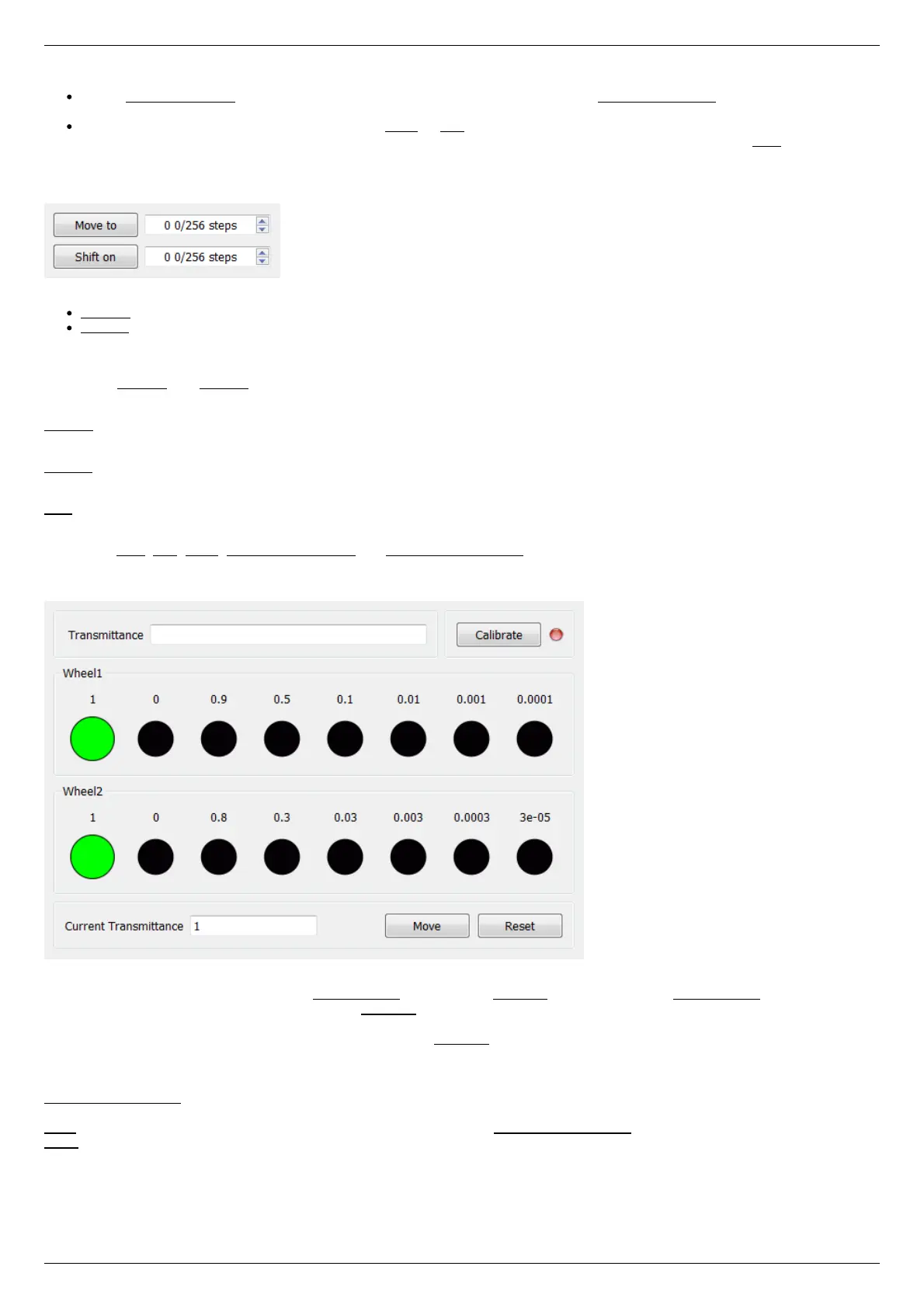
At the top of the attenuator control block a Transmittance window and a Calibrate button are located. Transmittance window contains a
control to select desired transmittance coefficient. Calibrate button does manual calibration, or location of the initial position, of the
attenuator - first it initiates one revolution of attenuator with current controller settings to determine relative position of attenuator
wheels and then does Automatic Home position calibration . Calibrate button is optional - if the attenuator did not perform the
calibration or it was reset, for example by pressing Cancel during movement, calibration will be performed before the next movement
automatically.
Attenuator has one or two wheels, each wheel contains 8 optical filters. Below these filters are visualized as bars with circles. Below a
Current Transmittance window is located. This window contains trasmittance coefficient which is the closest to desired one that can be
achieved with the current filters.
Move button performs movement toward the filters corresponding to the Current Transmittance, that is, the highlighted ones.
Reset button deactivates all filters.
Controller and motor status



 To Next Page