8.1.2. Administration
Note. Administration interface and TANGO support might not be present in your version of the device. You can update
the device firmware using our instruction.
Automatic device detection
As a convenience we provide a small dedicated utility called "Revealer" in order to help you instantly identify all the Standa 8SMC4-
USB-Eth1 adapters connected to your local network. You can download it from our software page.
"Revealer" utility interface
The Graphical User Interface of the "Revealer" is a simple one. In order to start search click Search button on Search settings panel -
the scan takes approximately 3 seconds. After that all Standa 8SMC4-USB-Eth1 devices found in your local network will be listed on
Available devices panel as clickable links. When clicked, the link opens your defaul system browser and redirects it to Administartion
interface web page.
The utility requires Java Runtime Environment (or simply JRE) version 6 or greater to work. There are high chances that you already
have it installed on your PC as it's the requirement for a great number of popular software packages and so you just need to double-
click the "revealer-j_0.1.0.jar" file to launch the utility.
Otherwise it means that you don't have JRE installed and have two options:
1. Download our ready-made packages for your operating system containing the "Revealer" utility and all the stuff necessary to
make it work. In this case you just need to launch "Revealer" executable.
2. Install JRE. A good candidate is Oracle JRE which you can install following the official instructions.
Warning. "Revealer" uses UDP broadcasts to reach all Standa 8SMC4-USB-Eth1 in your LAN so it might be
unusable in the environments where UDP broadcasts are forbidden or unwanted.
Overview
Standa 8SMC4-USB-Eth1 device is equipped with web-based Administration interface which enables the end user to control device
services and monitor system state.
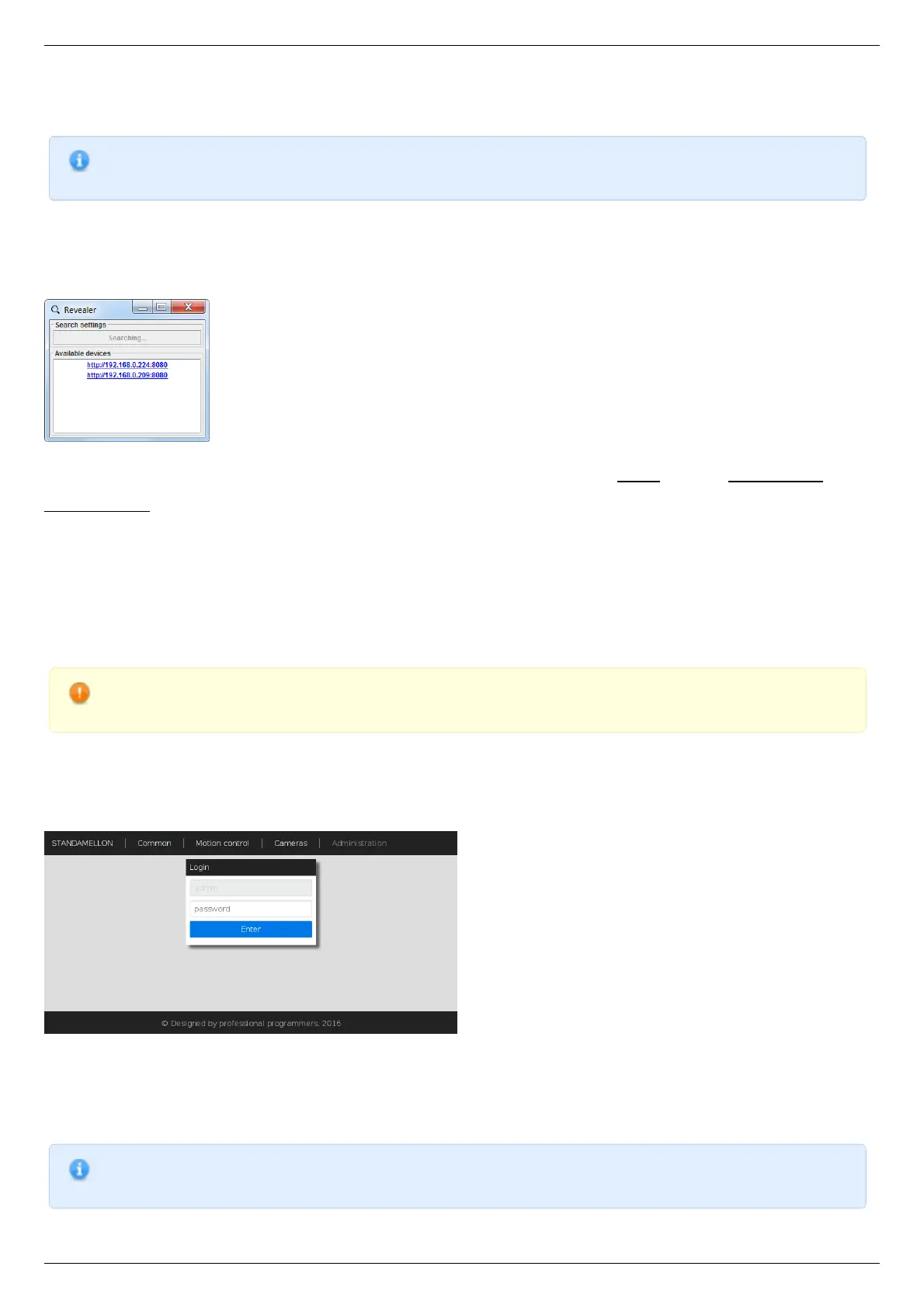
Administration interface login page
In order to get access to the Administration panel, navigate your browser to http://[address] URL (where [address] should be
replaced with IP address of the device in your local network and can be obtained with the help of "Revealer" utility). If you are doing
this for the first time (or you've disabled cookies/password storage in your browser) you'll need to authenticate yourself using "admin"
as login and password.
Note. It's highly recommended to enable javascript in your browser while using Administration interface to get the
best user experience.



 To Next Page