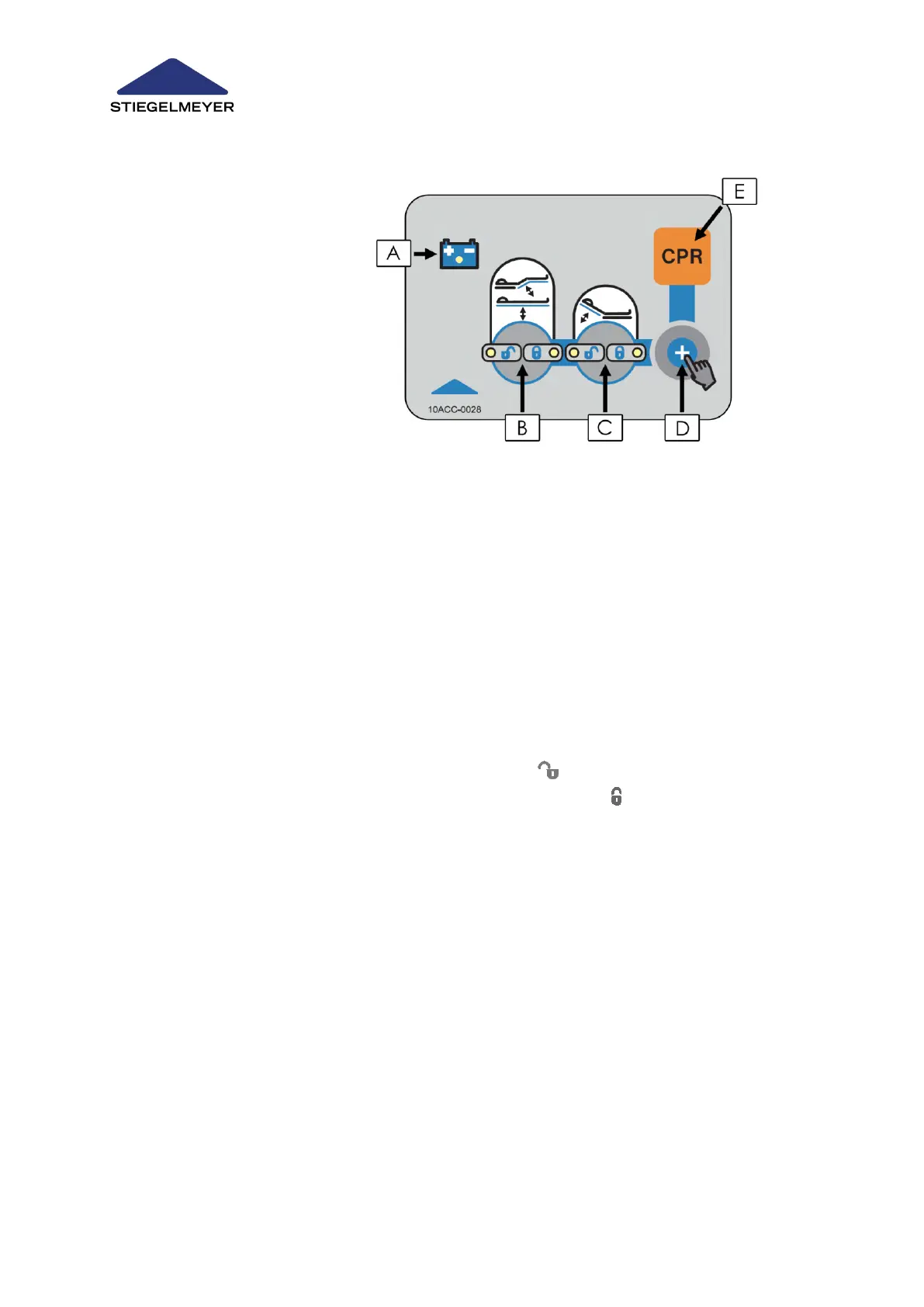
Illustration:
A = Battery charge indicator
B = Button for locking/unlocking mattress base height and thigh rest adjustments
C = Button for locking/unlocking backrest adjustments
D = Unlock button
E = Button for CPR position
Proceed as follows to lock or unlock functions:
1. Press and keep the unlock button pressed (D).
2. Press button (B) or (C) to lock or unlock the function concerned.
x If the green LED with the opened padlock lights up , this function is unlocked.
x If, however, the orange LED with the closed padlock lights up , this function is locked.
CPR Position
x Press button (D) and button (E) to adjust the bed to the CPR position.
Battery Charge Indicator
When the bed is equipped with a rechargeable battery (optional equipment) and is connected to
the mains supply, a yellow LED (A) indicates that the battery is charging. The LED lights up when
the battery is charging. When the LED is not on, this indicates that charging is either completed or
the bed is not connected to the mains.



 To Next Page