CAUTION
It is forbidden to operate the truck with more than
one person on the operator platform.
Requirements
– Operator platform is fully lowered.
– The truck braked to a halt.
Procedure
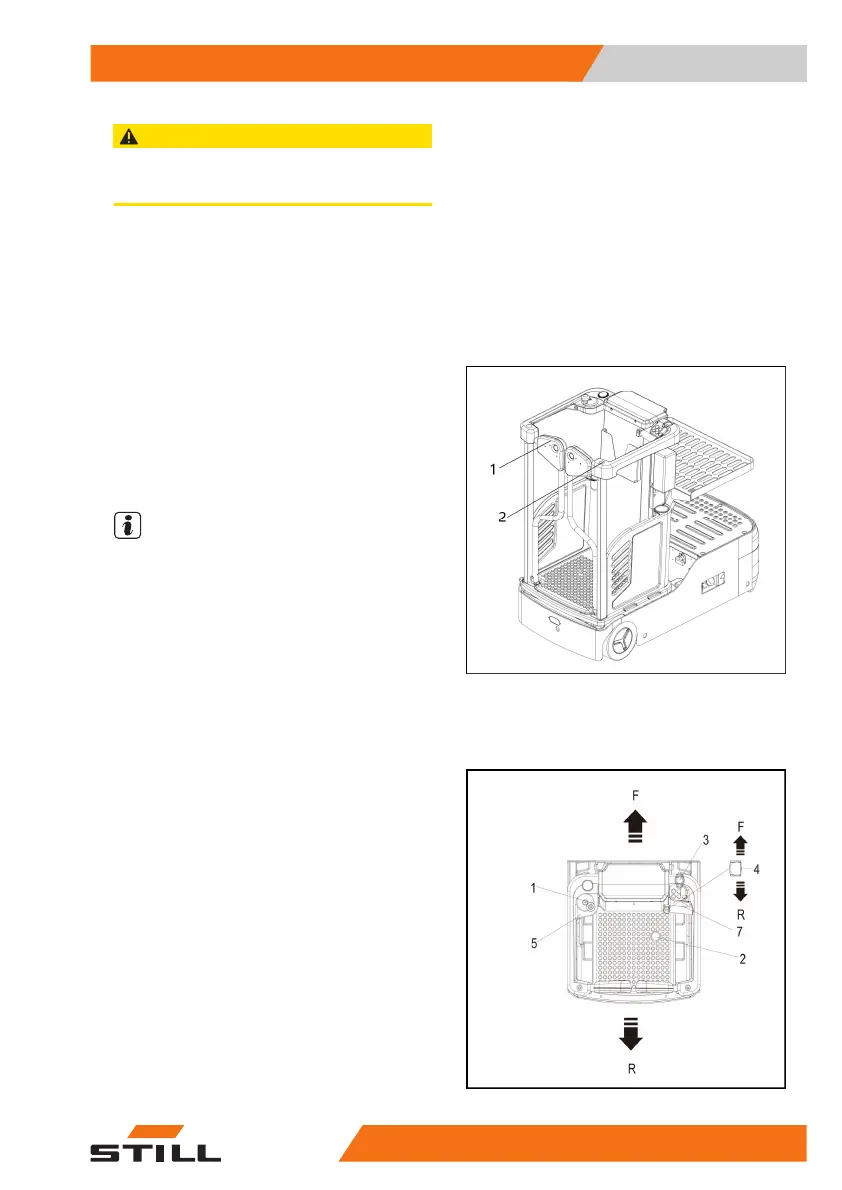
– Open the operator platform safety gates (1)
inwards. You must face the truck upon entry
and exit. To enter and exit, hold onto the
frame (2) of the truck.
– The safety gates (1) close automatically be-
hind the driver.
NOTE
The mechanical safety gates lock is fitted, the
truck safety gates will not open when the oper-
ator platform is raised.
Driving, Steering
Driving
– Close the safety gates.
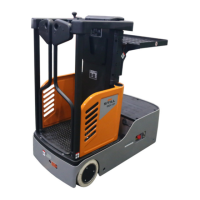
– Insert the key in the key switch(5) and turn
it to the “ON” position .
– The blue lamp on the front of truck is lit, and
the rear driving lamp flashes red.
– Pull up the emergency stop switch(3) .
– Apply the drive deadman switch(2).
– Right hand in sensor switch(7) position.
– Use the travel switch(4) to select the re-
quired driving direction.
●
Forward = F
●
Reverse = R
Operation
4
Drive operations
655091 801 1525EN-12/2022 - 06


 To Next Page