WARNING
Before switching on the key switch, all visual inspec-
tions and function checking must be carried out with-
out any defects being identified.
– Perform the visual inspections and function check-
ing.
–
Do not
operate the truck if defects have been
detected; contact the authorised service centre.
– Apply the parking brake.
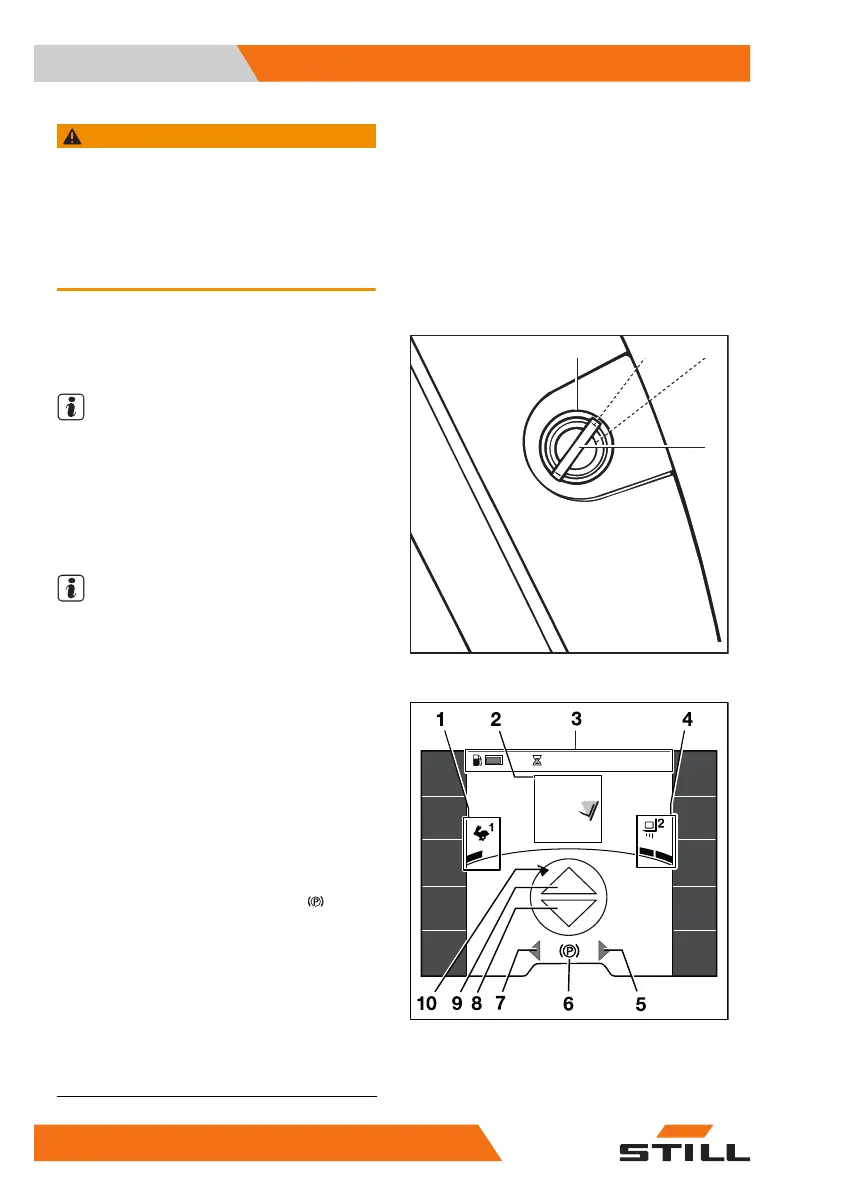
– Insert the switch key(1) into the key switch
and turn it to the "I"position.
NOTE
If the truck is equipped with the "Access au-
thorisation with PIN code" variant, the display
initially changes to the input menu for access
authorisation.
Once the truck is ready for operation, the main
screen is shown on the display.
NOTE
The engine will not start until operational read-
iness has been established and the main dis-
play appears on the display.
Main display
1 Selected drive programme with driving
dynamics display
2 Load information (variants)
3 Status bar
1
: fuel level, operating hours,
time
4 Selected load dynamics programme with
dynamics bar
5 "Right" turn indicator display
6 Driving speed or parking brake
7 "Left" turn indicator display
8 "Reverse" drive direction indicator
9 "Forward" drive direction indicator
10 Steering angle display
Additional information may appear on the dis-
play.
7071_003-101
0 I
1
II
432 h
08:20
1,6 t
7°
2,71
m
1
An example status bar(3) is shown in this figure.
Operation
4
Switching on and starting
128 57378011527EN-12/2023 - 07



 To Next Page