6.2.4 IP Address Configuration
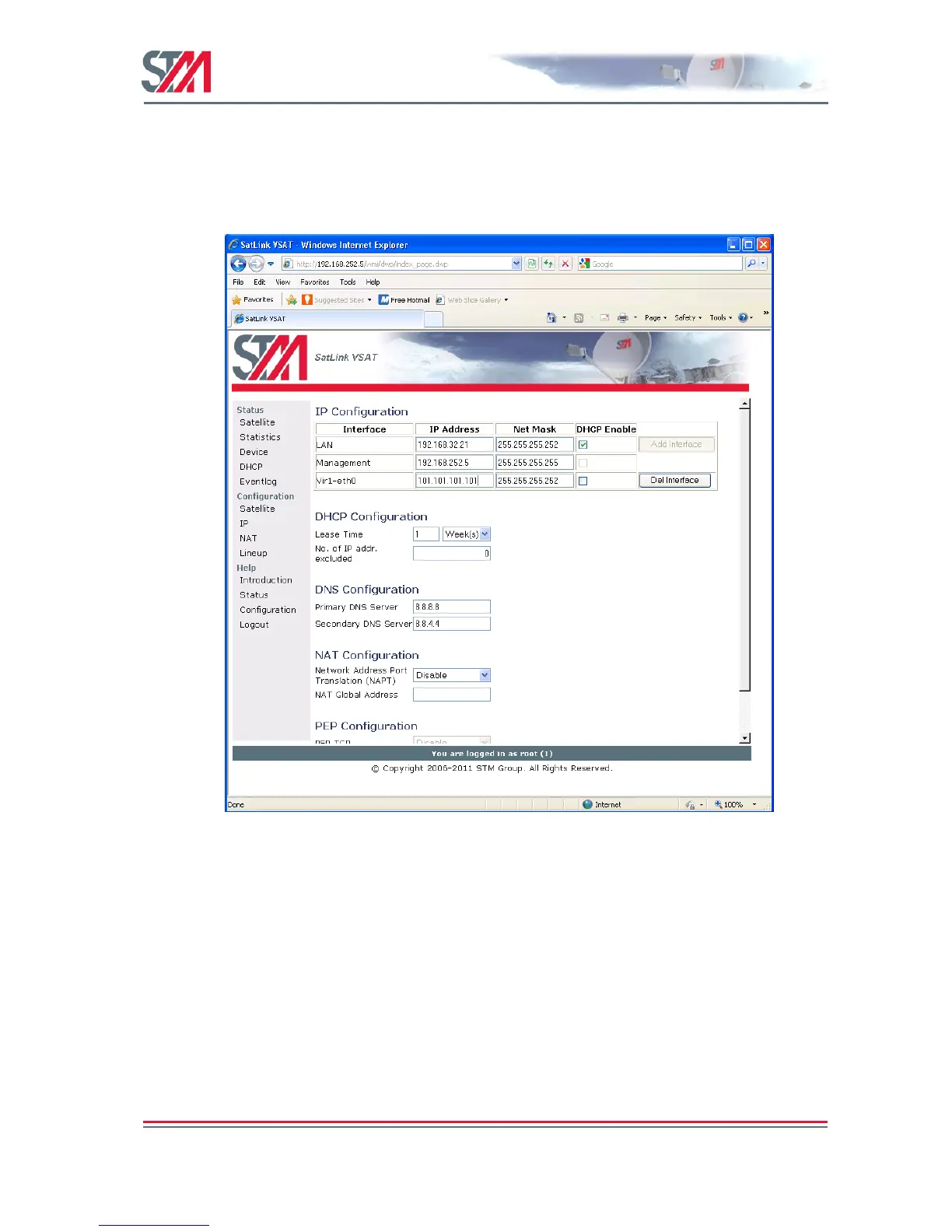
1) The VSAT web interface is used to configure the IP addresses and netmasks of the VSAT's LAN,
Management and Virtual (Vir1-eth0) interfaces. The Web interface is also used for LAN DHCP
server, DNS, NAT, and PEP configuration.
Click on the Configuration
IP option in the SatLink VSAT home page.
Figure 23: IP Configuration – LAN, Management, and Virtual Interfaces
2) Enter the valid IP address and Netmask for the LAN, Management, and Virtual (Vir1-eth0) interfaces.
3) Enable / Disable the DHCP server.
The DHCP server can be enabled only for one interface (LAN or Virtual).
When enabled, the DHCP server will automatically allocate IP addresses in the VSAT LAN (or
Virtual) Interface subnet except the VSAT's own IP LAN (or Virtual) address and addresses excluded
manually.
4) Set the lease time for an IP address allocated to a host on the LAN (or Virtual) subnet.
5) Specify the number of IP addresses to be excluded from the available range of addresses defined by
the VSAT LAN (or Virtual) subnet. The excluded range of IP addresses will be the upper range of the
LAN (or Virtual) subnet.
6) Enter the IP address for the primary and secondary DNS servers to be used by the hosts on the VSAT
LAN (or Virtual) subnet.



 To Next Page