11
3. CONNECTIONS
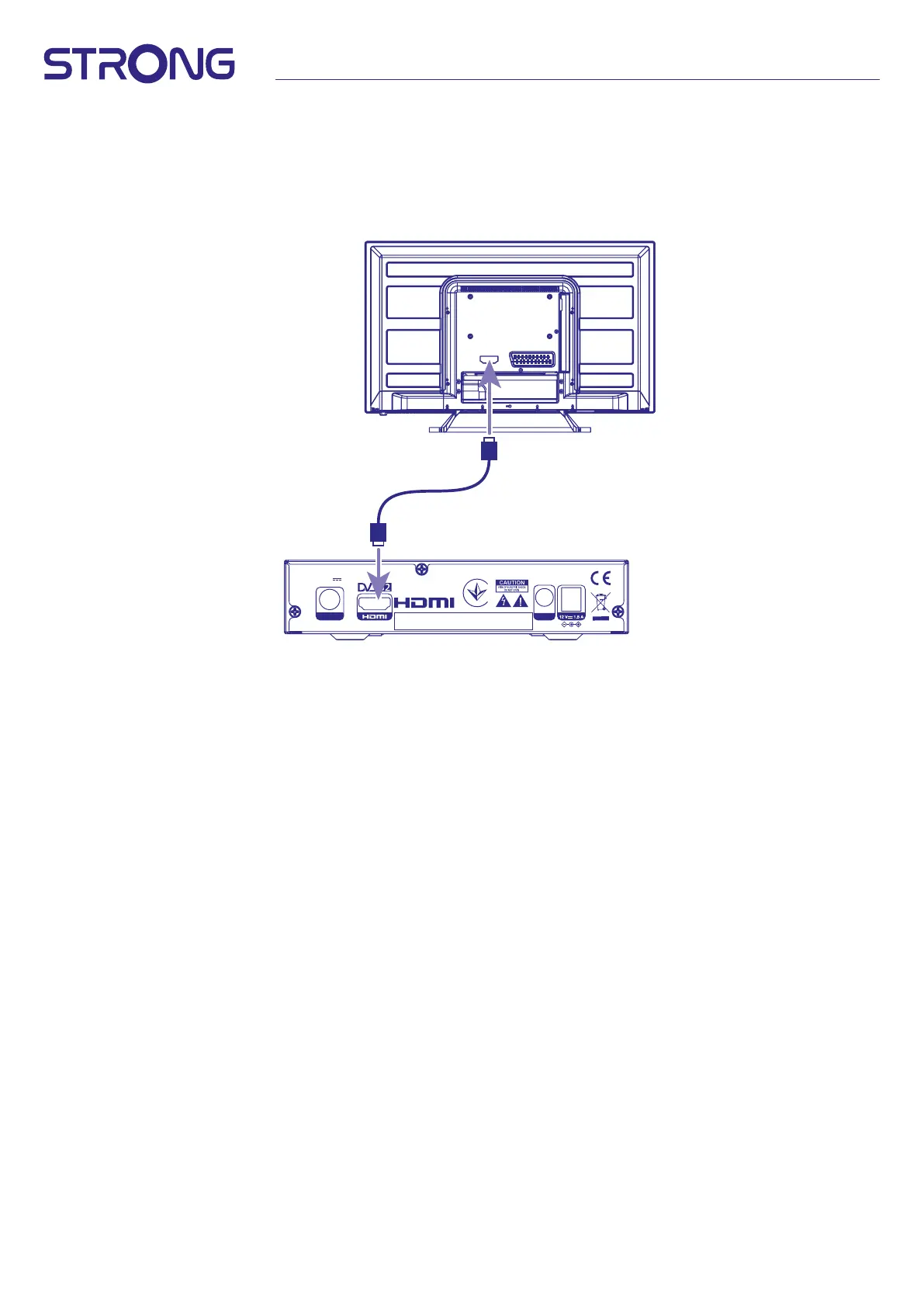
3.1 Basic connection using an HDMI cable
Fig.6
a. Connect the LNB of your satellite antenna to the SAT IN connector of your receiver using a good quality
coax cable and suitable ‘F-connector' plugs.
b. Connect one end of a good quality HDMI cable to the HDMI output on your receiver and the other end to
the HDMI input of your TV.
c. Plug the power adapter to a suitable wall outlet.
DIGITAL HD SATELLITE RECEIVER 7015
SAT IN S/PDIF
COAXIAL
13/18 V
500 mA max.
Supplied by STRONG Austria
MANUFACTURED UNDER LICENSE FROM DOLBY LABORATORIES.
DOLBY, DOLBY AUDIO AND THE DOUBLE-D SYMBOL ARE
TRADEMARKS OF DOLBY LABORATORIES LICENSING CORPORATION.



 To Next Page