7 Teleservice Application Framework
User Manual 91/374
7.2.2 Data daemon
/etc/init.d/_ydatad.config
How to activate the configuration file of the data daemon
Activate the configuration file of the data daemon, so the data daemon is started during the boot up sequence
automatically.
1. Rename the configuration file of the ydatad the following way:
# mv /etc/init.d/_ydatad.config /etc/init.d/ydatad.config
2. Reboot the system
# reboot
ydatad
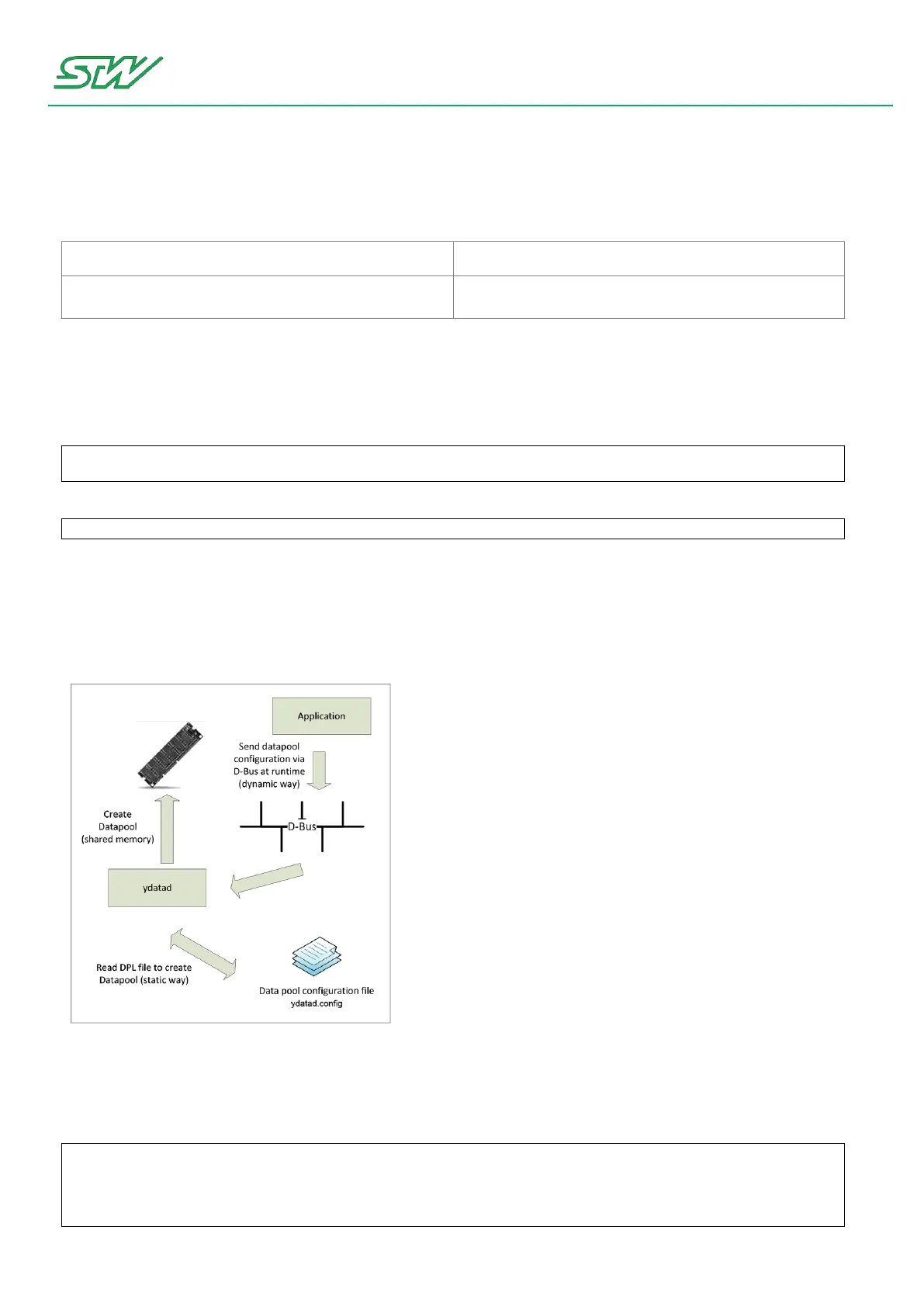
The data daemon provides access to common data pools. It gives applications and processes the opportunity
to define, create and delete variable lists via D-Bus commands. In order to achieve quick response times and a
generally good performance when working with those variables, writing and reading will be handled by the
"shared memory" mechanism.
Basic configuration of the daemon can be handled in its own configuration file (ydatad.config).
Relevant sections of the configuration file:
Section: Log file path
# The logging information can be written to a log file at the following path
# By default path is deactivated.
# Max. path length is 255
# If the path is deactivated or no path is set, an error message will be put on stdout.
Log_File /var/log/ydatad.log


 To Next Page