Discovery Delay – Global SettingsGlobal Settings
30
Revision: 1.2 (7/1/2021)
Global Settings
Editing Global Settings
1. If the pedal is powered on, disconnect the power and wait at least 3 seconds
Note:
In rare instances, unplugging the power cable and replugging it too quickly can
stress the regulators and cause them to pull extra current and may risk damaging
your unit� Please wait at least 3 seconds before plugging it back in to prevent this�
2� Hold the [PRESET SELECT] button and power on the unit�
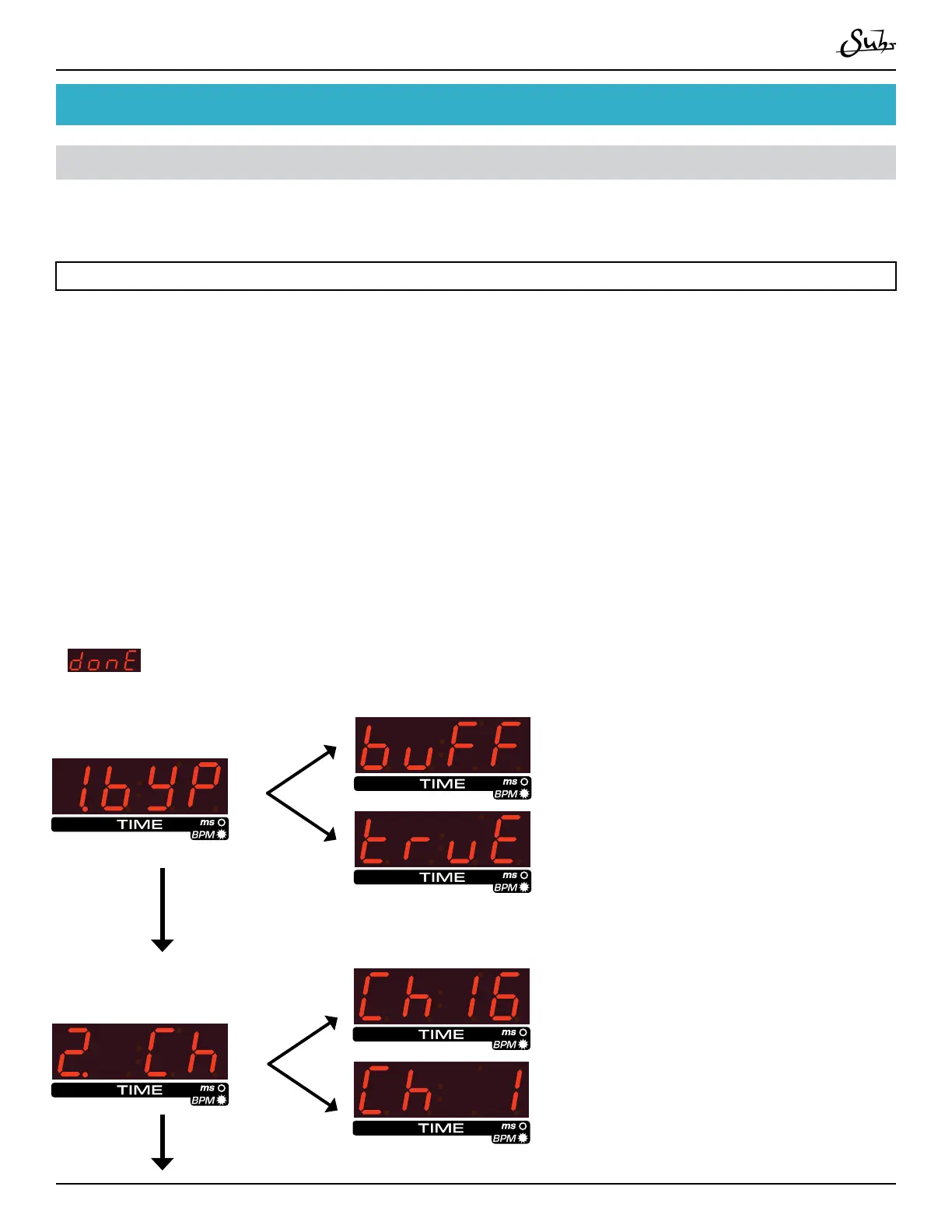
3. You will now enter a numbered list of global settings� Use the [▲] and [▼] but-
tons to scroll through the settings� Use the [PRESET SELECT] button to select a
setting�
4. Once a setting has been selected, you will return to the main numbered list�
When nished editing settings, scroll to the bottom of the list with [▼] until
is displayed� Preset [PRESET SELECT] to nish altering the settings and
start the pedal�
1. Bypass Mode:
[▼]
[▼]
2. MIDI Channel:
Choose between ‘True’ bypass and
‘Buered’ bypass modes� When in
‘true’ bypass mode, the signal will go
directly from the pedal’s input to it’s
output without passing through the
pedal’s eect circuitry�
Set the MIDI channel you want your
Discovery Delay to communicate on,
1-16� e default is MIDI channel 1�
[▲]
[▲]



 To Next Page