Discovery Delay – Usage CasesUsage Cases
36
Revision: 1.2 (7/1/2021)
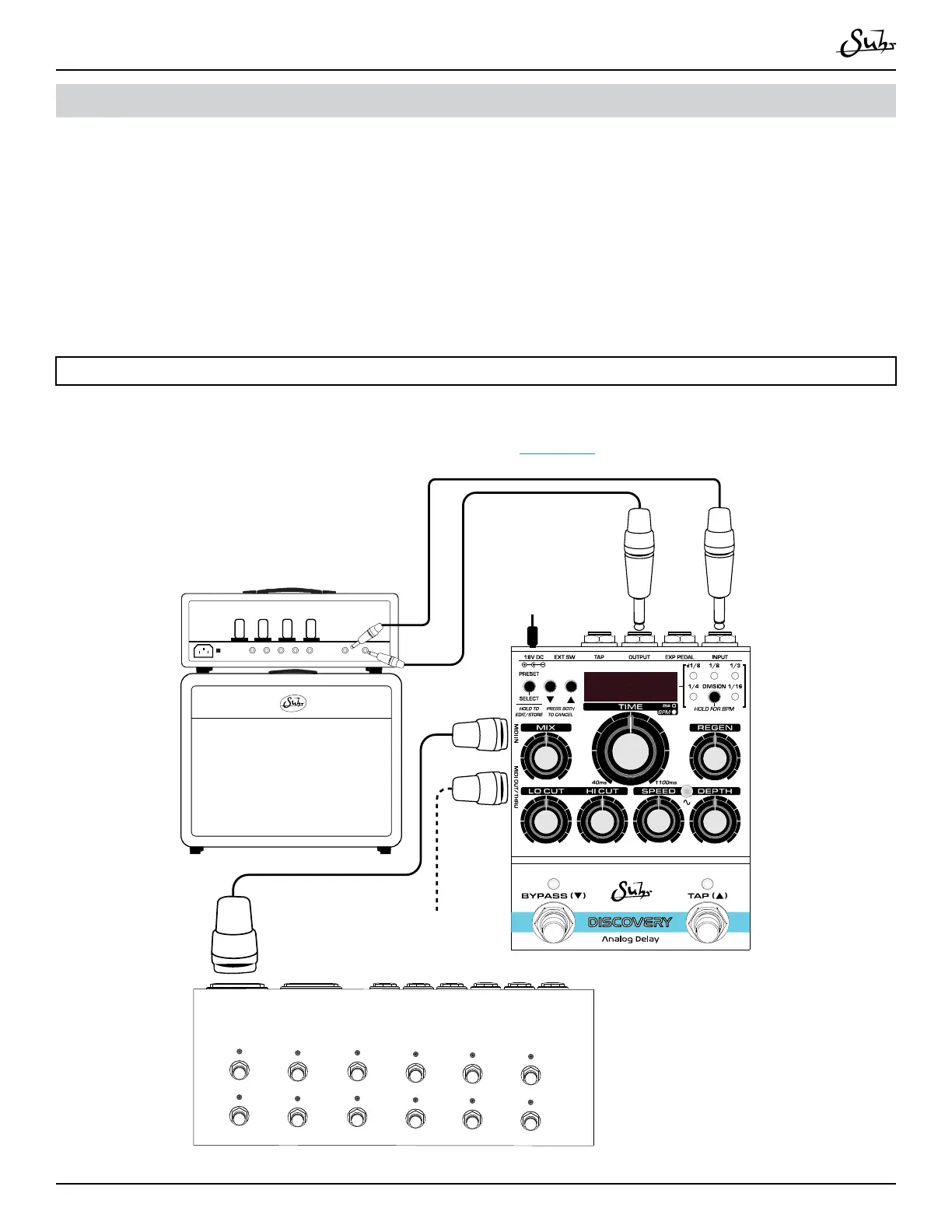
MIDI Switching from External Device
1. Plug in included 18V DC power supply�
2� Plug a 5-pin MIDI Cable from devices MIDI OUT to Discovery’s [MIDI IN]�
3. Optional: Plug a 5-pin MIDI Cable from Discovery’s [MIDI OUT/THRU] to
other device’s MIDI IN�
Note:
For more information on how to set the MIDI channel of the Discovery Delay and
the MIDI OUT/THRU options, please refer to Page 23�
88 88
Use included
18V DC power supply
Device with MIDI Switching (Example – Boss ES-8)
MIDI out
MIDI Switching Device
MIDI in
16Ω 8Ω 8Ω 4Ω 4Ω
SEND RETURN
Effects Loop
Optional: Connect to
other MIDI devices



 To Next Page