1-6
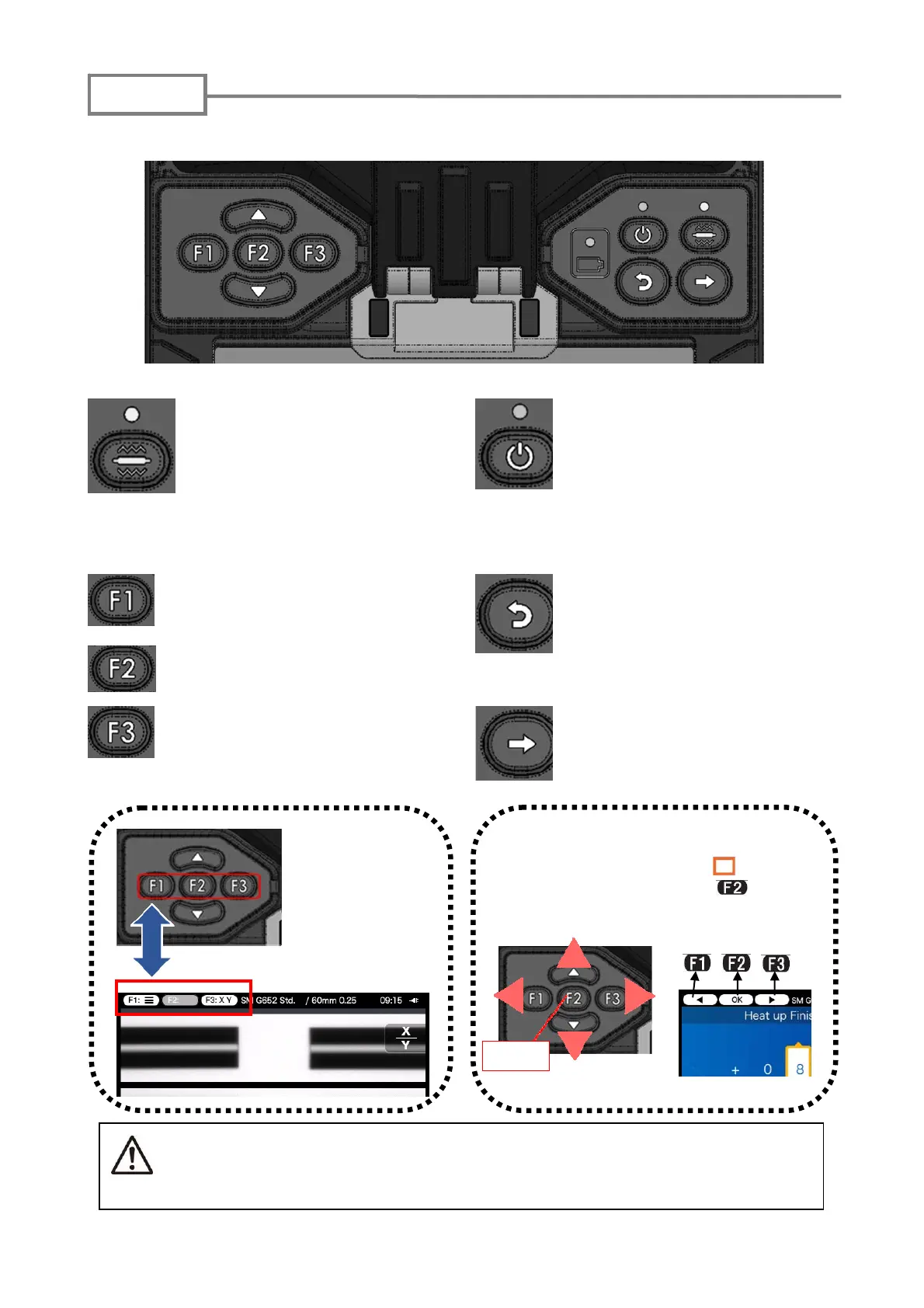
Heat shrink oven key/LED
Starts the heat shrink oven
process.
The LED illuminates while the
process is in progress and the
oven is heated up.
Power key/LED
Switches ON/OFF the splicer.
The LED illuminates during
power on.
Function keys
Correspond to the icons
located on the left upper
corner of the screen and are
pressed to use the function
being displayed.
RESET key
Cancels the splicing process
and goes back to a previous
step.
SET key
Starts the splicing process and
advances to a next step.
The keys are provided on the top of the splicer.
The Function keys
correspond to the
icons located on the
left upper corner of
the screen.
The left-hand keys are sometimes
used to move the cursor “ ” up and
down, and to left and right. key is
pressed to enter the selected item.
Caution
Do not press the keys on the keypad with a sharp object ( e.g. a ballpoint pen,
screwdriver, or nail ) Doing so will damage the keypad.
Keypad
Ente



 To Next Page