6-1
An administrator can edit splice/heater program parameters and function settings which
are not visible in operator mode. The administrator can also setup a passcode to keep
operators from accessing functions.
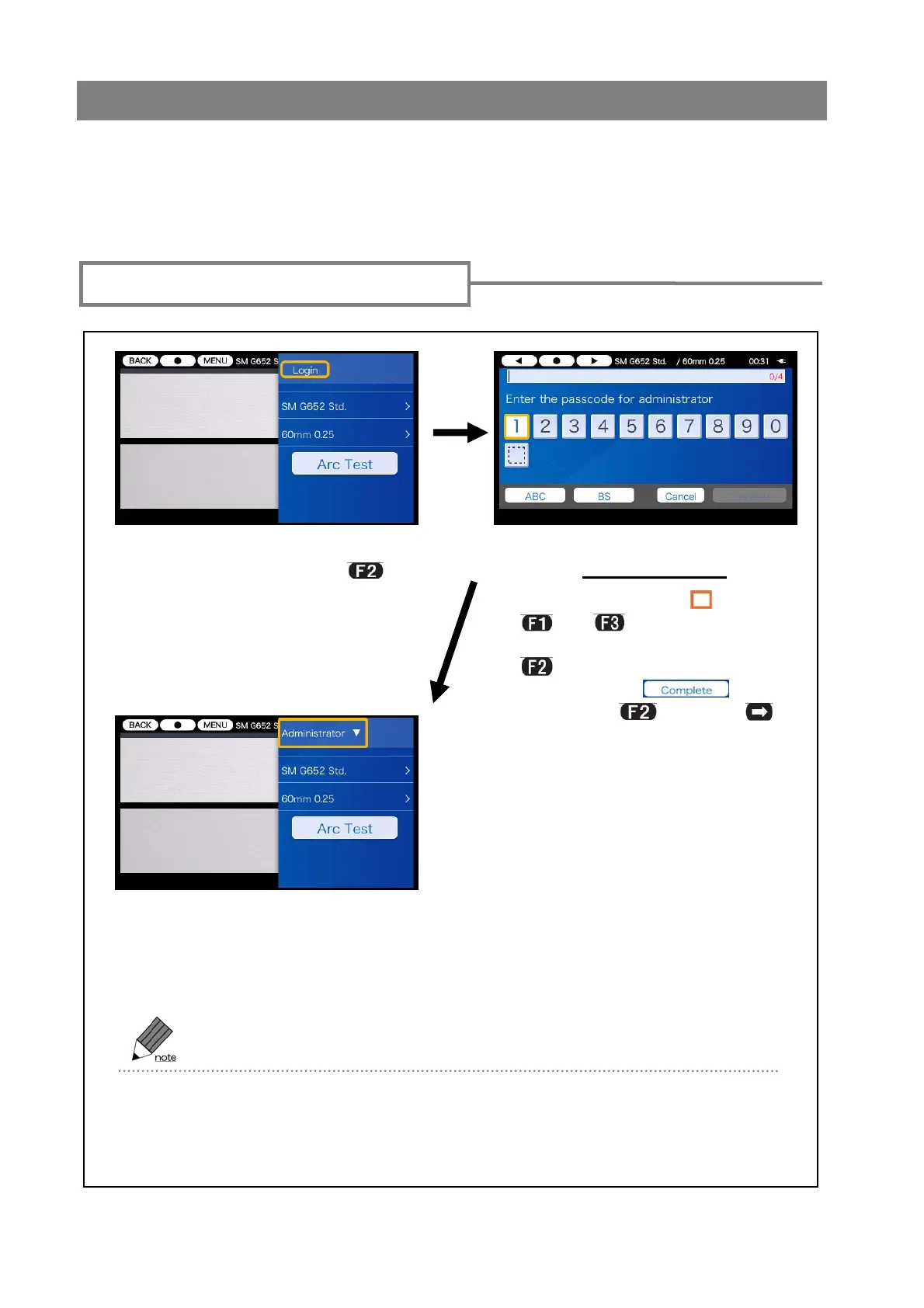
Accessing administrator menu
6. Administrator mode
Pass code: 0000
Input Pass Code screen
1)Open the setup pane. Move the
cursor to “Login” and press
key.
3)After the entered passcode is
verified, “Administrator” label is
displayed on the setup pane.
You are in Administrator mode.
Once you enter the passcode, you can always access Administrator menu without
re-entry of the passcode until you turn off the power. If you turn off the power and turn it
on again, operator menu is displayed.
2)Move the cursor “ ” using
and keys. Enter the
default passcode “0000” using
key. After the entry, move
the cursor to icon
and press
or SET



 To Next Page