3-5
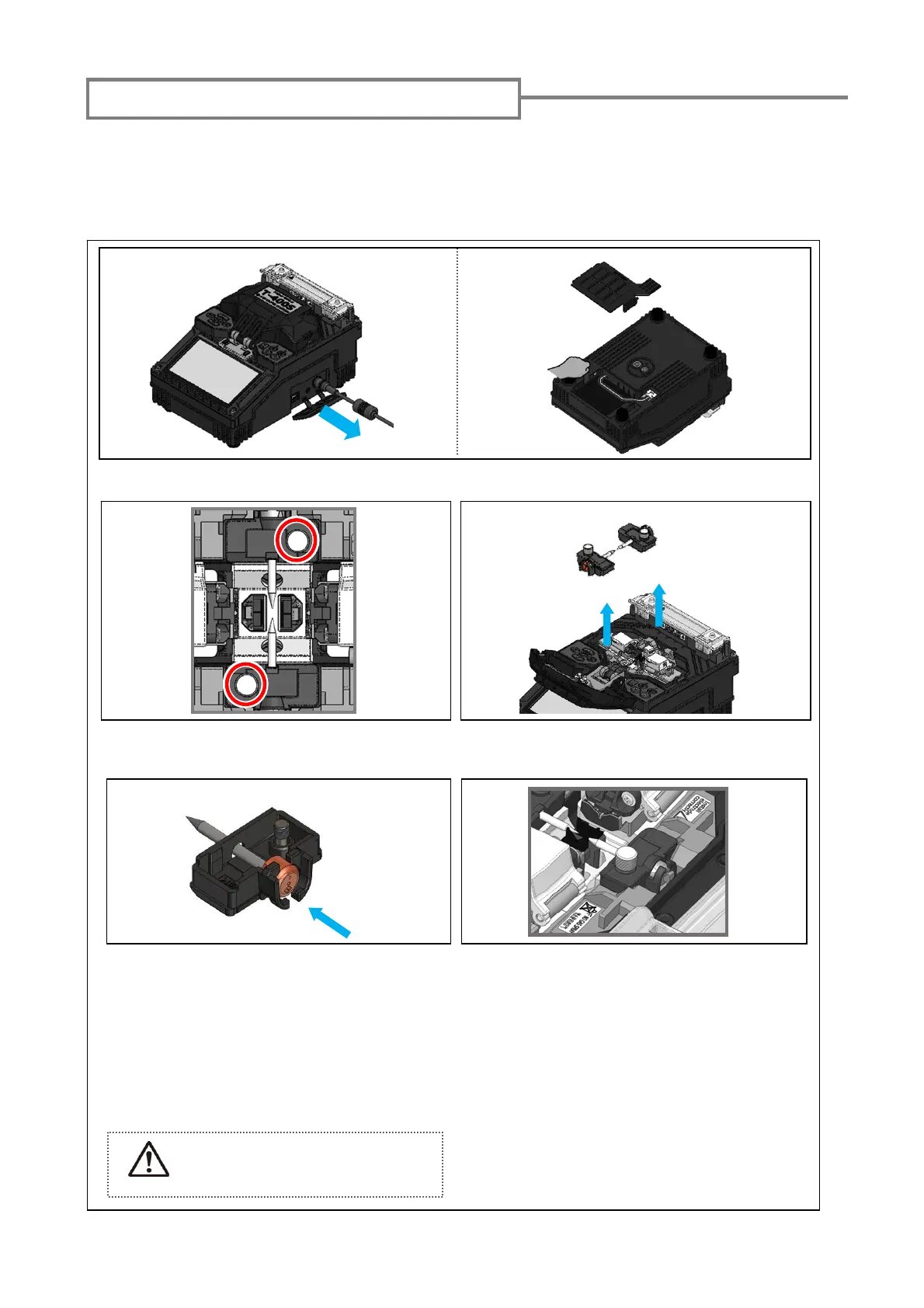
1: Turn off the splicer and unplug the power cord. Remove the battery. (Refer to Page2-3.)
2: Using your fingers, loosen the thumbscrews.
6: Repeat step 2 to 5 for the other electrode.
Always replace both electrodes at a time.
Please replace electrodes to maintain the performance of T-400S
at about 6,000
discharges. The tip of the electrode is very sharp shape. Please take great care
when handling it.
Electrode replacement procedures
3: Lift up the electrode cover plate as shown in
the picture above and remove the electrode.
When handling the electrodes,
avoid touching the electrode
tips with anything.
4: Install a new electrode correctly in the
cover plate.
*Make sure the “collar (plastic button)” of the
electrode passes the latch of the cover plate
and is fully inserted all the way in.
Caution
5: Tighten the thumbscrew while pressing
the electrode below at each electrode
cover plate.
7: Plug the power cord into the power
module and turn on the power to condition
the electrodes. After conditioning the
electrodes, the Arc count is automatically
reset.


 To Next Page