6-14
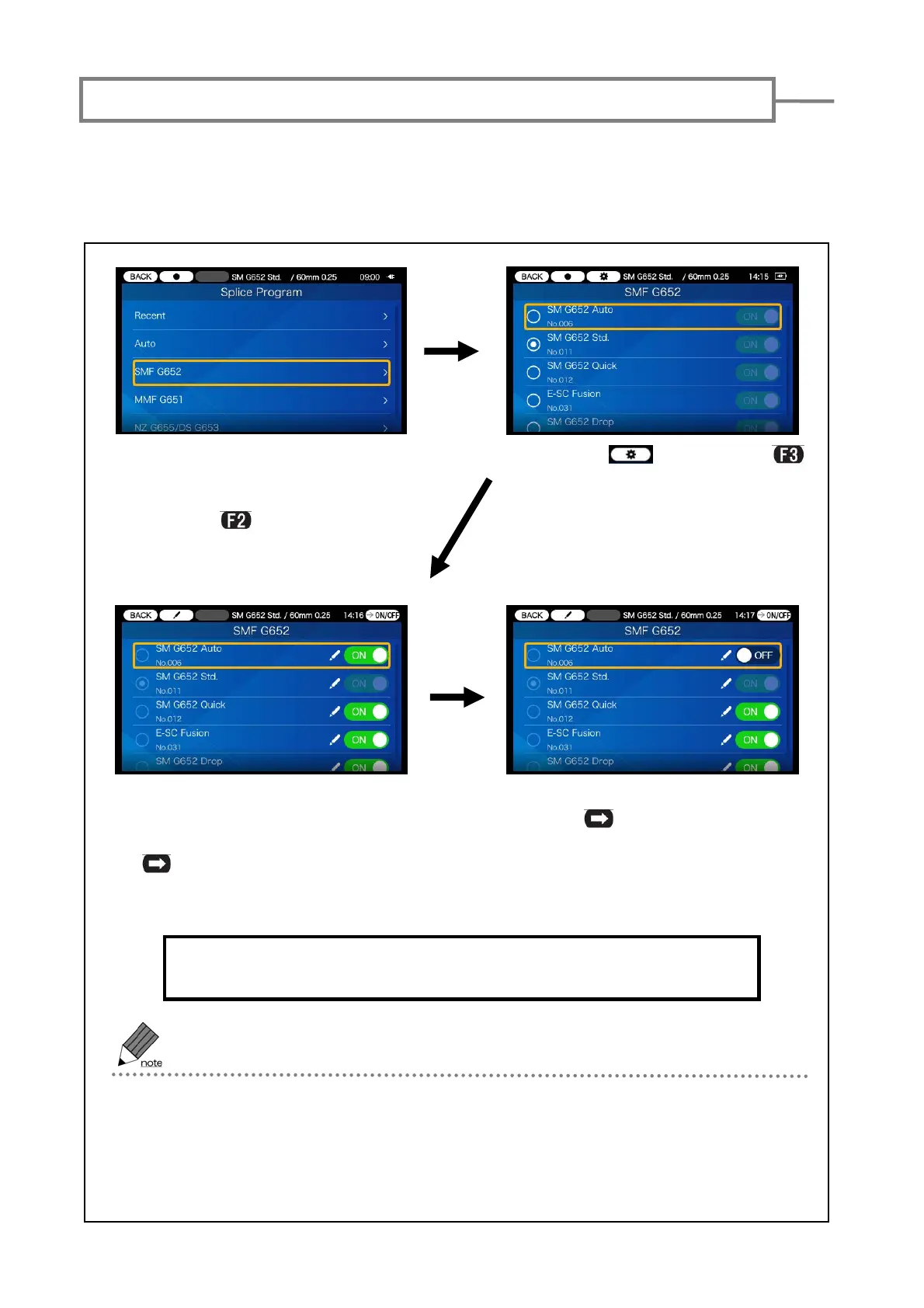
1)Go to Splice Program selection
screen. For example, move the
cursor to “SMF G652” category
and press key.
3)Move the cursor to the splice
program you would like to reg-
ister/de-register and press SET
key.
The registered splice program is visible in the Operator menu screen
and saved after the power is turned off.
·In Administrator menu, heater programs can also be registered/de-registered
in the same procedures.
·The splice/heater program which is currently selected for use cannot be
de-registered. First select other program to make the currently selected
program unselected, and then de-register it.
Some splice programs are factory pre-registered in the program menu and if you would
like to use a program other than the registered programs, you can register it and show it
in the splice program menu.
4)ON⇔OFF are switched every
time
key is pressed. In
this example the splicer pro-
gram is de-registered.
Registering (showing)/de-registering (hiding) splice program
2 ) Select icon. (Press
key.)



 To Next Page