6-13
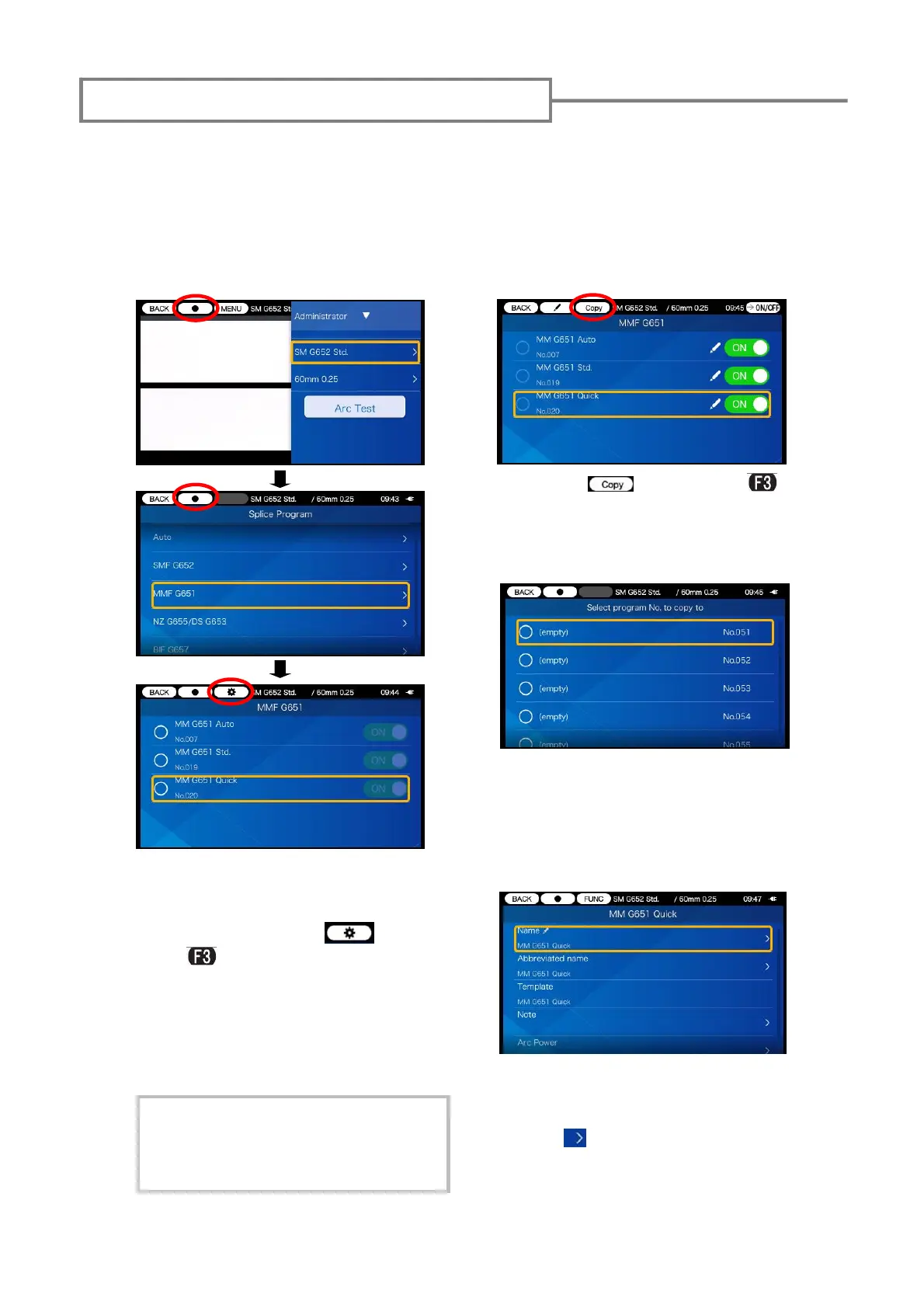
In Administrator mode, you can create your own new splice program by copying an ex-
isting splice program to a blank area of splice programs. After the copy, you can edit the
name of the copied program and change the parameter settings.
First, log in to Administrator mode to do this action.
As an example this page describes how to copy splice program.
Copying splice program/heater program
1) While keeping logging in to
Administrator mode, move the
cursor to the item you would like
to copy, and select
icon
(press
key).
2: Select icon (press
key) again to copy the selected
item.
3: Select the number of splice
program where you would like to
paste the copied program.
4: When copying is done, the
copied program details are dis-
played. An editable mark has a >
mark ( ) at the rightmost part of
the row. For more details, please
refer to P.6-6 and P.6-7.
To copy heater program, follow the
same procedures as described in this
page. For the details of heater pro-
grams, please refer to P.6-8.


 To Next Page