Installation, Operation, and Maintenance Manual
14 SUMMIT PUMP MODEL 2196 / 2196-LF / 2196-R / 2796
DIAL INDICATOR TECHNIQUE
Models 2196, 2196-LF and 2796
TO USE THE DIAL INDICATOR TECHNIQUE FOR IMPELLER CLEARANCE SETTING
1. Lock out power to the pump driver.
2. Remove the coupling guard.
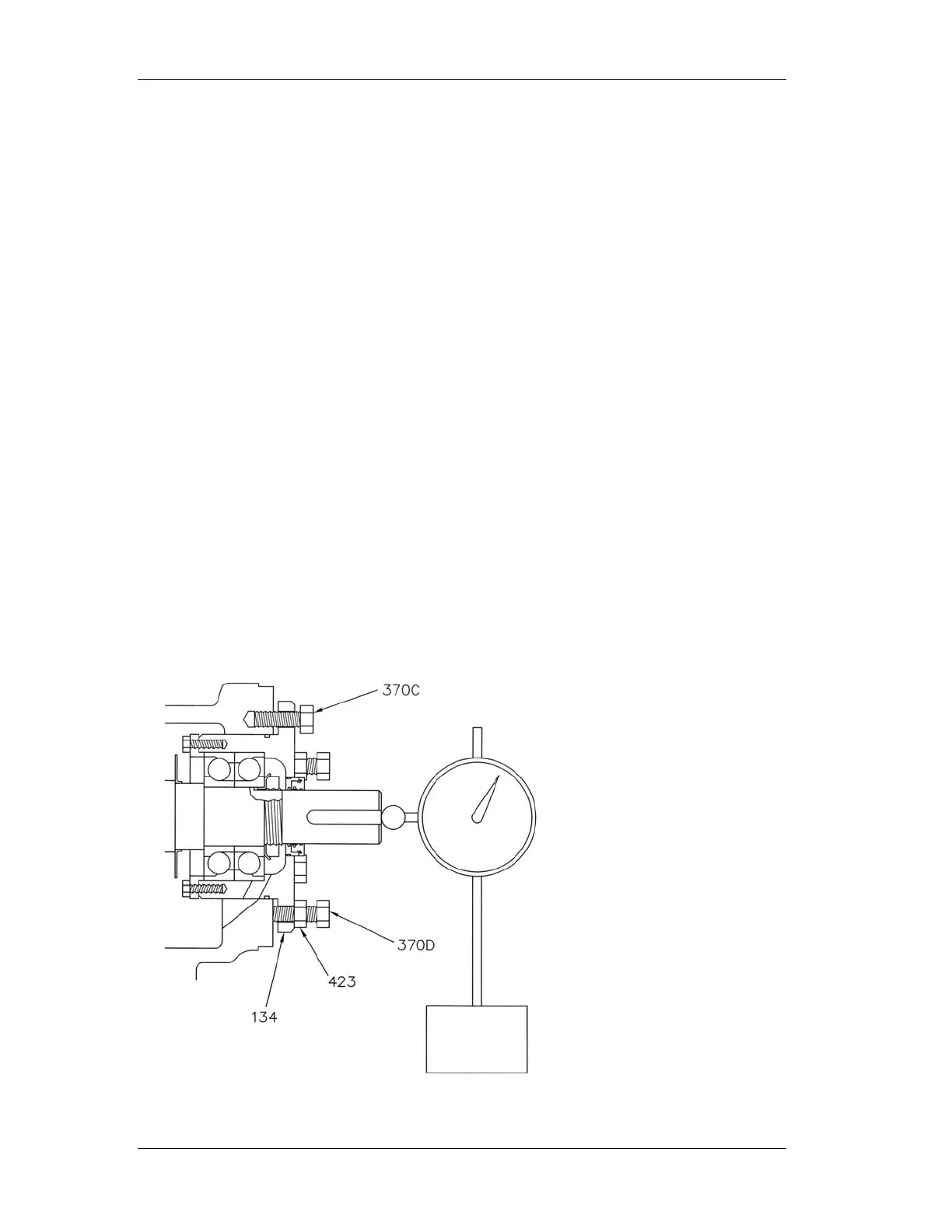
3. Place a dial indicator with a magnetic base on the pump base plate. Place the
indicator against the end of the pump shaft or coupling face.
4. Loosen jack bolts (370D) and jam nuts (423).
5. Tighten bearing housing bolts (370C) evenly while slowly rotating the shaft until
the impeller starts to rub on the casing.
6. Set the dial indicator to zero.
7. Tighten the jack bolts (370D) evenly until they contact the frame. Continue to
tighten until the dial indicator reads the proper clearance as shown in Table 6.
8. Tighten bearing housing bolts (370C) evenly; then tighten jack bolts (370D)
evenly. Be sure the dial indicator does not move from the proper setting.
9. Rotate the shaft to be sure it turns freely.
10. Reinstall the coupling guard.
11. Unlock power to the pump driver.


 To Next Page