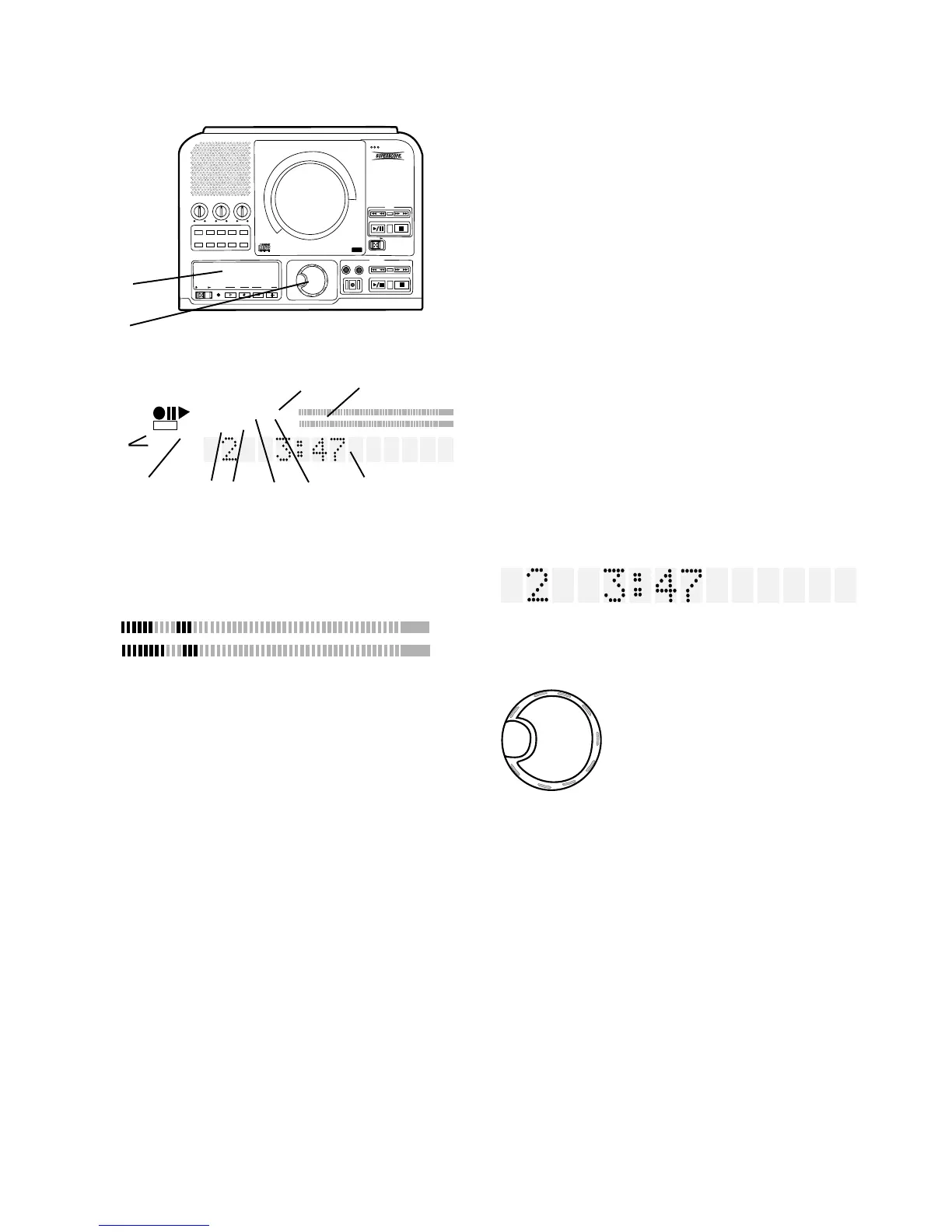
PUSH
BASS
MID
TREBLE
TEXT VR PROG REPEAT MENU/STORE
DISP SINGLE
A-B CANCEL/DELETE
REC MODE
CD-RW PLAYBACK
CD RECORDING SYSTEM PSD300
MIC
PLAY
OPEN
REC/PLAY
ERASE FINALIZE
REC
SELECT
PUSH ENTER
POWER KEY TEMPOSTANDBY
- 13 -
Controls, Display (top) continued
DIGITAL
7 DIGITAL indicator
Lit during digital playback or recording.
Not lit during analog playback or record-
ing.
R
L
dB-50 -30 -22 -16 -12 -8 -4 0OVER
8 Level meter
Displays the level of the Left and Right channels of
audio from the music source. During CD playback this
is the audio level of either the CD drive or the CDR
drive. During recording this is the audio level of all
music sources feeding the CDR drive.
CD
CD-RW
10 TEXT indicator
TEXT is displayed when the CD being
9 CD indicator
Displays CD, CD-R, or CD-RW telling
you the type of disc that is in the selected
drive.
TEXT
played includes CD TEXT information. Or when TEXT
mode is selected to enter CD TEXT information onto a
CD you are recording.
A-B
11 A-B indicator
A- is lit after pushing the A-B button once
indicating that the beginning of audio segment to be
repeated has been selected. REPEAT is also lit. A-B
is lit after pushing the A-B button a second time. The
audio segment from A to B is repeated indefinitely.
13
14
R
L
dB-50 -30 -22 -16 -12 -8 -4 0OVER
1 A B TOTAL TRACK
REPEAT AUTO SYNC
PROGRANDOM DIGITAL
STANDBY
CD-RW
CD TEXT
TOC
9
10 11 12 13 14 15
13 Display continued
SYNC
14 SYNC indicator
Lit when the SYNC RECORD mode is
on.
15 Alphanumeric display
Information, instructions and error messages can be
displayed. The example shown indicates track 2 is
being played and it is three minutes and forty seven
seconds to the end of track 2.
SELECT
PUSH / ENTER
14 SELECT control
This is the "master" control for
the PSD300. Push and
release to switch control
between the CD drive and the
CDR drive.
For most operations you turn
to select, then push and
release to confirm and enter your selection.
• In PROG mode turn to select track, then push and
release to program the track.
• In Play mode turn to select the track.
• When recording, selects recording level.
• In MENU mode turn to scroll through menu selec-
tions.
7 8
TOTAL TRACK is lit when the display information (time
to end) applies to the whole CD rather than the track
being played.
TOTAL TRACK
12 TOTAL TRACK indicator
TRACK is lit when the display information (time to end)
applies to the track being played rather than the whole
CD.
AUTO
13 AUTO indicator
Lit when tracks are automatically being
determined (by digital subcode or audio sensing).



 To Next Page