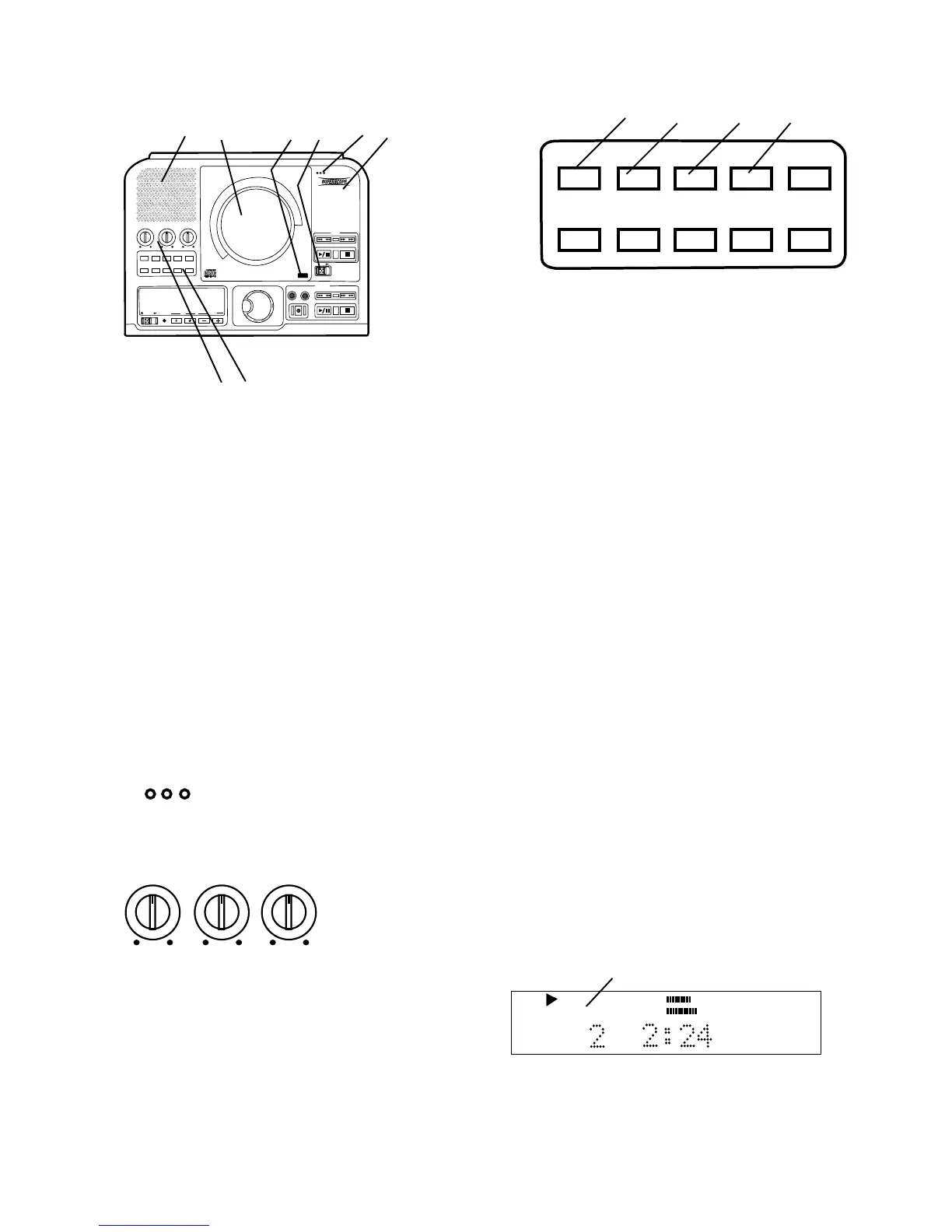
Controls, Display (top)
1 Speaker grill
The built in full range speaker allows listening
to a CD without having to connect to other
equipment for amplification.
- 7 -
2 CD drive
The top loading drive is for playback only. The
PSD300 can playback CD, CD-R and CD-RW
discs.
A disc being played can be heard over the built in
speaker, can be recorded on the CDR drive, or
output to an external amplification system or
recording device via LINE OUT or DIGITAL out
connections.
The CD drive is opened by the OPEN slide switch
(a), and closed by pushing on the corner marked
PUSH (b).
MIC (microphone)
Built in microphone.
MIC
4 PSD300 Model number
BASS
MID
TREBLE
Tone controls
Turning a knob
controls the level of
the corresponding
frequency range of
PUSH
BASS
MID
TREBLE
TEXT VR PROG REPEAT MENU/STORE
DISP SINGLE
A-B CANCEL/DELETE
REC MODE
CD-RW PLAYBACK
CD RECORDING SYSTEM PSD300
MIC
PLAY
OPEN
REC/PLAY
ERASE FINALIZE
REC
SELECT
PUSH ENTER
POWER KEY TEMPOSTANDBY
1 2 b a 3 4
5 6
3
5
the CD being played in CD drive. Level adjustments
apply to the internal speaker, headphone jack and
LINE OUT output. Turn clockwise to boost the fre-
quency and counterclockwise to attenuate it. Level
adjustments do not apply to MIX OUT.
TREBLE High frequencies (6 kHz)
MID Middle frequencies (2 kHz)
BASS Low frequencies (150 Hz)
TEXT VR PROG REPEAT
MENU/STORE
DISP SINGLE
A-B
CANCEL/DELETE
REC MODE
1 2 3 4
6 Control buttons
1 TEXT button
Activates scrolling text in the display.
When a CD with text is first read the text is
automatically displayed and scrolls across.
2 VR button (voice reduction)
Push and release to activate voice reduction, a
special processor that reduces the volume of the
vocal track on a CD.
VR ON is displayed momentarily when voice
reduction is switched on.
Push and release the VR button again to turn
voice reduction off.
VR OFF is displayed momentarily.
Voice reduction is useful for vocal performers
who want to add their own voice through a
microphone for playback or recording. The
amount of voice reduction varies with the method
of mastering used in the original recording.
3 PROG button (program)
Push and release to enter programming mode.
Programming lets you select tracks for playback
in the CD drive only. Up to 30 tracks can be
selected in any order you desire. See How to
program tracks for a full discussion of this
feature.
4 REPEAT button
There are two repeat modes, entire CD and track.
Entire CD: while playing a CD in either drive push
and release once to repeat the entire CD.
REPEAT
TRACK
CD
a
a REPEAT is lit and steady in the display.



 To Next Page