POWER
ON OFF
MIX LINE AUX DIGITAL
REMOTE
RC-5 EXT. INT.
FOOT
PEDAL
IN
OUT
IN
OUT
R
L
R
L
INOUT
OUT
- 17 -
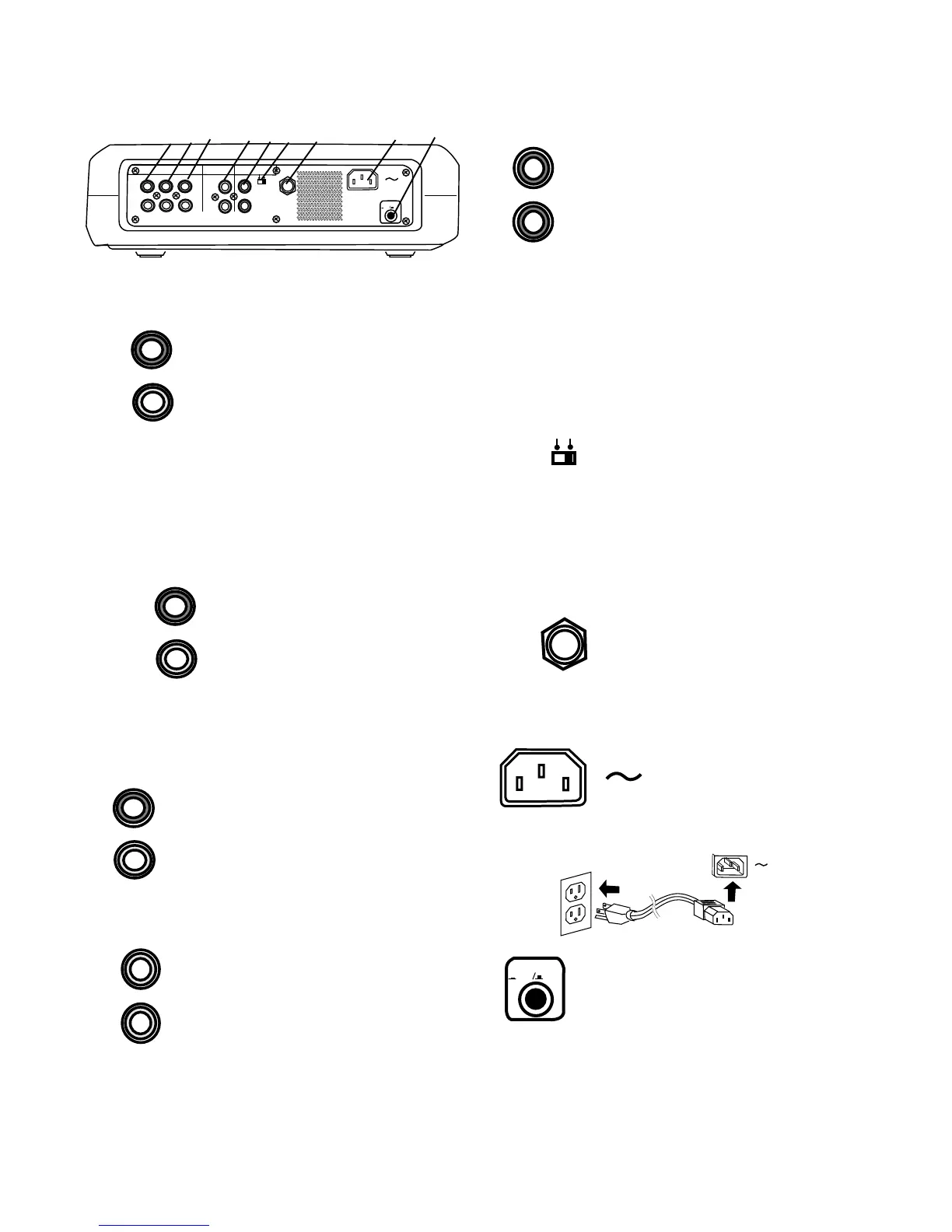
Controls, Connections (rear)
1 MIX OUT jacks
Plug Right and Left RCA audio
cables in here to connect to the
input of an amplifier or other
external unit. Use for recording
onto an external recorder.
Output from the CD drive and MIC/
LINE (or INT MIC) and/or AUX
MIX
R
L
OUT
jacks are output as line level output to an external
recorder or amplifier. The signal is output before going
to the CDR drive, so it is available for monitoring or
recording even if the CDR drive is stopped. This signal
cannot be equalized by the PSD300 tone controls.
1 2 3 4 5 6 7 8 9
MIX LINE AUX
R
L
OUT
2 LINE OUT jacks
Plug Right and Left RCA
audio cables in here to
connect to the input of an
amplifier or other external
unit. When the CDR drive
is not recording the LINE
OUT jacks output the MIX
out signal. This signal can be equalized by the
PDS300 tone controls.
AUX
R
L
IN
3 AUX IN jacks
Plug Right and Left RCA audio
cables in here to connect to the
output of an external unit.
Use for recording onto the CDR
drive from an external audio
source such as a cassette deck.
DIGITAL
IN
OUT
4 DIGITAL IN and OUT jacks
Plug RCA coaxial cables in here to
connect to the input and/or output
of an external digital unit.
Use IN for recording onto the CDR
drive from an external digital audio
source.
Use OUT for going to an external
digital device.
5 REMOTE RC-5 IN and OUT
jacks
Plug RCA audio cables in here to
connect to the input and output of
an RC-5 remote control system.
The RC-5 control code list is on
page 38.
Notes:
• For more information on the RC-5 system and
details regarding its operation please contact
Superscope Technologies.
• When an RC-5 remote control system is not used
the REMOTE EXT. INT. switch should be at INT.
6 REMOTE EXT. INT. switch
Switch to EXT. (external) when an
external RC-5 remote control
system is used.
Notes:
• Switch to INT. (internal) to enable the supplied IR
(infrared) remote.
• A list of the RC-5 remote control codes is on the
page 38.
7 FOOT PEDAL jack
An optional foot pedal can provide
Play/Pause control for the CD
drive and the CDR drive.
Foot pedal (FT200) is available
from Superscope Technologies
Inc.
FOOT
PEDAL
POWER
ON OFF
9 Power switch
Push and release to turn power ON (in
position). Push and release to turn
power OFF (out position).
Normally, to retain memory, leave this switch at ON
and turn power on and off with the Standby POWER
slide switch on the top of the unit.
8 Power plug
Plug one end of the
supplied power cord in
here and the other into a
110 VAC outlet.



 To Next Page