- 15 -
Controls, Connections (front) con-
tinued
PHONE/SPEAKER
LEVEL
PHONE SELECTOR
MIC/LINE
CD
LINE OUT AUX
PHONES
LINE OUT
ReWritable
Recordable
CD PLAY / RECORD
OPEN/CLOSE
MIX
SPLIT
MIC
STEREO
ONOFF
ALC
DIGITAL
ANALOG
INPUT
ONOFF
SPEAKER
MIC
LINE
INT
LINE
MIC
MIC/LINE
L
PUSH
R
MIC/LINE RIGHT
PUSH
LEFT
3 4 5
3
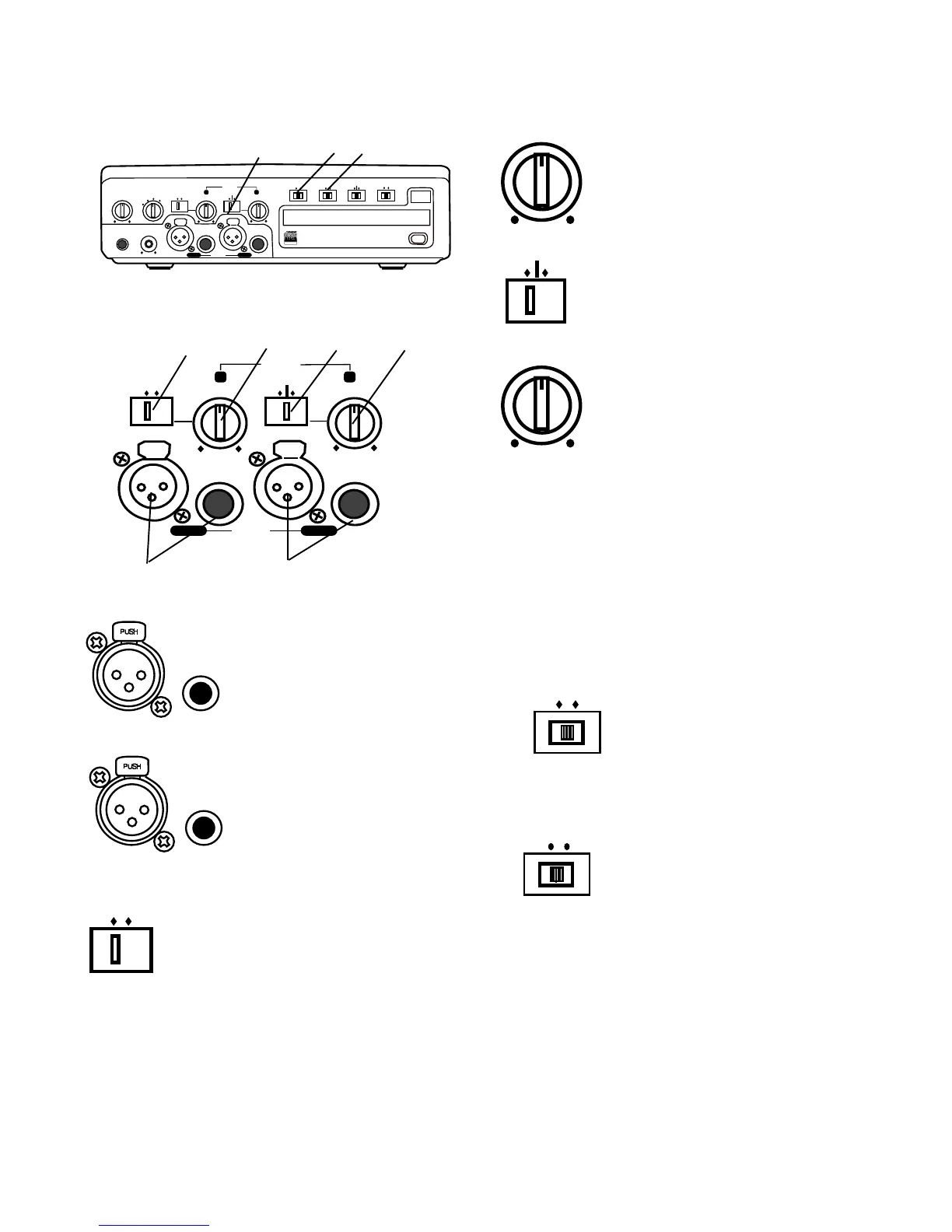
MIC/LINE/INT controls and input jacks contin-
ued
MIC
LINE
INT
LINE
MIC
MIC/LINE
L
PUSH
R
MIC/LINE RIGHT
PUSH
LEFT
3 4 5 6
1 2
1 Left XLR or 1/4" input
jack
Plug in an instrument or
other line level audio device
here to provide audio to the
left stereo channel.
4 Left level control
Turn to adjust the level of the left input.
INT
LINE
MIC
5 Right LINE MIC INT switch
Switch to LINE for a line level input or to
MIC for a microphone level input.
Switch to INT for the internal micro-
phone.
6 Right level control
Turn to adjust the level of the right
input.
Note: When internal mic is selected both the Left level
control and the Right level control are active. To
record the internal microphone to both the left and
right channels adjust both Left and Right level controls.
Note: To avoid feedback, turn the internal SPEAKER
OFF/ON switch OFF or reduce the PHONE/SPEAKER
LEVEL control, and reduce the LINE OUT level control
if connected to an external amplifier.
DIGITAL
ANALOG
INPUT
the DIGITAL IN jack on the rear of PSD300.
4 INPUT ANALOG/DIGITAL
switch
Select between analog or digital
external input. Connect digital
output of the source machine to
ONOFF
ALC
ON – Limits any input signal greater than -12 dB. Left
and right MIC/LINE (or INT MIC) level controls should
be set to maximum.
OFF – Set level using left and right MIC/LINE (or INT
MIC) level controls. Levels in excess of 0 dB may be
recorded and may result in distorted recordings.
5 ALC OFF/ON switch
Record level limiter for analog
input during recording.
2 Right XLR or 1/4" input
jack
Plug in an instrument or other
line level audio device here to
provide audio to the right
stereo channel.
MIC
LINE
3 Left LINE MIC switch
Switch to LINE for a line level input or to
MIC for a microphone level input.
Note: To mix two microphones from the front inputs
with a stereo line input, use the AUX input on the rear
for the stereo line input.


 To Next Page