PUSH
BASS
MID
TREBLE
TEXT VR PROG REPEAT
MENU/STORE
DISP SINGLE
A-B
CANCEL/DELETE
REC MODE
CD-RW PLAYBACK
CD RECORDING SYSTEM PSD300
MIC
PLAY
OPEN
REC/PLAY
ERASE FINALIZE
REC
SELECT
PUSH ENTER
POWER KEY TEMPOSTANDBY
How to Record
minutes and automatically stops.
Finalizing
counts down
for about 2
TOTAL TRACK
CD-R
R
L
dB-50 -30 -22 -16 -12 -8 -4 0
CD-RW
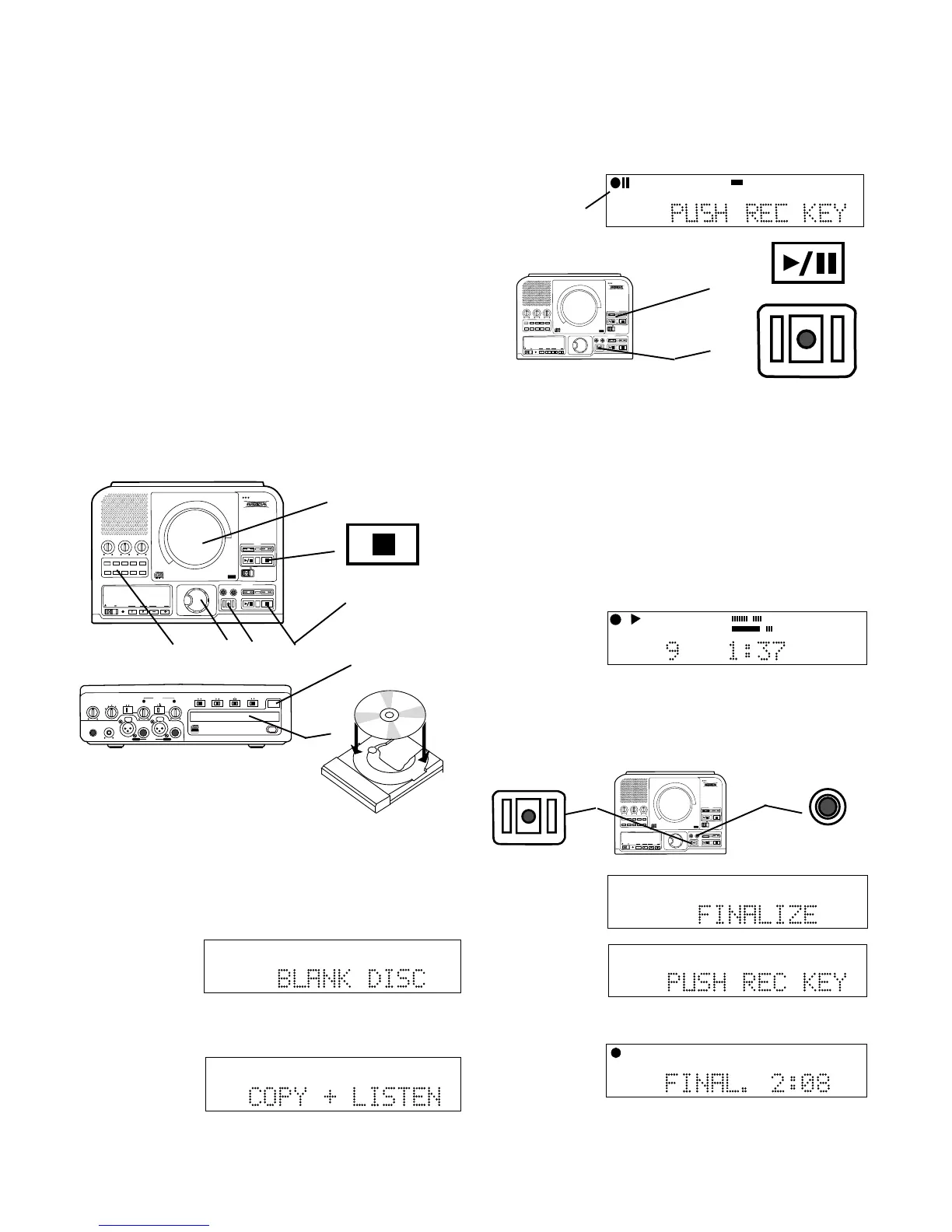
7 Push and release the REC button.
TOTAL TRACK
CD-R
R
L
dB-50 -30 -22 -16 -12 -8 -4 0
CD-RW
FINALIZE
REC
6
7
FINALIZE is
displayed for a
couple of
seconds.
Then PUSH
REC KEY is
displayed.
TOTAL TRACK
CD-R
R
L
dB-50 -30 -22 -16 -12 -8 -4 0
CD-RW
6 To finalize push and release the FINALIZE button.
The entire CD will be recorded and recording will
automatically stop when completed. This REC mode
does not automatically finalize the recorded disc.
TOTAL TRACK
CD
R
L
dB-50 -30 -22 -16 -12 -8 -4 0
CD
DIGITAL
AUTO SYNC
5 Push and release the REC button
The CD will play at normal speed and you can listen
while recording on the built-in speaker or on an
amplifier/speaker system connected to the LINE OUT
jacks.
a The red rec indicator and the pause indicator in
the display are lit.
b The Play/Pause button for the CD drive is lit and
flashing.
c The red REC button is lit and flashing.
PUSH
BASS
MID
TREBLE
TEXT VR PROG REPEAT
MENU/STORE
DISP SINGLE
A-B
CANCEL/DELETE
REC MODE
CD-RW PLAYBACK
CD RECORDING SYSTEM PSD300
MIC
PLAY
OPEN
REC/PLAY
ERASE FINALIZE
REC
SELECT
PUSH ENTER
POWER KEY TEMPOSTANDBY
b
c
SCMS (Serial Copy Management System)
The SCMS copy management system is designed to
prevent consumer recorders from making unlimited
digital copies of a digital source. Most consumer CD
recorders will not make a digital copy when SCMS is
present in the digital source, while a professional CD
recorder (PSD300) will act differently.
If the digital source being recorded on the PSD300
contains no SCMS information then the copy will also
not include SCMS. If the digital source material being
recorded on the PSD300 contains SCMS information
then the copy will also include SCMS.
The SCMS copy management system does not apply
to analog source material.
PUSH
BASS
MID
TREBLE
TEXT VR PROG REPEAT
MENU/STORE
DISP SINGLE
A-B
CANCEL/DELETE
REC MODE
CD-RW PLAYBACK
CD RECORDING SYSTEM PSD300
MIC
PLAY
OPEN
REC/PLAY
ERASE FINALIZE
REC
SELECT
PUSH ENTER
POWER KEY TEMPOSTANDBY
1
Stop button lit
4 5 6 3
PHONE/SPEAKER
LEVEL
PHONE SELECTOR
MIC/LINE
CD
LINE OUT AUX
PHONES
LINE OUT
ReWritable
Recordable
CD PLAY / RECORD
OPEN/CLOSE
MIX
SPLIT
MIC
STEREO
ONOFF
ALC
DIGITAL
ANALOG
INPUT
ONOFF
SPEAKER
MIC
LINE
INT
LINE
MIC
MIC/LINE
L
PUSH
R
MIC/LINE RIGHT
PUSH
LEFT
2b
2a, 2c
- 24 -
2 Insert a blank CD-R or CD-
RW disc in the CDR drive.
a Push OPEN/CLOSE to open the disc tray.
b Add the blank disc.
c Push OPEN/CLOSE to close.
3 Push and release the CDR drive Stop button to
activate the drive. After reading the disc BLANK DISC
is displayed.
TOTAL TRACK
CD-RW
R
L
dB-50 -30 -22 -16 -12 -8 -4 0
Example
display.
Example
display.
TOTAL TRACK
CD-R
R
L
dB-50 -30 -22 -16 -12 -8 -4 0
How to copy an existing CD (basics)
OBSERVE REGULATIONS REGARDING COPYRIGHT INFRINGEMENT.
4 Push and release REC MODE. Turn the SELECT
control so COPY + LISTEN is displayed.
Push and release the SELECT control to accept the
COPY + LISTEN recording mode choice.
AUTO SYNC
CD-RW
TRACK
dB-50 -30 -22 -16 -12 -8 -4 0OVER
R
L
Example
display.
a
REC
Example
display
during
recording.
1 Insert a CD in the CD drive.



 To Next Page