- 28 -
Record adjustments continued
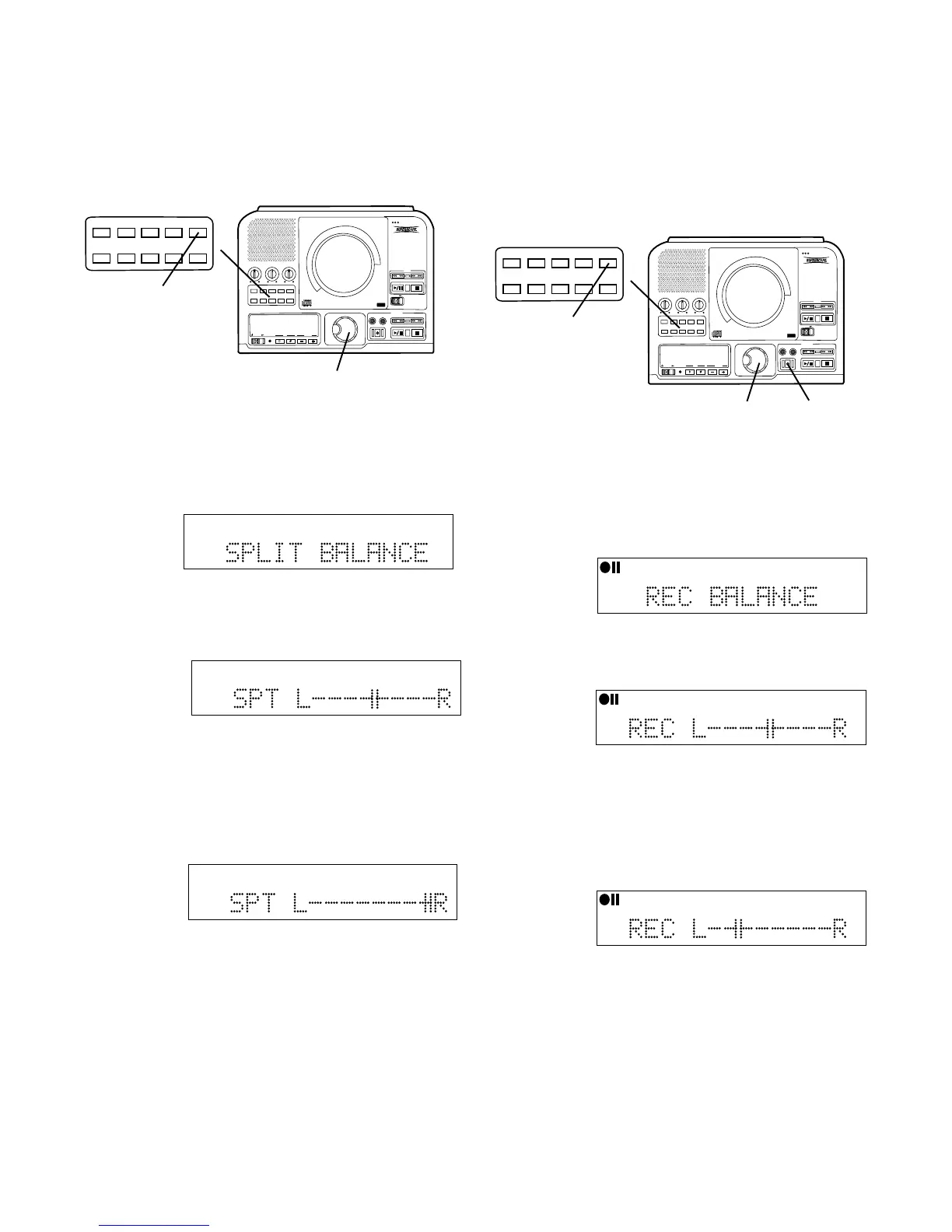
a Push and release the SELECT control. The
current balance setting is displayed
How to adjust SPLIT BALANCE
The SPLIT BALANCE menu item lets you adjust the
right left stereo balance from the CD drive.
PUSH
BASS
MID
TREBLE
TEXT VR PROG REPEAT
MENU/STORE
DISP SINGLE
A-B
CANCEL/DELETE
REC MODE
CD-RW PLAYBACK
CD RECORDING SYSTEM PSD300
MIC
PLAY
OPEN
REC/PLAY
ERASE FINALIZE
REC
SELECT
PUSH ENTER
POWER KEY TEMPOSTANDBY
TEXT VR PROG REPEAT MENU/STORE
DISP SINGLE
A-B CANCEL/DELETE
REC MODE
1
3
TOTAL TRACK
CD-R
R
L
dB-50 -30 -22 -16 -12 -8 -4 0
CD-RW
TOTAL TRACK
CD-R
R
L
dB-50 -30 -22 -16 -12 -8 -4 0
CD-RW
Example
display
shows
balance to
the Right.
c Push and release the SELECT control to confirm
your balance adjustment. The SPLIT BALANCE
display returns.
d Push and release MENU/STORE to exit Menu
mode.
b Turn the SELECT control clockwise to adjust
balance to the Right and counter clockwise to
adjust balance to the Left.
How to adjust REC BALANCE
The REC BALANCE menu item lets you adjust the
right left stereo balance for recording on the CDR drive.
You can adjust REC BALANCE during a recording
session by pausing the recording session.
With the PSD300 in Stop, Play/Pause, REC or
REC Pause mode,
1 Push and release MENU/STORE.
2 Turn the SELECT control so SPLIT BALANCE is
displayed.
TOTAL TRACK
CD-R
R
L
dB-50 -30 -22 -16 -12 -8 -4 0
CD-RW
Example
display
shows mid
point of
balance.
PUSH
BASS
MID
TREBLE
TEXT VR PROG REPEAT
MENU/STORE
DISP SINGLE
A-B
CANCEL/DELETE
REC MODE
CD-RW PLAYBACK
CD RECORDING SYSTEM PSD300
MIC
PLAY
OPEN
REC/PLAY
ERASE FINALIZE
REC
SELECT
PUSH ENTER
POWER KEY TEMPOSTANDBY
TEXT VR PROG REPEAT MENU/STORE
DISP SINGLE
A-B CANCEL/DELETE
REC MODE
1
2
3
1 With the PSD300 in REC mode (recording mode
selected and REC button lit and flashing).
2 Push and release MENU/STORE.
3 Turn the SELECT control so REC BALANCE is
displayed.
CD-R
R
L
dB-50 -30 -22 -16 -12 -8 -4 0
CD-R
AUTO SYNC
TRACK
a Push and release the SELECT control. The
current balance setting is displayed
Example
display
shows mid
point of
balance.
b Turn the SELECT control clockwise to adjust
balance to the Right and counter clockwise to
adjust balance to the Left.
CD-R
R
L
dB-50 -30 -22 -16 -12 -8 -4 0
CD-R
AUTO SYNC
TRACK
CD-R
R
L
dB-50 -30 -22 -16 -12 -8 -4 0
CD-R
AUTO SYNC
TRACK
Example
display
shows
balance
partially to
the Left.
c Push and release the SELECT control to confirm
your balance adjustment. The REC BALANCE
display returns.
d Push and release MENU/STORE to exit Menu
mode.



 To Next Page