- 18 -
How to Play
How to Play a CD (basics)
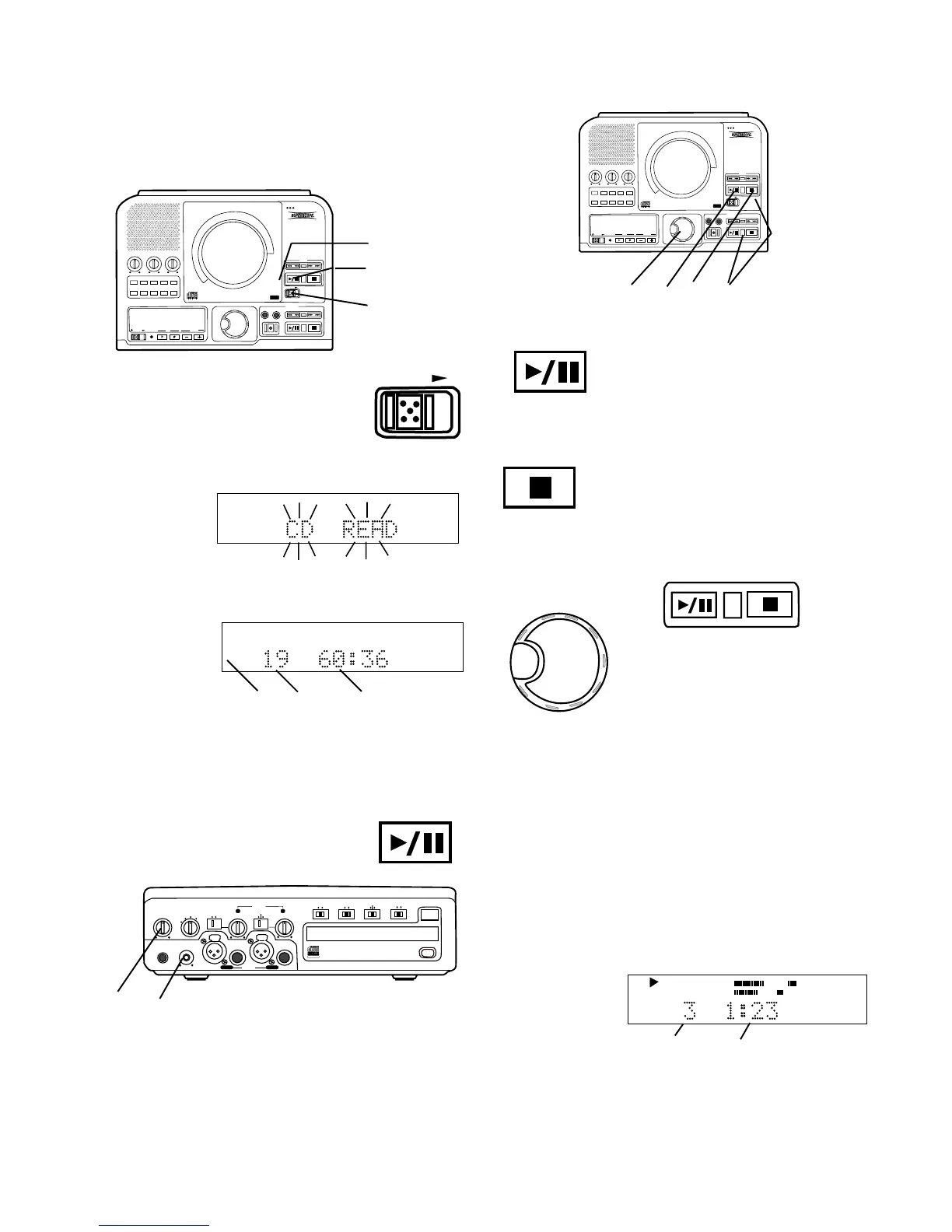
Push and release the Play/Pause
button (1) to Pause. When paused,
push and release to continue play from
the same point.
Push and release the Stop button (2) to
Stop. When Play/Pause is pushed,
play starts from the beginning of the
disc.
How to play
SELECT
PUSH / ENTER
3a
If both the CD drive and the
CDR drive have CDs in-
serted and ready for play
you can switch between the
drives during play, stop or
pause by pushing and
3b
How to display time
There are three modes of time display:
A Elapsed track time
B Total remaining disc time
C Remaining track time
A Elapsed track time
The default time display shows the elapsed time on
the track being played.
Example
display.
CD
TRACK
R
L
dB-50 -30 -22 -16 -12 -8 -4 0
a b
That track 3 (a) has been playing for 1 minute and 23
seconds (b).
How to Pause
How to Stop
How to switch between drives
PUSH
BASS
MID
TREBLE
TEXT VR PROG REPEAT
MENU/STORE
DISP SINGLE
A-B
CANCEL/DELETE
REC MODE
CD-RW PLAYBACK
CD RECORDING SYSTEM PSD300
MIC
PLAY
OPEN
REC/PLAY
ERASE FINALIZE
REC
SELECT
PUSH ENTER
POWER KEY TEMPOSTANDBY
3
4
2
2 Slide the OPEN switch to open the
CD drive.
OPEN
3 Insert your CD and push at PUSH to close the CD
drive.
CD READ will
flash on the
display.
R
L
dB-50 -30 -22 -16 -12 -8 -4 0
If CD text is available the CD title/artist will scroll
across the display.
Then the display
will show disc
information
(example shown).
TOTAL TRACK
CD
R
L
dB-50 -30 -22 -16 -12 -8 -4 0
CD
a b c
a The type of disc (CD, CD-R or CD-RW) is shown.
b The number of tracks on the disc.
c The total playing time of the disc.
4 Play Push the Play/Pause button to
begin play. The CD will play to the end
and stop.
PHONE/SPEAKER
LEVEL
PHONE SELECTOR
MIC/LINE
CD
LINE OUT AUX
PHONES
LINE OUT
ReWritable
Recordable
CD PLAY / RECORD
OPEN/CLOSE
MIX
SPLIT
MIC
STEREO
ONOFF
ALC
DIGITAL
ANALOG
INPUT
ONOFF
SPEAKER
MIC
LINE
INT
LINE
MIC
MIC/LINE
L
PUSH
R
MIC/LINE RIGHT
PUSH
LEFT
d e
Adjust internal speaker or headphone volume with the
PHONE/SPEAKER level control d.
Adjust the LINE OUT level with the control e and your
amplifier's volume controls if using an external ampli-
fier.
1 Connect and turn on the PSD300, see Connections
(basic) on page 6.
releasing the SELECT control (3a) or the Play/Pause
or Stop buttons (3b).
PUSH
BASS
MID
TREBLE
TEXT VR PROG REPEAT
MENU/STORE
DISP SINGLE
A-B
CANCEL/DELETE
REC MODE
CD-RW PLAYBACK
CD RECORDING SYSTEM PSD300
MIC
PLAY
OPEN
REC/PLAY
ERASE FINALIZE
REC
SELECT
PUSH ENTER
POWER KEY TEMPOSTANDBY
3a 1 2 3b



 To Next Page