- 19 -
How to play continued
How to select tracks
You can select tracks during Stop, Play or Pause.
Turn the SELECT control (5) to
choose the track. During play wait
about a second or push and
release the SELECT control to
switch to the beginning of that
track. During Stop or Pause push
Play/Pause to begin playing the
selected track.
SELECT
PUSH / ENTER
How to Search
While playing (CD or CDR drive) push and hold a Fast
backward search or Fast forward search button (6).
Samples of audio are played while searching back-
ward or forward. After a couple of seconds of holding
the search speeds up.
For more accurate positioning on the CD drive push
and release the Fast backward or Fast forward search
button during Pause. Each push and release is
approximately one half second of audio.
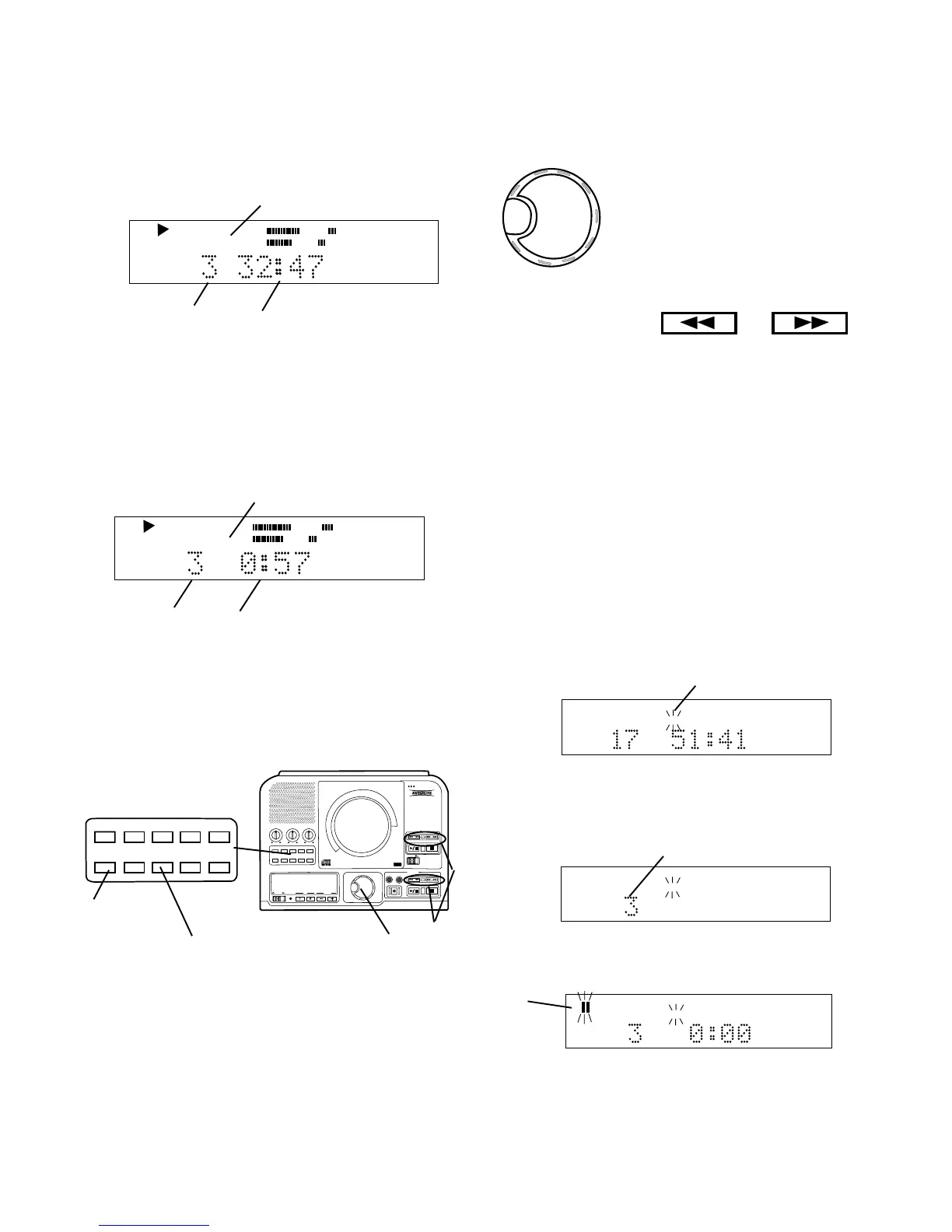
While stopped push and release the SINGLE button
(7).
How to play a Single Track
CD TEXT
R
L
dB-50 -30 -22 -16 -12 -8 -4 0
TOTAL TRACK
b
Example display shows TRACK 3 selected (b).
Push and release Play/Pause.
CD TEXT
R
L
dB-50 -30 -22 -16 -12 -8 -4 0
TRACK
c
The selected track will be cued to music and paused.
Paused symbol flashing (c).
CD TEXT
R
L
dB-50 -30 -22 -16 -12 -8 -4 0
TOTAL TRACK
a
Example display shows TRACK flashing (a).
Turn the SELECT control to choose the track you wish
to play.
B Total remaining disc time
Push and release DISP (4) once. The display shows
the total time remaining on the disc counting down.
CD
R
L
dB-50 -30 -22 -16 -12 -8 -4 0
TOTAL TRACK
a c
b
The example display indicates that track 3 (a) is
playing, and total track (total disc) (b) has 32 minutes
and 47 seconds to play (c).
Push and release DISP (4) another time. The display
shows the time remaining on the track counting down.
C Remaining track time
CD
TRACK
R
L
dB-50 -30 -22 -16 -12 -8 -4 0
b c
a
The example display indicates that track time is
displayed (a) track 3 is playing (b) and has 0 minutes
and 57 seconds of remaining play time (c).
Push and release DISP (4) a third time. The display
returns to the track time counting up.
TEXT VR PROG REPEAT MENU/STORE
DISP SINGLE
A-B CANCEL/DELETE
REC MODE
PUSH
BASS
MID
TREBLE
TEXT VR PROG REPEAT
MENU/STORE
DISP SINGLE
A-B
CANCEL/DELETE
REC MODE
CD-RW PLAYBACK
CD RECORDING SYSTEM PSD300
MIC
PLAY
OPEN
REC/PLAY
ERASE FINALIZE
REC
SELECT
PUSH ENTER
POWER KEY TEMPOSTANDBY
4
5 6
7



 To Next Page