- 16 -
Controls, Connections (front) con-
tinued
PHONE/SPEAKER
LEVEL
PHONE SELECTOR
MIC/LINE
CD
LINE OUT AUX
PHONES
LINE OUT
ReWritable
Recordable
CD PLAY / RECORD
OPEN/CLOSE
MIX
SPLIT
MIC
STEREO
ONOFF
ALC
DIGITAL
ANALOG
INPUT
ONOFF
SPEAKER
MIC
LINE
INT
LINE
MIC
MIC/LINE
L
PUSH
R
MIC/LINE RIGHT
PUSH
LEFT
9 10 11 12
6 7 8
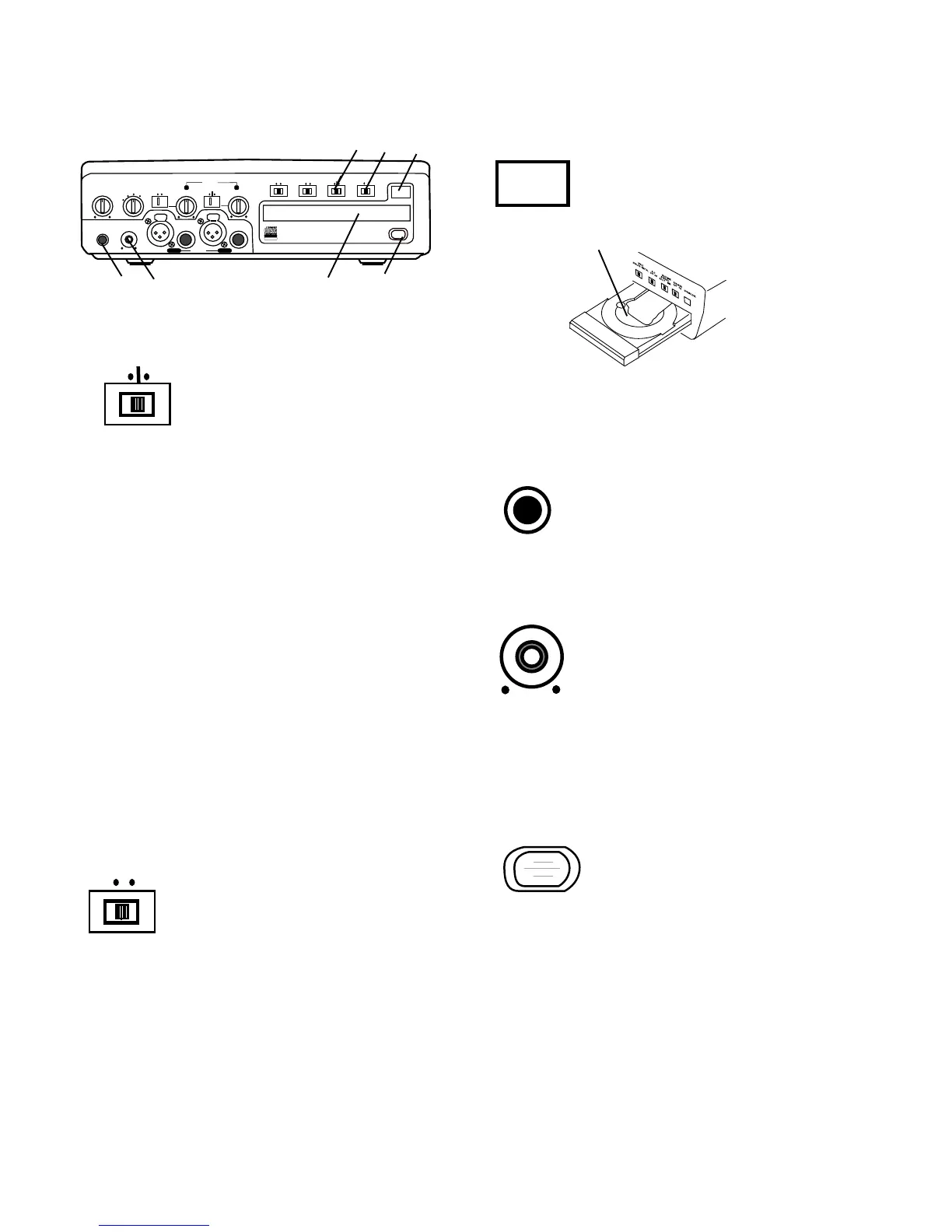
6 MIC/LINE SPLIT/STEREO/MIX
switch
Determines how the signal from
the CD drive and the signals from
the MIC/LINE (or INT MIC) inputs
are recorded.
MIX
SPLIT
MIC/LINE
STEREO
OPEN/CLOSE
8 OPEN/CLOSE switch
Push and release to OPEN the
CDR drive.
To CLOSE the CDR drive, push and release the
OPEN/CLOSE switch.
CDR drive open
PHONES
9 PHONES jack
Plug stereo headphones in here.
Adjust headphone volume with the
PHONES/SPEAKER LEVEL control.
10 LINE OUT level control
Turn to adjust the level of the output to
the LINE OUT jacks.
LINE OUT
11 CDR drive (disc tray)
In this manual this drive is referred to as the CDR drive.
The CDR drive is used for recording and can record
CD-R and CD-RW discs. The CDR drive can also
playback CD, CD-R and CD-RW disks
12 Remote control sensor
Sensor for the supplied wireless
remote control.
Note: Set the REMOTE EXT. INT.
switch on the back to INT. to enable
the wireless remote control.
7 SPEAKER OFF/ON switch
Turns the built-in speaker OFF or
ON.
ONOFF
SPEAKER
SPLIT – Left and right signals from the CD drive are
sent to the left channel of the recording. Left and right
signals from MIC/LINE (or INT MIC) are sent to the
right channel of the recording. Left and right signals
from the AUX inputs are sent to the left and right
channels of the recording.
STEREO – Left and right signals from the CD drive
are sent to the left and right channels of the recording.
Left and right signals from the MIC/LINE (or INT MIC)
and/or AUX inputs are sent to the left and right chan-
nels of the recording.
MIX – Left and right signals from the CD drive and the
AUX inputs are sent to the left and right channels of
the recording. MIC/LINE (or INT MIC) inputs are sent
to both channels of the recording.
Note: When internal mic is selected both the Left level
control and the Right level control are active. To
record the internal microphone to both left and right
channels adjust both Left and Right level controls.



 To Next Page