- 33 -
About the Remote continued
1
ABC
2
DEF
3
GHI
PROG
4
JKL
5
MNO
6
PQR TEXT
7
STU
8
VW
9
XYZ SINGLE
DISPLAY
0
SPACE
TEMPO RESET
VR
CDR CD
REPEAT CAN/DEL ENTER MEN/STO
A B
TR INC
REC
REMOTE CONTROL
RC300PSD
AMS
#
KEY
TEMPO
13
14
15
16
17
18
19
20
21
13
#
KEY
= KEY controls.
See page ............... 11.
14
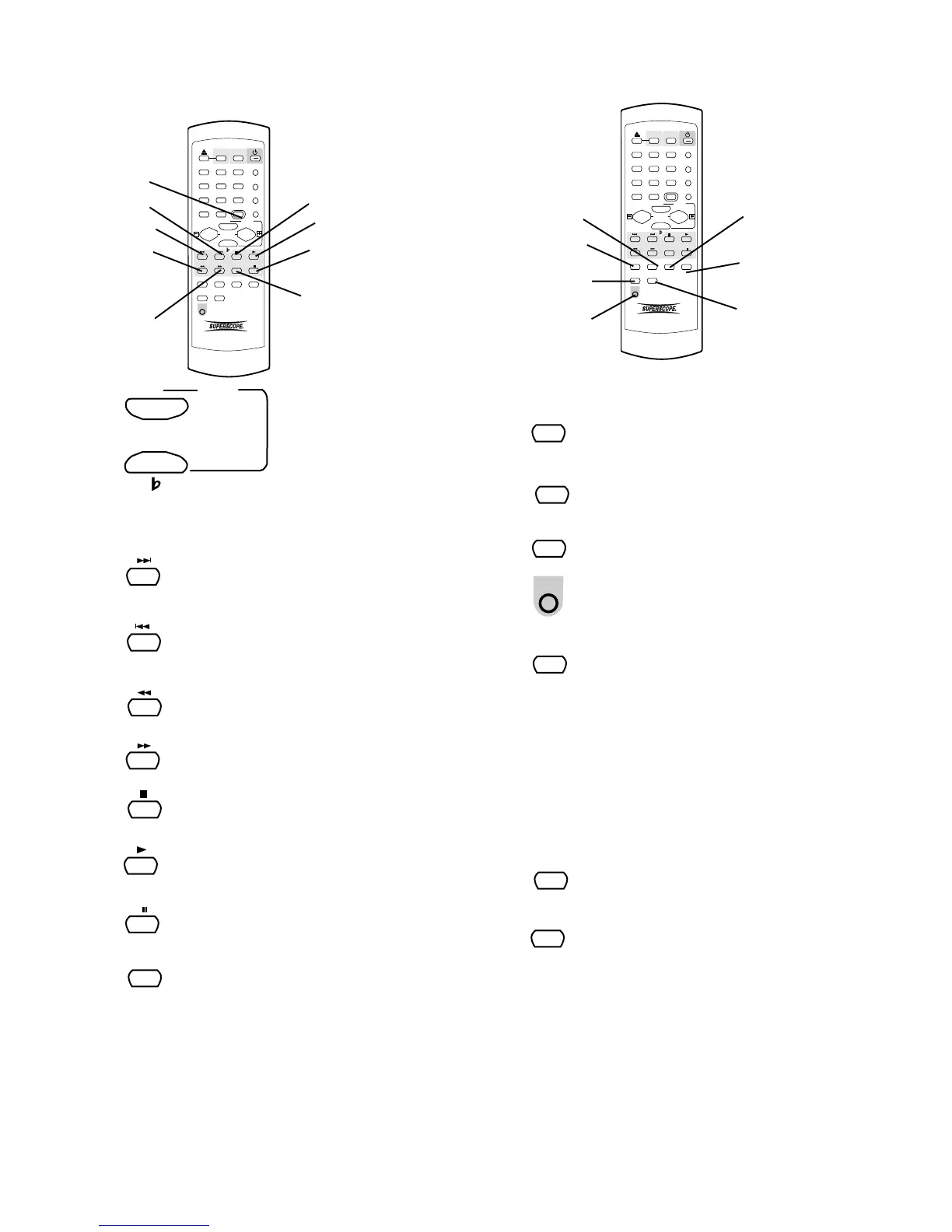
Track Skip forward button.
Push and release during Play or Pause
to skip forward to the next track.
15
Track Skip backward button.
Push and release during Play or Pause
to skip backward to the previous track.
16
= Fast backward search button.
See page ......................................... 11.
= Fast forward search button.
See page ......................................... 11.
17
18
= Stop button.
See page ......................................... 11.
= Play of Play/Pause button.
See page ......................................... 11.
19
= Pause of Play/Pause button.
See page ......................................... 11.
20
AMS (Automatic Search) button.
Remote only. Push and release to play
the first 10 seconds of each track. AMS
21
AMS
1
ABC
2
DEF
3
GHI
PROG
4
JKL
5
MNO
6
PQR TEXT
7
STU
8
VW
9
XYZ SINGLE
DISPLAY
0
SPACE
TEMPO RESET
VR
CDR CD
REPEAT CAN/DEL ENTER MEN/STO
A B
TR INC
REC
REMOTE CONTROL
RC300PSD
AMS
#
KEY
TEMPO
22
23
24
25
26
27
28
22
CAN/DEL
= CANCEL DELETE button.
See page ......................................... 10.
23
REPEAT
= REPEAT button.
See page ........................................... 7.
24
= A-B button.
See page ......................................... 10.
A B
25
= REC button.
See page ......................................... 14.
REC
26
ENTER button.
is displayed in the time display while searching. Push
Pause to pause the automatic search. Push Play to
switch from AMS to Play. Automatically stops at the
end of the disc. Push AMS to exit automatic search.
Performs some of the functions of the
SELECT control.
• In Play and Program modes push number button
to select the track. Then push ENTER to enter
the selection.
• Selects settings in MENU mode.
• Programs track numbers.
• Enters a letter during finalizing text entry.
• When entering CD TEXT push ENTER to enter
the selected character.
ENTER
27
= MENU/STORE button.
See page ........................................... 8.
28
TR INC button. Remote only.
During recording push and release to
manually increment a new track. It is
recommended to set AUTO TRACK to
OFF.
TR INC



 To Next Page