396-4412Y1 QuickDraw 3000 Operator’s Manual 21 Revised 02/20/2020
Pre-treating Carrier Water
For users who are mixing batches that contain AMS and/or other treatment for the water carrier, it is
possible to pre-mix this in the water and not have to do that step for every batch. To do the following
process, the QuickDraw must be plumbed so that water can be pulled from the ground source tank
and circulated through the QuickDraw to the trailer tank(s).
A recipe may even be set up for the pre-mixing process. Create the recipe with the products that will
be added to the water for the pre-treating. Run this batch and load it into the carrier supply tank.
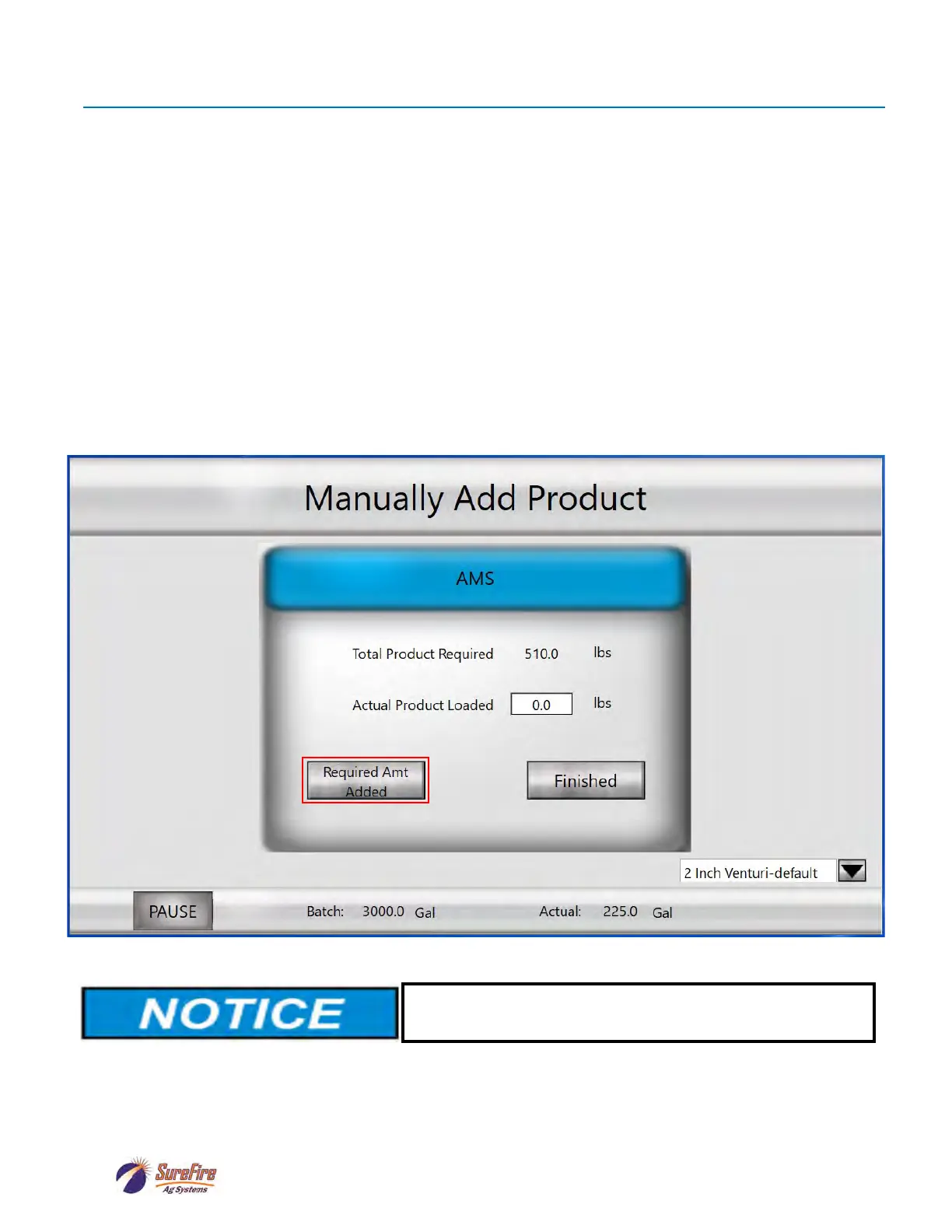
When using pre-treated water, use the same recipe that you would use if you were going to manually
add the AMS or other treatment. Set up the AMS or other treatment as a Manually Added Product with
Load Order of 1. When the batch gets to the point where it wants this Manually Added Product, simply
push the button to say Required Amt Added. The batch will continue mixing the automatic products.
With the AMS or other treatment on the recipe as a Manually Added Product, it will be shown in the
Historical Batch Report.
When filling a tank with Pretreated Water, be sure to label
the tank so it is clear that the tank contains treated water.



 To Next Page