396-4412Y1 QuickDraw 3000 Operator’s Manual 32 Revised 02/20/2020
System Settings
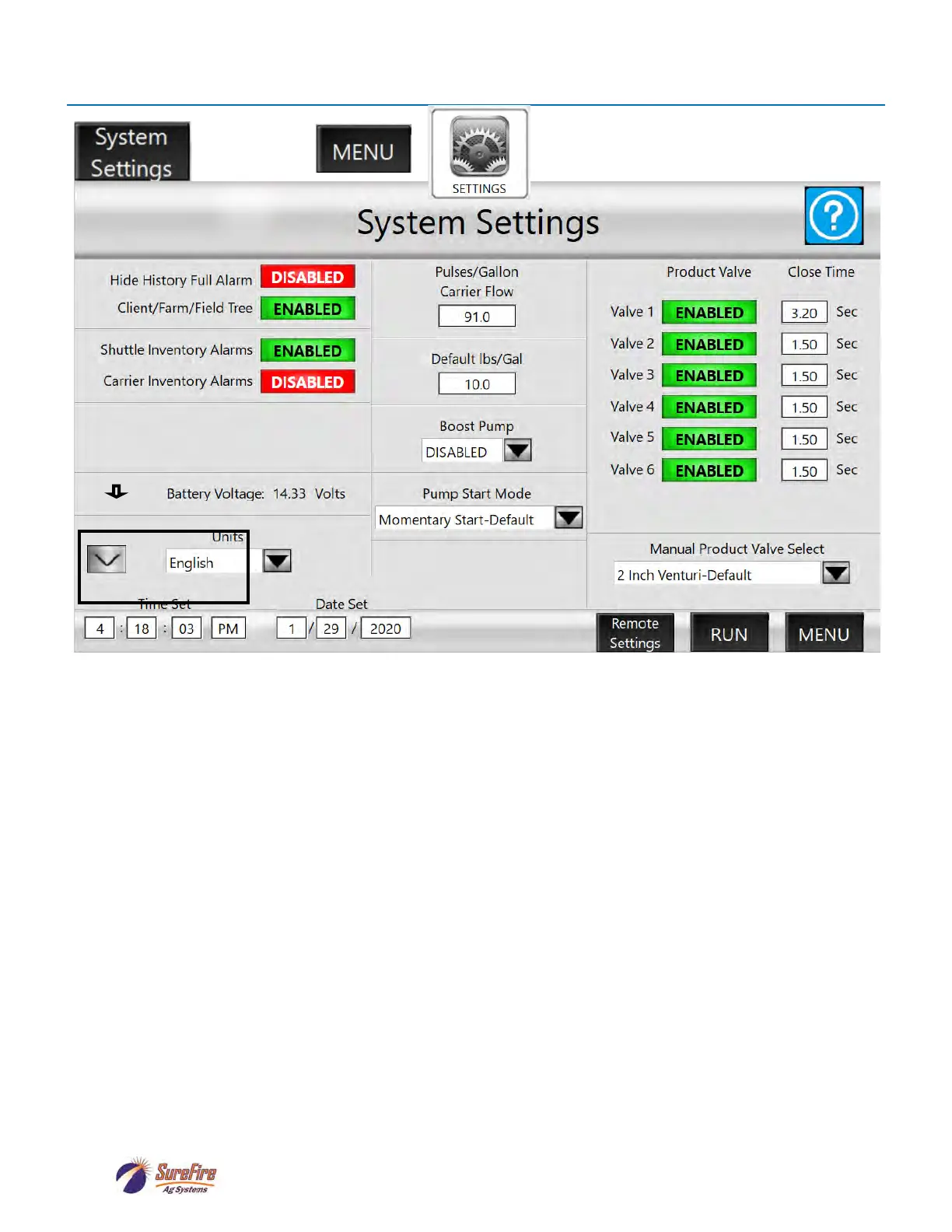
Hide History Full Alarm: If ENABLED, the system will overwrite old history records without warning
when the history is full. The History will hold 100 batches. Batch number 101 will overwrite batch
number 1.
Grower/Farm/Field Tree: If ENABLED, the user will only see Farms associated with the current
Grower, and Fields associated with the current Farm when selecting Farms and Fields. If DISABLED,
the user will be able to see all the Farms and Fields while selecting.
Shuttle Inventory Alarms and Carrier Inventory Alarms: If ENABLED, the screen will show a
warning when a batch is set up if the inventory of that product or carrier is below what is needed for that
batch. For this to work, the inventory of the product tote or carrier tank must be updated each time a
new tote is connected or a tank is refilled. If DISABLED, there will be no warning before a batch starts,
but flow alarms will activate and the system will pause the batch if the tote or tank runs empty and flow
is not detected.
Inactive Shutdown: If ENABLED, the controller will shut down if it is inactive for the time set in
Inactive Shutdown Time. This will save battery power. The down arrow to the left of Units will bring up
Display Sleep setup.
Battery Voltage: Shows the voltage reaching the controller from the battery.
Units: Select English or Metric.
Time Set / Date Set: This is the time / date that will be recorded in the batch history for each batch.
Pulses/Gallon Carrier Flow: The default is 91 for the Arag carrier flow meter. The default for the
Seametrics flowmeter is 13.7. This will be the default setting if no carrier is selected. To change the flow
cal for a specific carrier, go to that carrier and edit the Pulses/Gal (see page 28). Changing the number
here will not change a carrier that has already been set up.
OR
ARROW for page 2:
DISPLAY SLEEP and
INACTIVE SHUTDOWN
Press to left of Battery
Voltage for hidden screen



 To Next Page