396-4412Y1 QuickDraw 3000 Operator’s Manual 10 Revised 02/20/2020
Target
Current
Flow
Rate
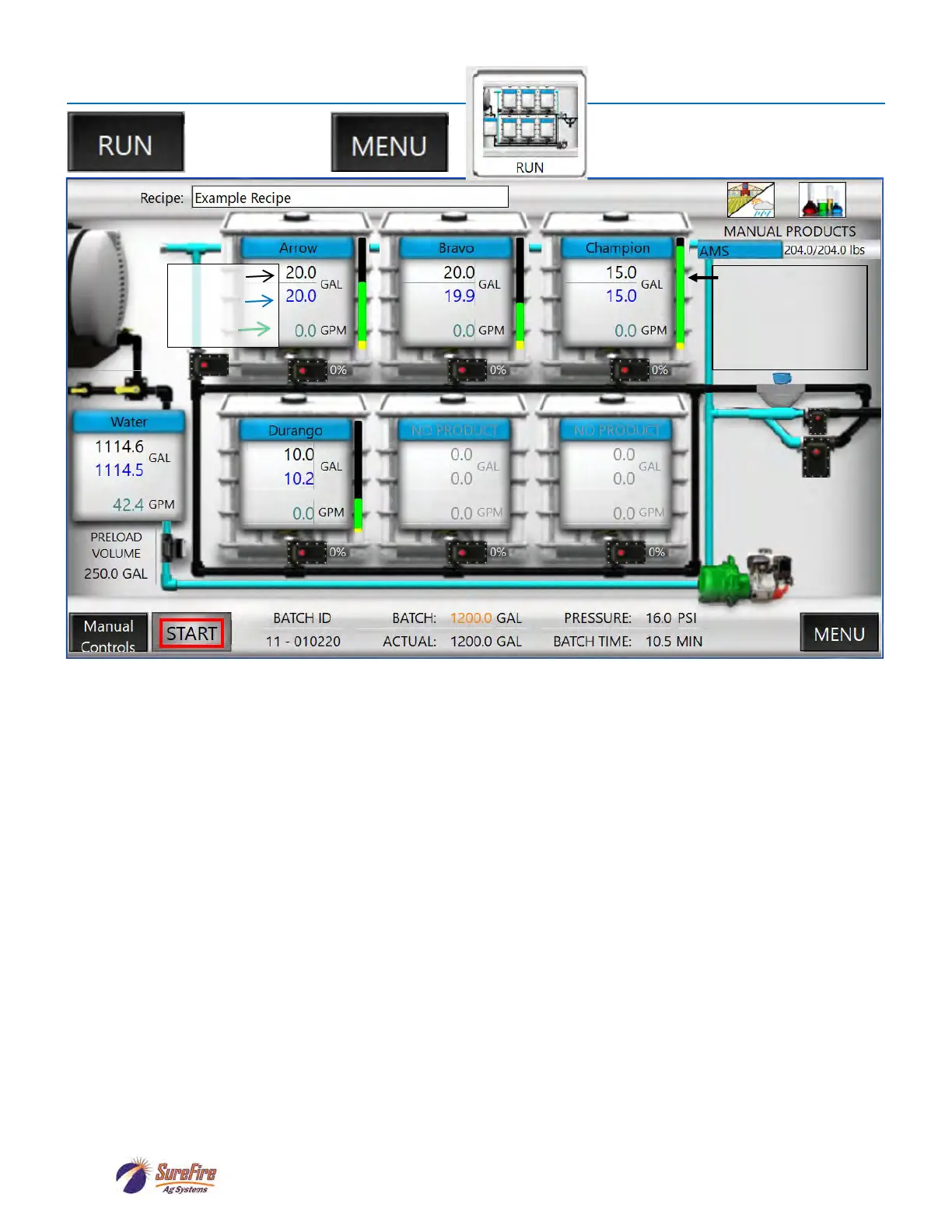
Run Screen
RUN SCREEN:
This screen contains all the real-time data that occurs during operation. Each box on the screen represents
one of the shuttles or totes connected to the system. Each shuttle also corresponds with a specific product
valve on the QuickDraw. The numbering of the totes starts in the top left and ends in the lower right tote on
the screen. The corresponding valves on the side of the QuickDraw are valves 1 to 6, starting from the
large valve at the bottom and counting up from there. The tote by itself on the left side shows the carrier
flow information. Press on a tote to bring up the TOTE SETUP SCREEN.
Each tote above has 3 lines of information. The black number in each tote contains the target value for
this batch and is the result of the calculations on the Job Screen. The blue number in each tote contains
the current total value (running total) that has been dispensed for this batch from that tote. This number
will increase as the product in that tote is being dispensed. The system will switch to the next product in the
sequence once the blue number equals the black number. The green number shows the flow rate of the
product into the batch, so it will show how fast the product is added into the batch. The units displayed for
these three numbers are determined by the “Volume Units” selected for that product on the Recipe
screens. So, your prescription or rate/acre could be in oz, but if gallons is selected for volume units, it will
display in gallons here.
At the top of the screen, press the RECIPE box to select a recipe or to create a new recipe.
The left icon on the top row is the FIELD AND WEATHER button. Press this to enter Grower, Farm, Field,
Operator, Crop, Machine, Pest, Temp, Wind Speed / Direction and Boom Height. These are optional
entries, but will add information to the historical record for each batch.
OR
Green Bar shows
relative amount of
product in tote.
Yellow Bar shows
how much is to be
used in current batch



 To Next Page