396-4412Y1 QuickDraw 3000 Operator’s Manual 29 Revised 02/20/2020
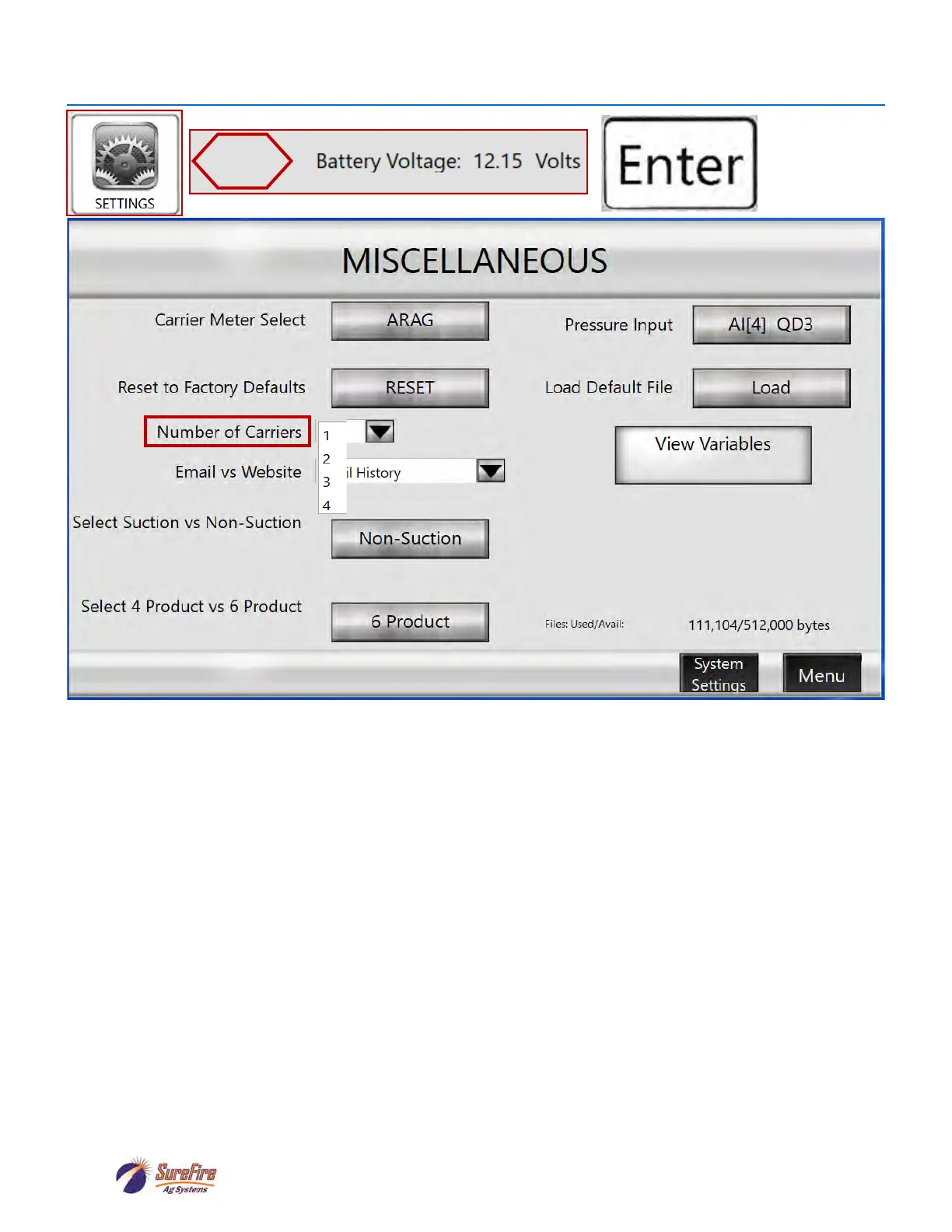
Miscellaneous Setup Screen (includes Multiple Carrier)
Press
here
Don’t mess with these unless you know what you’re doing.
Carrier Meter Select: Press to toggle from Arag to Seametrics.
Pressure Input: Press to toggle from QD3 to QD2.
Reset to Factory Defaults: Don’t touch this.
Load Default File: Don’t touch this either.
Number of Carriers: Pulldown menu to select from 1 to 4 carriers.
Email vs Website: Default is Email History
View Variables: Don’t touch.
Select Suction vs Non-Suction: Toggle to select (Non-Suction is Venturi)
Select 4 Product vs 6 Product: Toggle for 4 or 6.
Files: Used/Avail: A SureFire engineer may be interested in knowing this someday.



 To Next Page