396-4412Y1 QuickDraw 3000 Operator’s Manual 12 Revised 02/20/2020
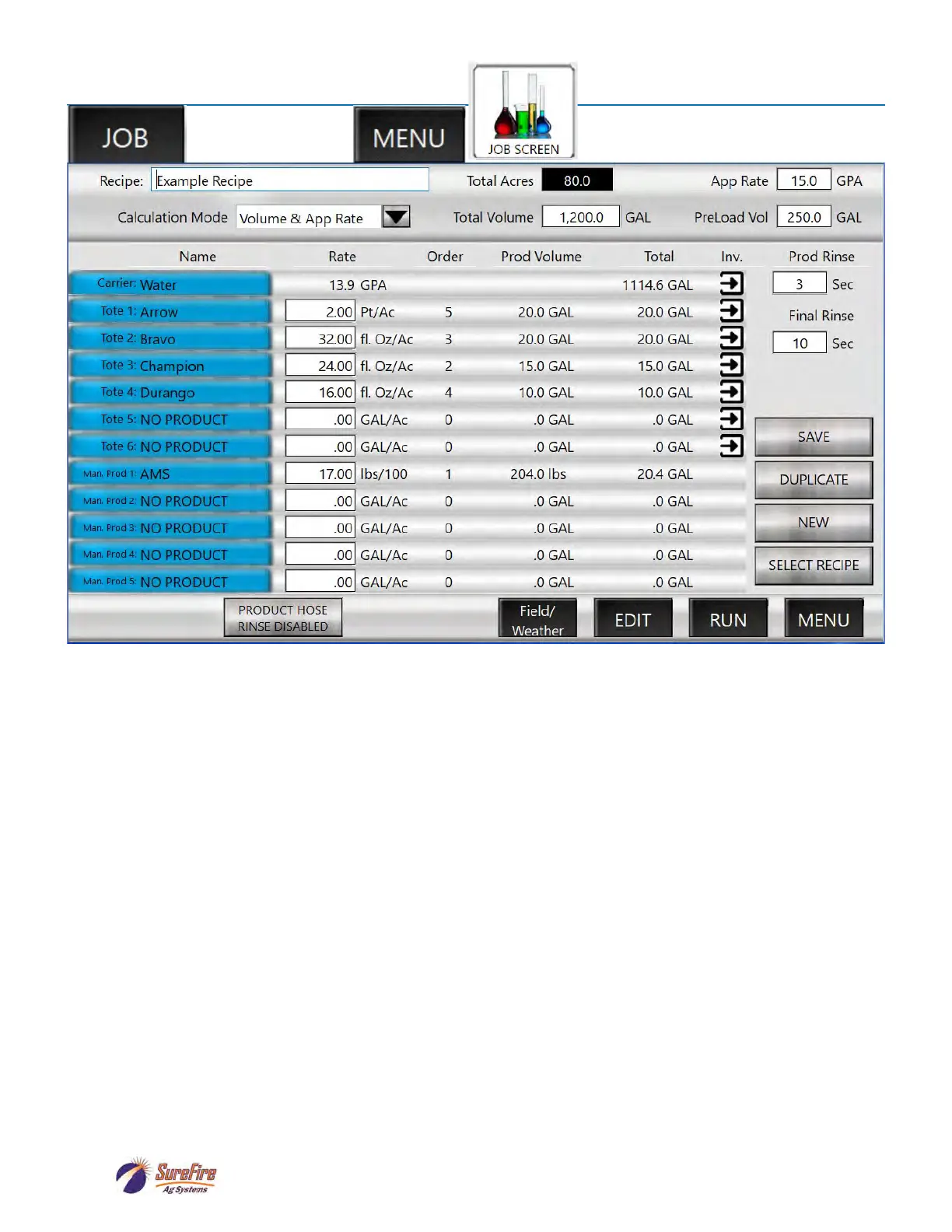
Job Screen
JOB SCREEN:
The Job Screen is used for setting up and verifying the batch to be run. Changes can be made here to the
basic Recipe that will apply only to the batch about to be mixed.
1. Verify the Recipe at the top left or press on the box to select or create a different recipe.
2. Select or verify the Calculation Mode (Volume & App Rate, Area & App Rate, Individual Volume, or
Area and Carrier Rate).
3. Depending on Calculation Mode, enter the Total Acres, App Rate, and/or Total Volume for the batch.
4. Enter the Preload Vol(ume).
5. Verify that the totes/chemicals shown are correct and connected to the valve shown.
6. Verify/change the Rate for each product. Rates can be changed on this screen to be effective for this
batch. To only change the rate for this batch, do NOT press SAVE. To change a rate for this batch and
for all future batches with this recipe, make the change and then press SAVE. The recipe will be saved
with the new rate.
7. Press on Field/Weather to enter Grower, Farm, Field, Operator, Crop, Machine, Pest, Temp, Wind
Speed / Direction and Boom Height. These are optional entries, but will add information to the histor-
ical record for each batch.
8. Press on EDIT to see/change the Totes with Rates and Load Order. Pressing on any blue box will do
the same thing.
9. Press on the arrow under Inv(entory) to verify/update the amount of chemical in the Tote.
10. Press RUN to go to the RUN SCREEN (this does NOT start the batch).
OR



 To Next Page