396-4412Y1 QuickDraw 3000 Operator’s Manual 27 Revised 02/20/2020
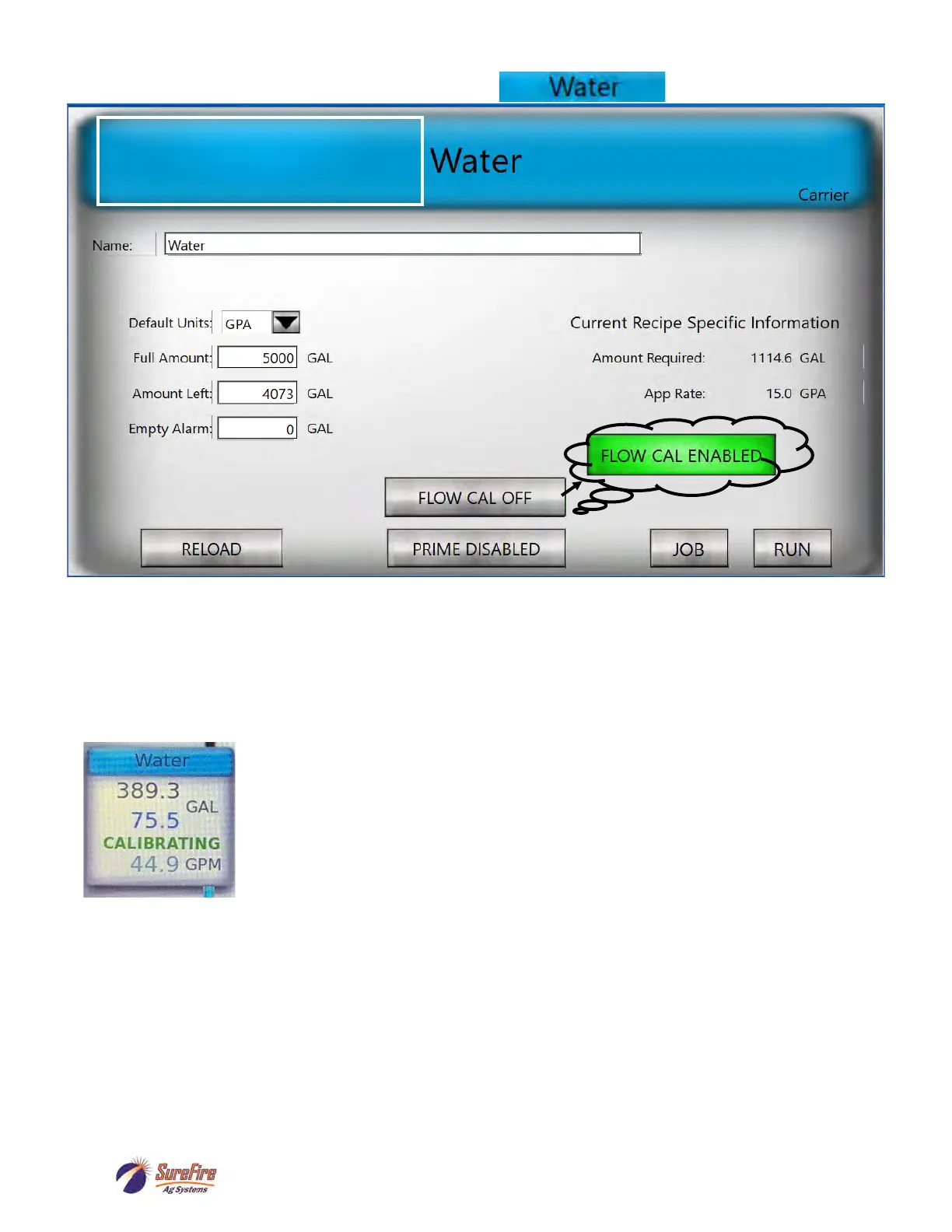
Carrier Setup Screen
FLOW CAL OFF—Press for FLOW CAL ENABLED. When the batch is started, the carrier solution
will flow through the Mass Meter as well as through the Carrier Flow Meter so that the Carrier Flow Cal
can be calibrated. This is especially important when using Multiple Carriers to verify accurate
measurement of each carrier.
The Carrier Tote on the Run Screen will show the “CALIBRATING” message while
the batch is running.
When the batch is completed the Carrier Flow Cal (Pulses/Gal) for that carrier will
be adjusted based on this calibration process.
Verify accurate carrier measurement for future batches.
The Carrier Flow Cal can always be adjusted manually, if needed. If the carrier is routinely ending up
short or long, adjust the Pulses/Gal for the carrier.
Increase the Flow Cal (Pulses/Gal) if more carrier is needed.
Decrease the Flow Cal if less carrier is needed.
See the navigation path on the next page.
On the RUN screen, press on the Carrier
tote to bring up this screen. Add a new
carrier or change the carrier by pressing
on the Name box.
Carrier Flowmeter Calibration (using Mass Meter)



 To Next Page