OPERATION OF THE MJB4
MJB4 - Operation Rev02 01-06 25
3
3.3.4. Saving and Loading Pro-
grams
This function is an optimal method for saving
selected settings to a specific program space (0 to
96) or selecting a previously saved program.
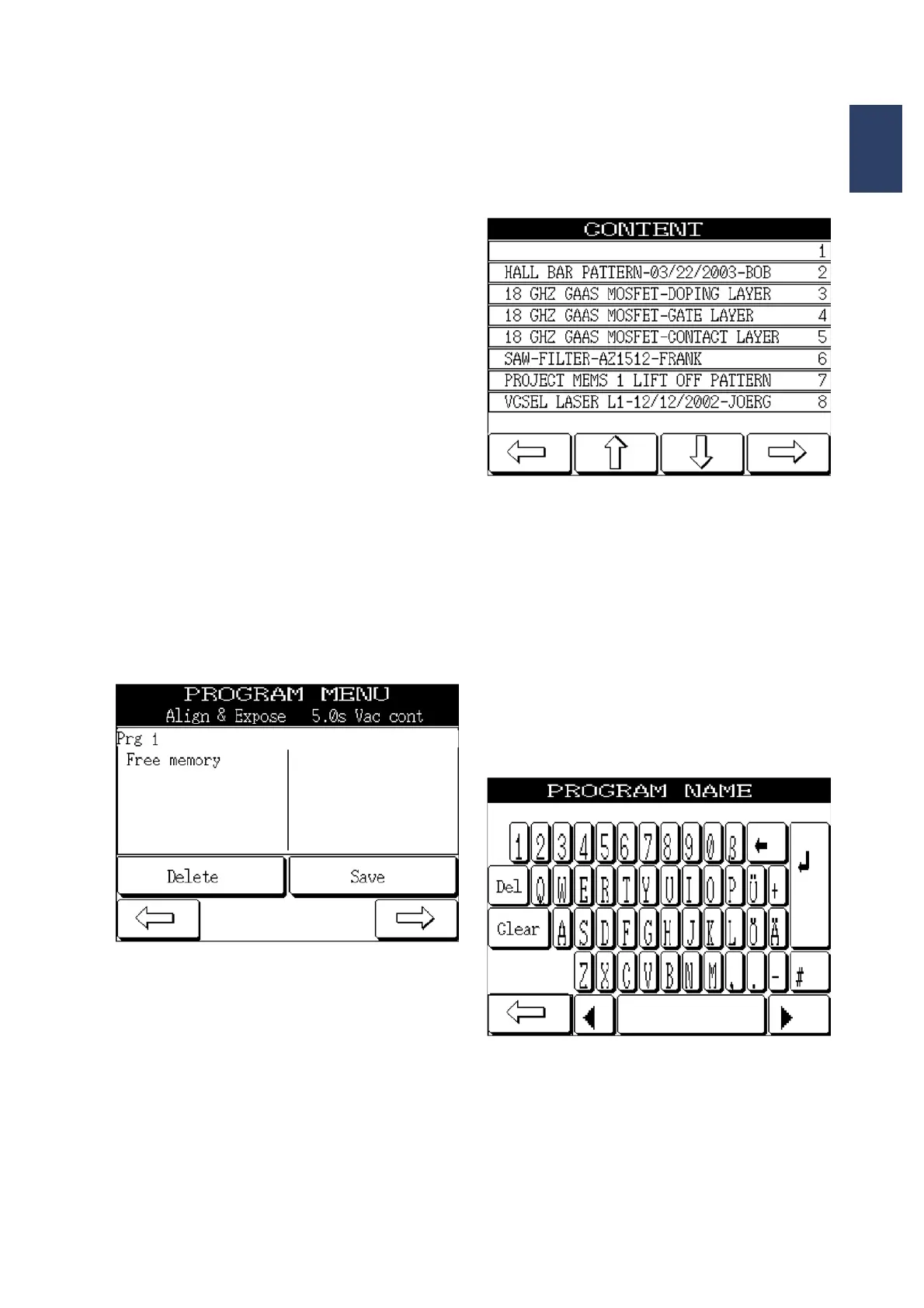
Select the PROGRAM MENU in the SETTINGS
MENU. The CONTENT menu appears in the display
and lists all the program spaces that have been
assigned or are still available. You can scroll through
the list with the UP and DOWN arrow buttons.
• If an already assigned program space is se-
lected in the CONTENT menu, all the set pa-
rameters appear under the PROGRAM MENU.
Press the LOAD button to activate the dis-
played parameters and the display switches
back to the MAIN MENU.
WARNING:
If you press the DELETE button, all the parameters
are deleted without warning and the program space is
available again.
Program menu
Content
If an available program space is selected in the
CONTENT menu, the display switches to the
PROGRAM menu, and you must press the SAVE
button. All parameters previously set in the
SETTINGS MENU are saved under the selected
program number. An alphanumerical keyboard then
appears in the display that allows you to enter a max
34 character description for the selected program
space. Press ENTER to confirm.
The display returns to the MAIN MENU and the
process can be started.
Alphanumerical keyboard



 To Next Page