20220323 Swegon reserves the right to alter specications.
25
WISE User Manual
Temperature control
Why regulate the temperature?
In order to reach and maintain the required temperature in a
room, for good comfort and to avoid negative eects on health
that an incorrect indoor temperature can result in.
How is temperature regulated?
In order to achieve the required temperature, the temperature
is measured in the room with one or more temperature sensors
and either regulates the room to an average value of several
sensors’ measured temperatures, or to the highest/lowest
measured temperature. Note that the majority of Swegon’s
room sensors can provide a room temperature if required.
Individual temperature sensors can if required, e.g. when they
are improperly located and do not give a representative value,
be excluded from the calculation of the room’s average value.
This is made under Settings for the relevant temperature sensor
by setting the Room temperature mode to Reference.
Operating case
If the temperature is outside of the limit values then heating or
cooling needs to be supplied. Heating and cooling is supplied to
a room by increasing the supply air ow of warm or cold air, or
by enabling the heating or cooling circuits in dierent climate
products. The heating/cooling signal can, e.g. result in increased
air ow if there is a cooling requirement, or open a heating actu-
ator if heating needs to be supplied.
It is even possible to control actuators in sequence, for example,
if cooling is to be realized by rst increasing the air ow before
the cooling actuator is opened. Dierent sequences can be set
by service personnel to obtain dierent sequence solutions.
In many cases the supply air temperature is measured to deter-
mine whether the increased ow will have the desired eect
or not. If the supply air is warmer than the room temperature,
when the temperature regulator needs to cool, the minimum
ow will be obtained for a cooling requirement. Dierent mini-
mum ows are supplied depending on the room’s mode, e.g.
minimum ow occupancy.
Set point adjustment
WISE RTA or the Swegon Inside app can be used to allow those
persons in the premises to inuence the temperature setpoint.
The temperature setpoint is adjusted with the help of the touch
buttons when WISE RTA is in active mode, which is enabled by
pressing one of the touch buttons. Aer a congurable number
of seconds WISE RTA returns to deactivated mode. If the product
is battery powered, the display dims in deactivated mode, while
for the 24V-fed products it is possible to congure whether it
should continue to be lit or be dimmed in deactivated mode.
In the Swegon Inside app, the user can set the temperature
setpoint in the same way as via WISE RTA. The user can also
activate Eco mode, which automatically controls the temper-
ature setpoint based on the outdoor temperature within the
permitted temperature setpoint range.
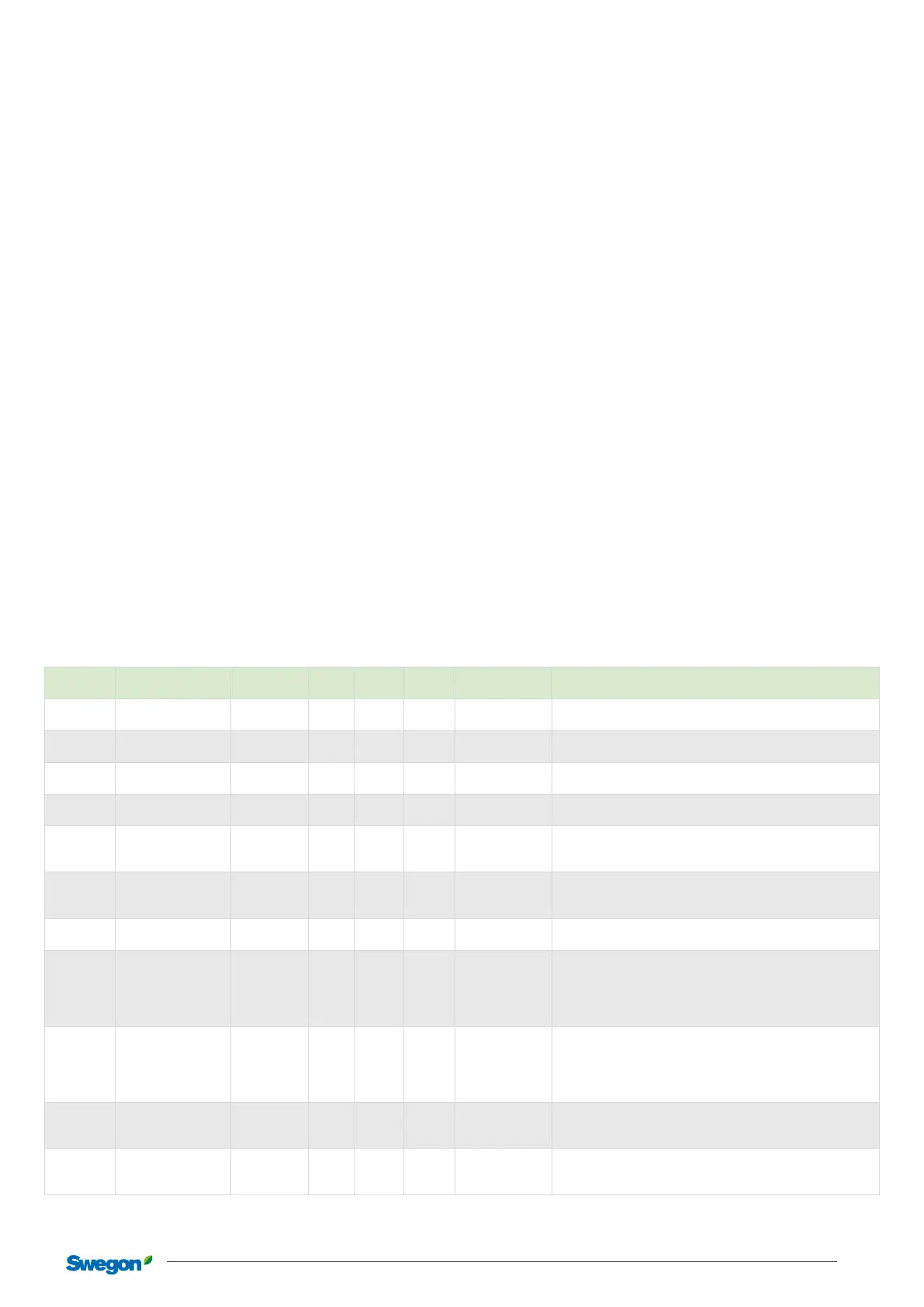
Adjustable room parameters in SuperWISE
Section Description
Standard
value
Min. Max. Unit
Lowest user level
(read/write)
Function
*
Temperature setpoint
value
22** 0 100 Celsius Local/Local Temperature setpoint value of the current operating case.
*
Temperature oset
cooling mode
1** 0.5 10 Celsius Local/Local
Number of degrees above the set “Temperature setpoint value”
that is permitted before cooling of the room occurs.
*
Temperature oset
heating instance
-1** -10 -0.5 Celsius Local/Local
Number of degrees below the set “Temperature setpoint value”
that is permitted before heating of the room occurs.
Temperature
Temperature,
operating mode
Average value Lowest Highest -
Installation/
Installation
Selection that determines how the measured room temperature is
to be presented when there are several room temperature sensors.
Occupancy
sensor
Forced occupancy
time RTA
0 0 1200 Minutes
Installation/
Installation
Timer that forces the room into occupancy during the set time
aer a setpoint oset has been made. Aer the set time, setpoint
oset for non-occupancy is reset.
Temperature
Temperature oset
time***
480 0 1200 Minutes Local/Local
Timer for how long the setpoint oset shall apply before it is reset,
regardless of whether there is occupancy or not.
0 = Never rest.
Temperature Temperature oset*** 0 -10 10 Celsius Local/Installation
The number of degrees above/below the set setpoint value at
which an oset should occur.
Temperature
Air temperature
dierence
1 0 10 Celsius
Installation/
Installation
Permitted supply air temperature to increase the ow in cooling
mode respective heating instance. Consequently, a dierence
that is 1 means that the supply air temperature must be one
degree lower than the room temperature so that a ow increase
occurs for cooling mode.
Temperature
Temperature
dierence for alarm
2.0 1 20 Celsius
Installation/
Installation
Limit for activation of the comfort alarm for temperature devia-
tions from the room set point value. The 2 °C setting means that
the comfort alarm is given when the room temperature drops
below the heating set point value by 2 °C or when the room tem-
perature exceeds the cooling set point value by 2° C.
Changeover Hysteresis 2.5 0 100 Celsius
Installation/
Installation
Minimum permitted dierence between the water’s supply ow
temperature and the room’s temperature to start heating and
cooling sequences.
Changeover
Supply ow
temperature
0 0 100 Celsius Local/Installation
The temperature of the water for the changeover function when
there is no measured value. Can be written via SuperWISE or the
BMS system.
*Set separately for the sections Occupancy, Unoccupied, Holiday, Summer night cooling and Morning heating.
**Standard value applies for Occupancy.
***Only applies to Occupancy.



 To Next Page