Swegon reserves the right to alter specications. 20220323
44
WISE User Manual
Lighting
Why lighting groups?
Lighting can be controlled via the WISE system and several rooms
can be included in a lighting group. It is therefore easy to manage
the lighting in the rooms, regardless of the size, oor layout and
any possible changes.
Rooms included in a group can give lighting information to the
group, without being switched on by the group’s lighting status.
It is possible to congure what triggers the lighting in a room. See
the section “Lighting control” in rooms under “Room functions”
for more information.
A room can be a part of a lighting group and several rooms can be
included one and the same group. A lighting group can extend over
several Directors, rooms that are placed under dierent Directors
can also be placed in the same lighting group. The lighting status
for all rooms in the group give a lighting group status. If the light-
ing in any of the rooms is ON the status of the lighting group will
be ON.
It is possible to specify a switch-o delay for the group. It is the
time that the group signal is ON aer all rooms in the group
have returned to no occupancy mode.
If a room is included in a lighting group its lighting status is
appraised to determine the lighting group’s status. If an included
room is to be illuminated with the help of the lighting group or
not is individually adjustable for each room.
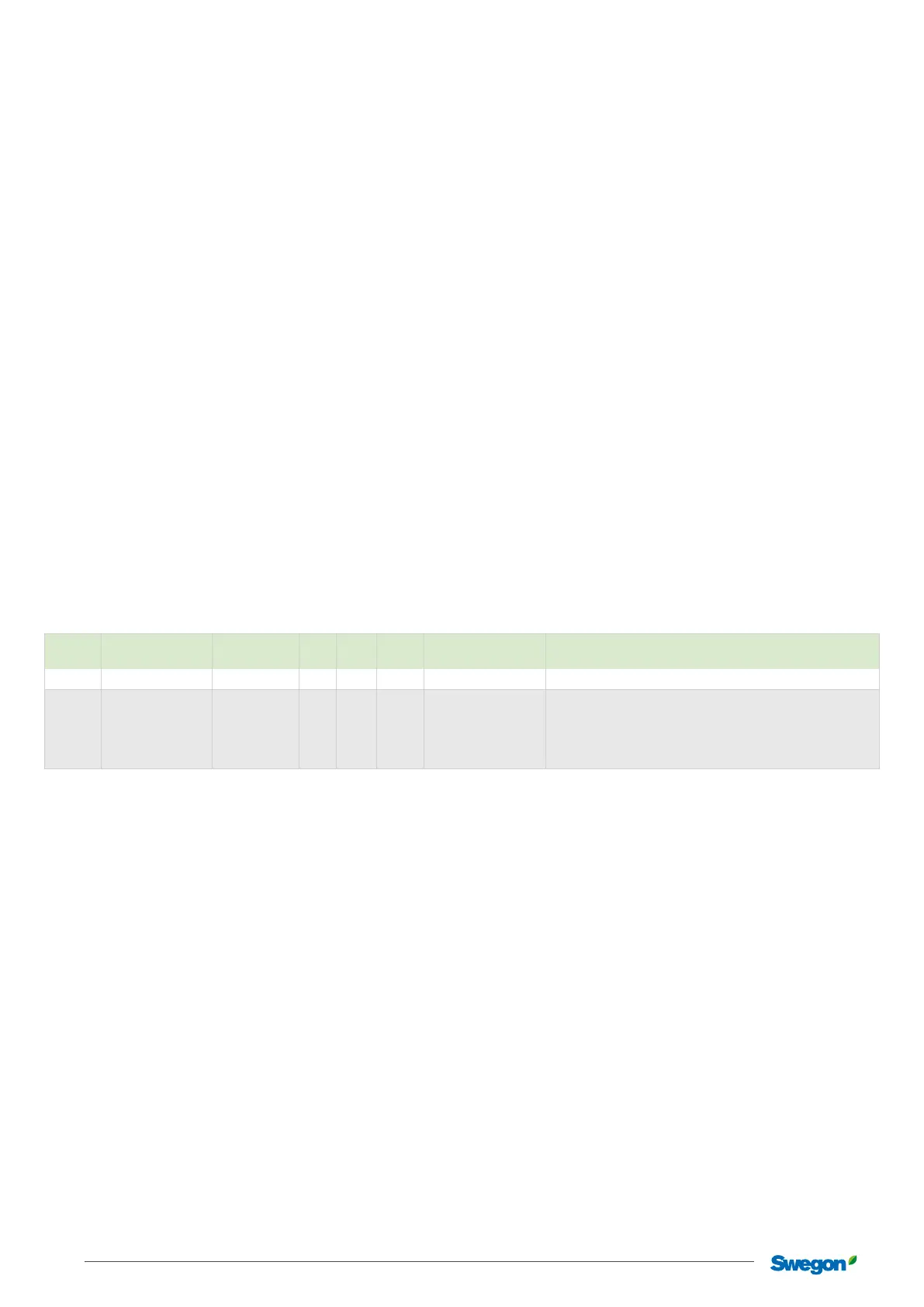
Adjustable group parameters in SuperWISE
Section Description
Standard
value
Min. Max. Unit
Lowest user level
(read/write)
Function
Lighting Switch-out delay 0 Minutes Local/Installation Time the lighting is switched on aer the room has been unoccupied.
Function Status, room
Contribute and
follow
- Local/Installation
States whether a room should use a function group value or only
contribute to the function group value without using it.
Contribute and follow
Contribute only
Follow only
Duct heater/cooler
Why a duct heater/cooler?
Duct heater/cooler is used to heat/cool the air for a group. This
function can be used when certain rooms have varying temper-
atures compared to the rest of the building. For example, a
conference room my need to be heated when it is not used while
the rest of the building needs to be cooled due to a high temper-
ature load caused by occupancy.
How do duct heaters/coolers work in
groups?
A duct heater/cooler can be placed in a duct branch that
supplies a number of rooms with air. In this case a function
group must be created to control the duct heater/cooler. A zone
can have many function groups with duct heaters/coolers.
The function group calculates room temperature, supply air
temperature and temperature load from rooms in the group.
It is possible to enable one or more rooms in a calculation for the
function group.
There are dierent ways to calculate these values, this is set in a
calculation mode parameter. The dierent ways are:
• Average value
• Lowest
• Highest
• Average value weighted uses the room’s maximal air ow to
balance the eect from the room, a small room inuences
the average value less than a large room.
In the function group there are also dierent ways to set the
required supply air temperature. If no optimization is enabled, a
xed temperature is used. For optimization, the setpoint value
for the supply air can be calculated as a dierence between
supply air temperature and room temperature (Relative optimi-
zation) or as a xed upper and lower temperature limit (abso-
lute optimization). There is a xed temperature setpoint value,
which is used when there is no heating or cooling requirement in
the group.
How temperature optimization works are described in detail
under “Air optimization functions”.



 To Next Page