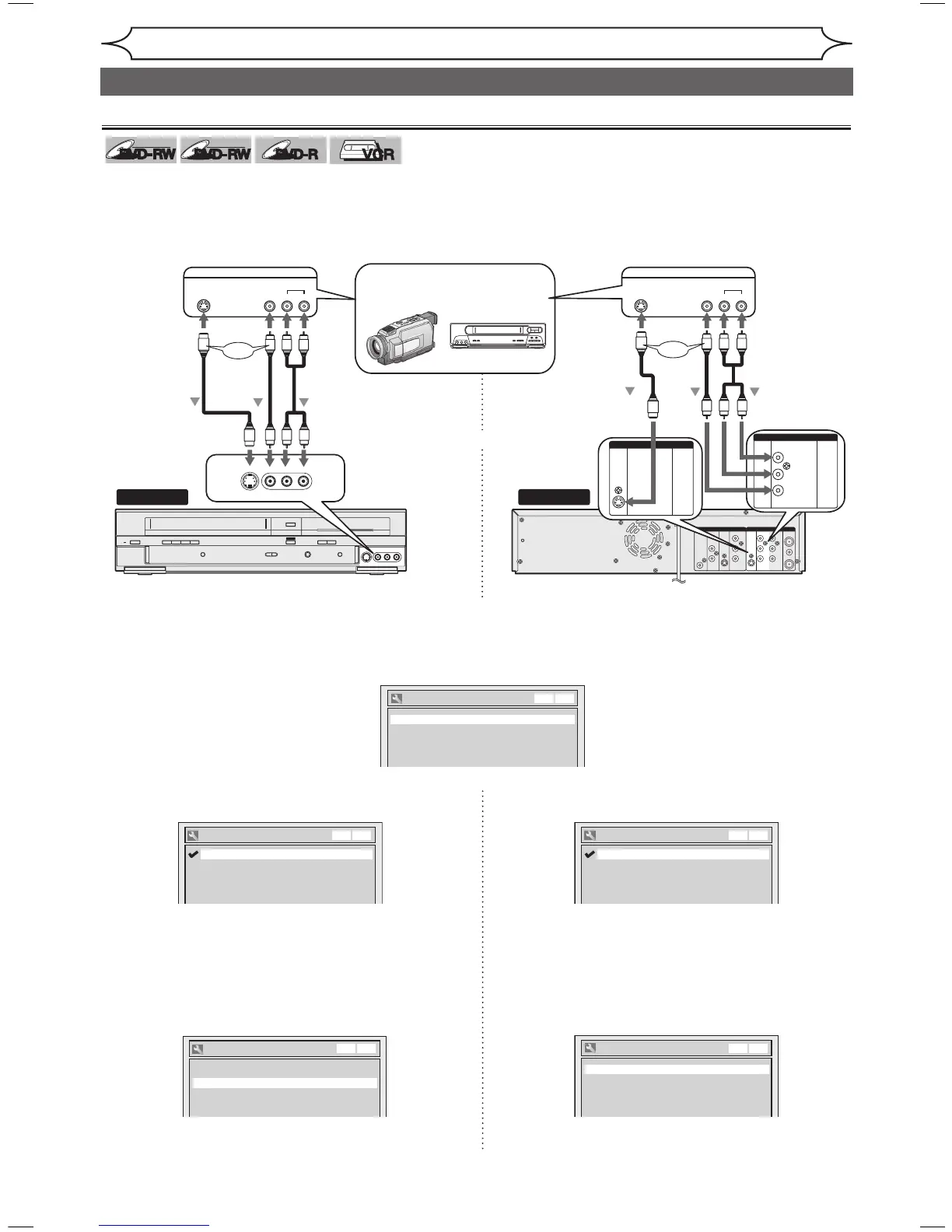
3. Using [K / L], select “L1 (Rear)”. Press [ENTER].
4. Using [
K / L], select the input jack type to
connect. Press [ENTER].
If you want to use S-VIDEO IN jack, select
“S-Video In”.
If you want to use VIDEO IN (Composite) jack,
select “Video In”.
5. Press [SETUP] to exit.
3. Using [
K / L], select “L2 (Front)”. Press [ENTER].
4. Using [
K / L], select the input jack type to
connect. Press [ENTER].
If you want to use S-VIDEO input jack, select
“S-Video In”.
If you want to use VIDEO input (Composite) jack,
select “Video In”.
5. Press [SETUP] to exit.
XXXX
Recording
Connection to an external source
Connect the external source properly to the unit by using input jacks either LINE2 (Front) or LINE1 (Rear).
When connecting an external equipment of monaural output to this unit, use AUDIO L jack of LINE 1 (Rear) or
LINE 2 (Front).
Use commercially available S-Video or Video cable and an Audio cable for this type of connection.
1. Press [SETUP].
2. Using [
K / L], select “Required Setting” and then “Select Video”. Press
[ENTER].



 To Next Page