You can delete titles which you do
not need anymore.
Be advised that the titles once
deleted cannot be recovered.
In Video mode, recordable disc
space of DVD-RW disc will
increase when the last title on
the title list is deleted. However,
deleting the last title will not
change recordable disc space of
DVD-R discs.
For DVD-R or DVD-RW (in Video
mode) discs once finalized, the
title list cannot be selected for
editing.
First:
1
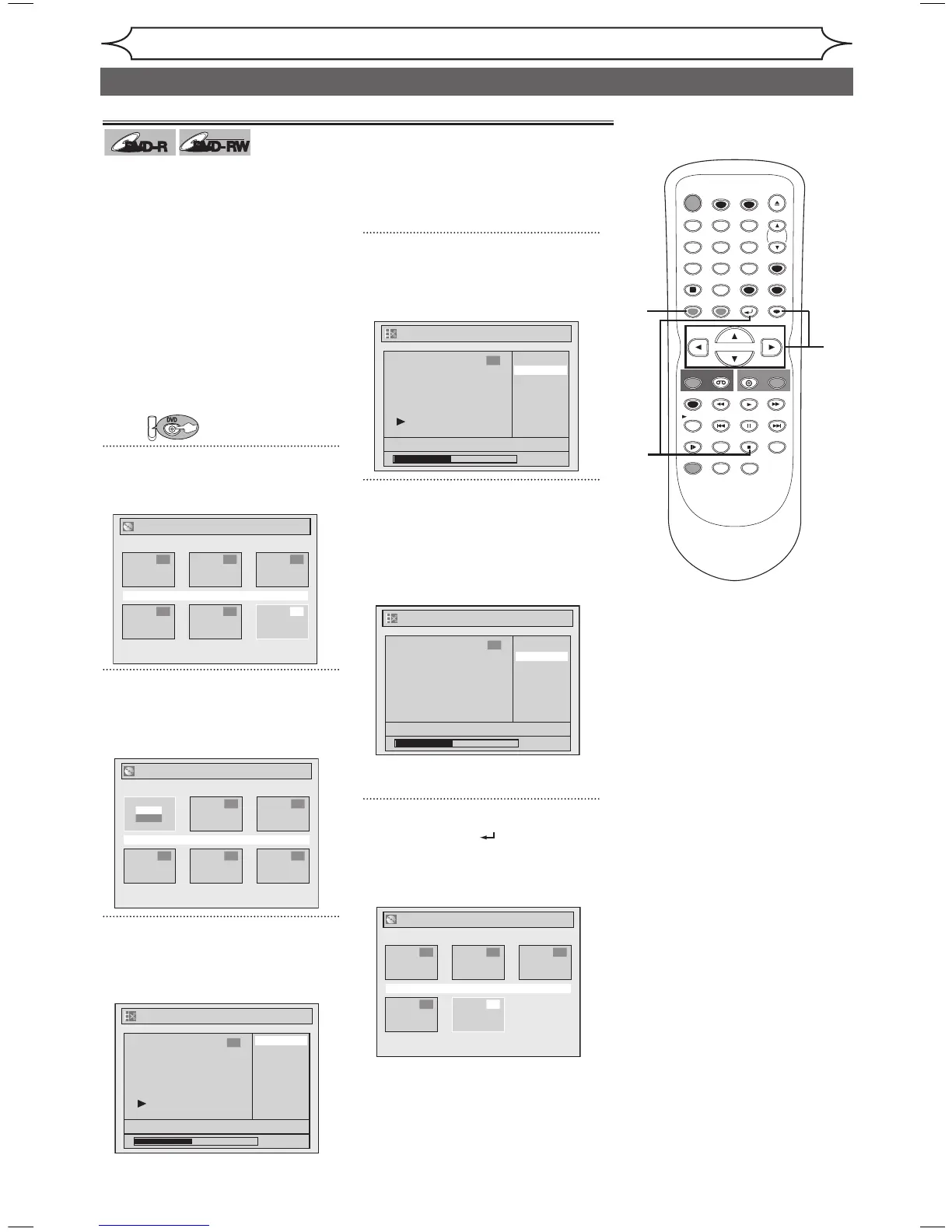
Press [TOP MENU].
Title List will appear.
2
Using [K / L / { / B], select the
desired title. Press [ENTER].
Option window will appear.
3
Using [K / L], select “Edit”.
Press [ENTER].
Edit menu will appear.
You cannot select “Chapter Mark”
when a DVD-R disc is inserted into
the unit.
“Chapter Mark” does not work on
the title less than 5 minutes.
4
Using [K / L], select “Title
Delete”. Press [ENTER].
Confirmation window will appear.
5
Using [K / L], select “Yes”.
Press [ENTER].
After that, “Are you sure?” will
appear, so that select “Yes” with
[K / L] and then press [ENTER].
Title will be deleted.
6
Press [RETURN ] or [STOP C]
to exit.
Data will be written onto the disc
momentarily.



 To Next Page