9 - 2 Symbol LS4208 Product Reference Guide
Connecting Using Wand Emulation
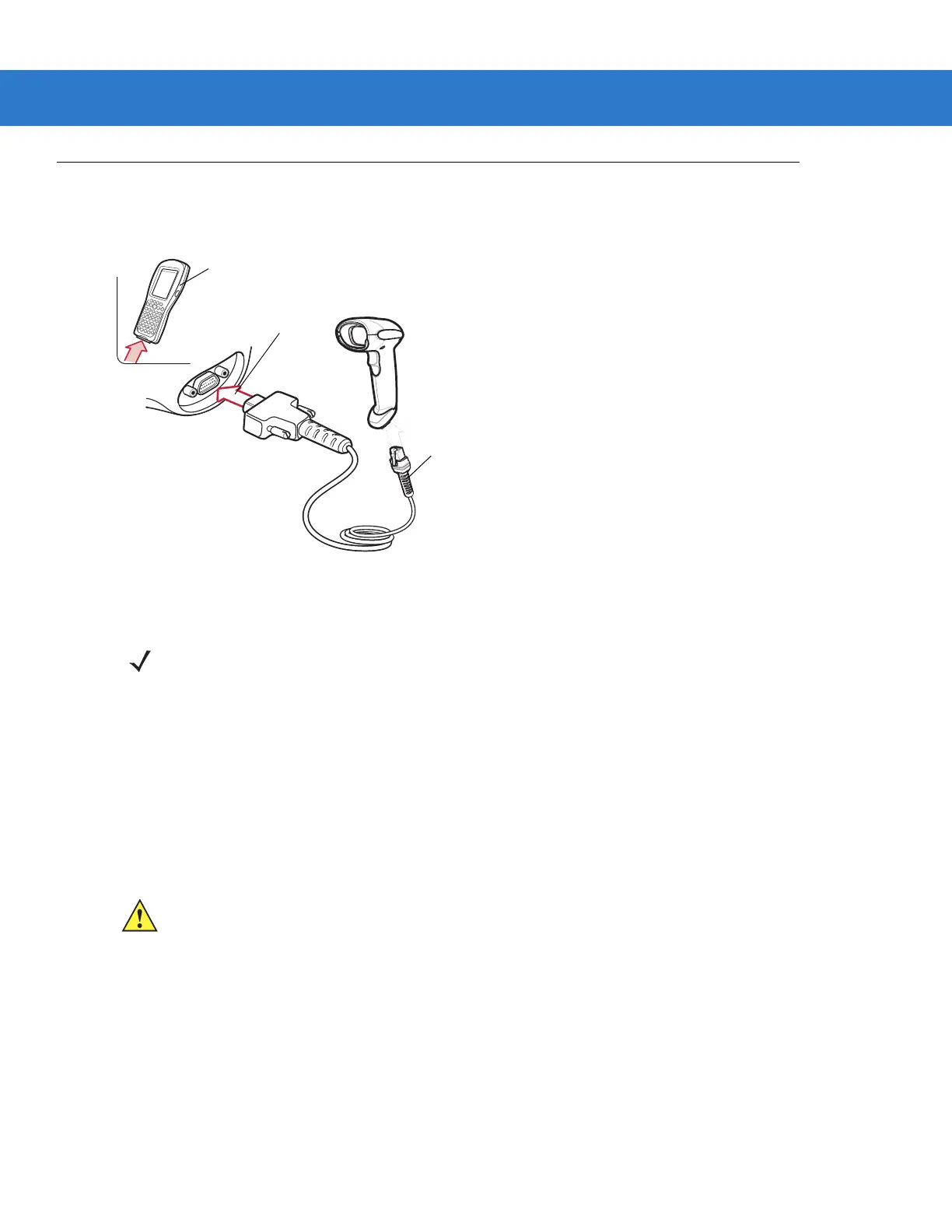
To perform Wand Emulation, connect the scanner to a portable data terminal, or a controller which collects the
wand data and interprets it for the host.
Figure 9-1
Wand Emulation Connection
1. Connect the modular connector of the Wand Emulation interface cable to the cable interface port on the
scanner (see Installing the Interface Cable on page 1-3).
2. Connect the other end of the Wand Emulation interface cable to the wand port on the mobile computer or
controller.
3. Select the Wand Emulation host type by scanning the appropriate bar code from Wand Emulation Host Types
on page 9-4.
4. To modify any other parameter options, scan the appropriate bar codes in this chapter.
Wand Port
Mobile Computer
Interface Cable
NOTE Interface cables vary depending on configuration. The connectors illustrated in Figure 9-1 are examples
only. The connectors may be different than those illustrated, but the steps to connect the scanner are the
same.
CAUTION Connect the scanner to 5 volt decoders only. Connecting the scanner to a 12 volt decoder can
damage the scanner and invalidate the warranty.



 To Next Page