2 - 6 Symbol LS4208 Product Reference Guide
Aiming
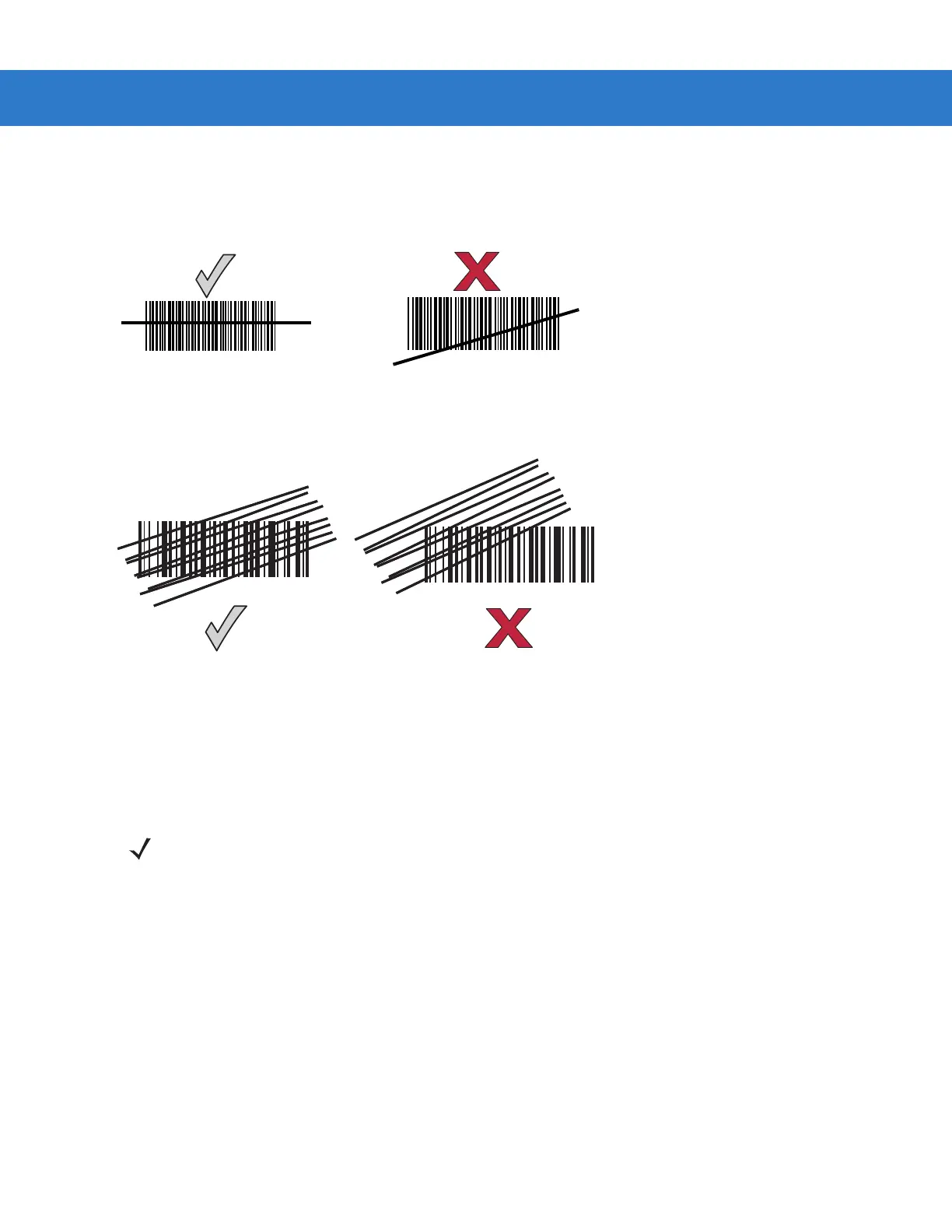
On a typical UPC 100% hold the scanner between contact and 19 inches from the symbol (see Symbol LS4208
Decode Zone on page 2-11). When scanning using a single-line scan mode, ensure the scan line crosses every
bar and space of the symbol.
Figure 2-6
Acceptable and Incorrect Single-Line Aiming
When scanning using a multi-line raster mode, at least one scan line must cross every bar and space of the
symbol.
Figure 2-7
Acceptable and Incorrect Multi-Line Aiming
Regardless of the scan mode, the scan line is smaller when the scanner is closer to the symbol and larger when it
is farther from the symbol. Scan symbols with smaller bars or elements (mil size) closer to the scanner, and those
with larger bars or elements (mil size) farther from the scanner.
Do not hold the scanner directly over the bar code. Laser light reflecting directly back into the scanner from the bar
code is known as specular reflection. This specular reflection can make decoding difficult.
NOTE Scan line lengths vary depending on the scan line width selected (see Scan Line Width on page 4-7). A full
scan line width is the default. Medium and short scan line widths are useful for scanning menus or
pick-lists.



 To Next Page